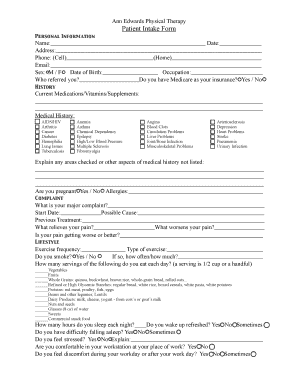
Ann Edwards Physical Therapy Patient Intake Form
Use a Ann Edwards Physical Therapy Patient Intake Form template to make your document workflow more streamlined.
What this physical therapy intake form does
Ann Edwards Physical Therapy Patient Intake Form collects the patient information a physical therapy practice needs before evaluation and treatment. In signNow, staff upload the document, review automatically detected fillable fields, assign patient and clinician fields, and send it for electronic completion. The patient reviews the form, provides required information and consent, and signs electronically. signNow records the transaction in an audit trail that can be stored with the completed PDF. HIPAA-covered practices should use a BAA and apply safeguards for protected health information.
Features for physical therapy intake
SignNow connects form preparation, patient completion, signature capture, and record preservation for Ann Edwards Physical Therapy Patient Intake Form.
Field detection
Upload Ann Edwards Physical Therapy Patient Intake Form to signNow, then review detected fields and correct assignments before sending. This reduces manual preparation while keeping the practice responsible for verifying every patient, clinician, date, and consent field.
Assigned fields
Assign signature, initials, date, and required patient-information fields to the correct signer. Clear assignments help patients complete the physical therapy intake form without altering sections intended for clinical staff.
Remote signing
Send the intake form by email or a controlled signing link. Patients can review and sign remotely, while the practice retains a defined workflow instead of exchanging paper copies at the front desk.
Audit trail
Capture signer actions, timestamps, and document history in an audit trail. The record helps connect the patient’s intent and completed form when the practice stores the audit trail with the signed PDF.
Mobile access
Use signNow mobile apps for patient intake at a clinic or during field-based care. Mobile completion can reduce paper handling while staff follow the practice’s HIPAA privacy and device-management procedures.
Plan options
Business plans provide templates and legally binding eSignatures; Business Premium adds bulk send and kiosk mode. Choose only features that match the practice’s patient volume, authentication, and privacy controls.
How patient intake works
Ann Edwards Physical Therapy Patient Intake Form moves through four controlled signNow stages, from document preparation to an auditable completed record.
Upload: Upload the intake PDF and inspect detected fields. Assign: Assign patient and clinician fields before sending. Sign: Send the invitation and collect the patient signature. Store: Store the completed PDF with its audit trail.
Ways to send and sign patient intake
- Open the signNow web app to upload Ann Edwards Physical Therapy Patient Intake Form, review detected fields, and prepare a reusable template for front-desk staff sending patient invitations.
- Use the signNow mobile app when a patient completes intake at the clinic or staff work away from a desktop, subject to managed-device and HIPAA safeguards.
- Use kiosk mode at a supervised reception area when the practice controls the device, clears the prior patient session, and prevents the next patient from viewing stored information.
- Generate a shareable signing link for a controlled patient-access workflow, then limit distribution and verify the recipient before collecting protected health information.
 Best ROI. Our customers achieve an average 7x ROI within the first six months.
 Scales with your use cases. From SMBs to mid-market, airSlate SignNow delivers results for businesses of all sizes.
 Intuitive UI and API. Sign and send documents from your apps in minutes.
Inside the intake audit trail
The signNow audit trail records technical events that help the practice connect patient intent, document integrity, and final completion.
Signer authentication:
Timestamp capture:
Document hashing:
Tamper-evident seal:
History retention:
Audit export:
Security for patient information
HIPAA protection:
Data in transit:
Stored data:
Service assurance:
Security management:
Activity history:
Mobile options for patient intake
Patients and staff can use the signNow iOS or Android app to complete Ann Edwards Physical Therapy Patient Intake Form. Use TLS 1.2 or 1.3 connections, current mobile operating systems, and supported app versions when handling protected health information.
iPhone app iOS 15 or later Android app Android 10 or later Mobile workflow Camera capture and offline signing
Camera-based capture can convert a paper copy into a document for review, while offline signing supports work without an active connection where the app permits it. Before enabling mobile intake, configure managed devices, screen locks, remote wipe, access permissions, and HIPAA-aligned procedures.



Recommended intake workflow setup
Configure Ann Edwards Physical Therapy Patient Intake Form for patient identity, signature evidence, protected information, and controlled access.
| Setting | Recommendation |
|---|---|
| Authentication method | Email link plus SMS OTP for higher assurance |
| Signature type | Typed or drawn electronic signature with intent |
| Audit trail | Capture and export with completed PDF |
| Document retention | Six years under HIPAA 45 CFR 164.530(j) |
| Encryption | TLS 1.2 or 1.3 and AES-256 at rest |
Retention practices for patient intake records
Use a documented retention schedule that protects patient information and preserves the signed form’s evidentiary history.
Apply the six-year HIPAA documentation period
Export the audit trail with every form
Archive patient records in approved storage
Record ownership and legal hold decisions
Rollout and retention timeline
A controlled rollout connects form preparation, patient delivery, staff onboarding, and documented retention obligations.
Prepare:
First send:
Days 1–7: trial:
Onboard:
Completion date:
Six years:
Legal hold:
Policy review:
Privacy pitfalls in patient intake
Including a patient’s diagnosis or treatment details in an unrestricted email attachment can expose protected health information beyond the intended care team. Sending Ann Edwards Physical Therapy Patient Intake Form before capturing electronic-record consent can weaken evidence that the patient agreed to use an electronic process. Leaving a shared kiosk session open can expose one patient’s contact, insurance, or medical information to the next visitor. Assigning a clinician-only field to the patient can cause inaccurate treatment information and require a corrected intake record.
Ann Edwards intake form troubleshooting
Resolve field, delivery, privacy, and retention questions before using the completed patient intake record.
If a patient cannot open the invitation, verify the email address and resend from signNow. Business includes templates and audit trails; Business Premium also adds quick invite links. For protected health information, confirm the practice has a HIPAA BAA before sending the intake form.
Business supports legally binding eSignatures, templates, and audit trails for patient intake workflows. For HIPAA-covered information, signNow states that HIPAA compliance requires a BAA. The practice remains responsible for configuring access, disclosures, retention, and other safeguards required by HIPAA.
Use signNow’s mobile app or web app to review the form, then add required signature, initials, date, and patient-information fields before sending. If automatic field detection misses a field, place it manually and assign it to the patient or clinician.
Business plans include 100 signature invites per user per year, with overage fees after the included allowance. Business Premium is $15 per user monthly when billed annually and adds bulk send, but the practice should confirm projected invite volume before selecting a plan.
A completed intake form can be downloaded with its audit trail and stored in the practice’s approved records system. HIPAA requires covered-entity policies and procedures to retain required documentation for six years under 45 CFR 164.530(j).
A patient’s electronic signature can support a U.S. transaction when intent, consent, attribution, and record reproducibility are established under ESIGN and applicable state law. For consumer-facing healthcare records, provide the ESIGN consumer disclosure and paper-access process required by 15 U.S.C. §7001(c).
Key performance indicators that demonstrate SignNow's proven track record.
BE READY TO GET MORE
Get this form now!

If you believe that this page should be taken down, please follow our DMCA take-down process.