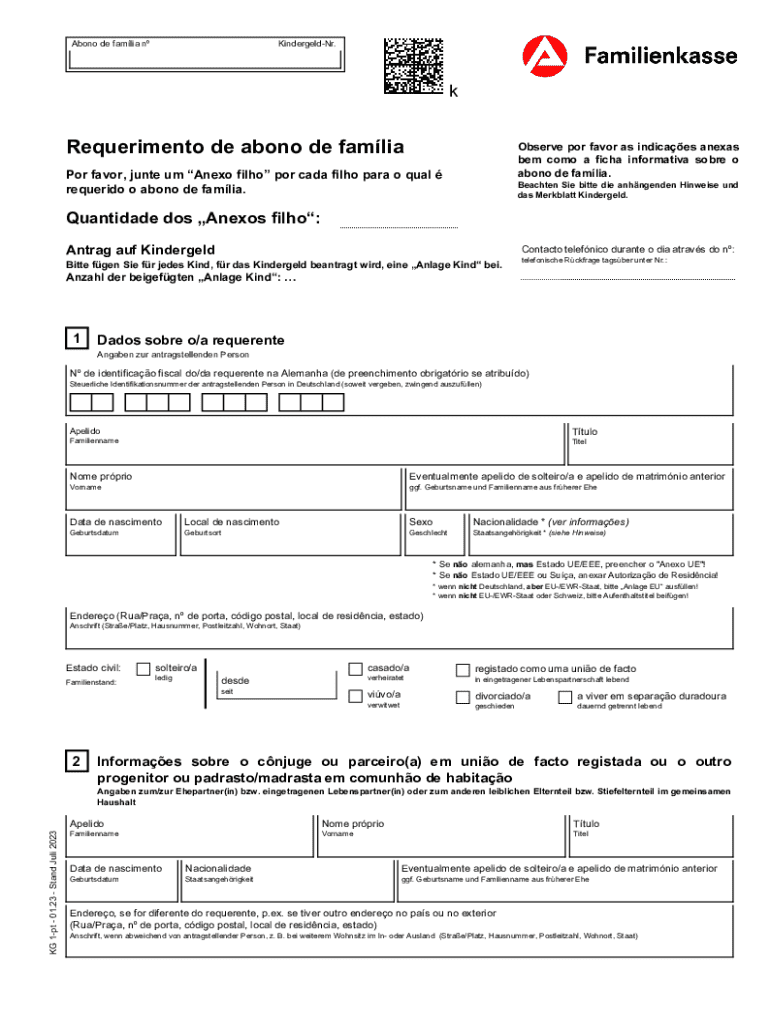
Requerimento DE Abono DE Fam Lia Form
Use a Requerimento De Abono De Fam lia template to make your document workflow more streamlined.
What this form does
Requerimento DE Abono DE Fam Lia Form is a document used to collect information and an acknowledgment or signature for a family-related request. Because the supplied form name does not identify a U.S. issuing agency, statutory deadline, or required field list, users should confirm the governing organization’s instructions before submission. In signNow, the sender uploads the document, reviews detected fillable areas, adds signer and date fields, sends it for completion, and retains the executed PDF with its audit trail. ESIGN and applicable state electronic-transactions law may support electronic signing when consent, intent, attribution, and record access requirements are met.
Who benefits from this form
Requerimento DE Abono DE Fam Lia Form supports structured collection, review, signature, and recordkeeping across organizations handling family-related requests.
Small service businesses use Requerimento DE Abono DE Fam Lia Form to collect family-related information and signatures without mailing paper, while preserving a completed copy for internal records and follow-up. Healthcare and social-service organizations can route the form through designated staff, using signNow access controls and audit trails when the document contains sensitive personal or benefits information. Larger employers and public-facing organizations can standardize the form through shared templates, delegated sending, and role-based administration when multiple offices process the same request.
These tasks are executed by both individual contributors and centralized administrators depending on organizational policy and required controls.
Who can use this form
Applicants
Individuals and authorized representatives can use the form to provide requested family-related information, supporting documents, and signatures when an organization accepts this workflow.
Processing teams
Organizations can use signNow to collect approvals, acknowledgments, dates, and signatures while preserving the completed document and audit evidence for internal review.
Choose the right signing method
- Use the signNow web app to upload Requerimento DE Abono DE Fam Lia Form, place fields, and send it from a desktop workflow.
- Use the signNow mobile app when a signer needs to review or complete the form from an iOS or Android device.
- Use kiosk mode when staff supervise completion on a shared device and need controlled, in-person form access.
- Create a shareable signing link when multiple recipients need access without separate email invitations.
 Best ROI. Our customers achieve an average 7x ROI within the first six months.
 Scales with your use cases. From SMBs to mid-market, airSlate SignNow delivers results for businesses of all sizes.
 Intuitive UI and API. Sign and send documents from your apps in minutes.
Features that support this workflow
signNow combines document preparation, signer routing, audit evidence, and controlled storage for organizations processing Requerimento DE Abono DE Fam Lia Form.
Document preparation
Upload the source PDF and inspect detected fields before sending, helping the sender preserve the form’s original structure while adding only necessary inputs.
Signer routing
Assign names, emails, roles, and signing order so each participant sees the fields intended for that person and unauthorized edits are reduced.
Audit trail
Capture typed, drawn, or click-to-sign actions alongside timestamps and activity history, supporting later review of how the form was executed.
Reusable templates
Use reusable templates for recurring requests so approved labels, instructions, and signature positions remain consistent across offices or departments.
Mobile signing
Allow recipients to review and sign from signNow mobile apps when the organization permits remote completion and the signer has access to the required information.
Record control
Store the executed document with its completion evidence and apply the organization’s own retention, access, and deletion policy.
Best practices for completing the form
Accuracy, signer control, and evidence preservation matter more than speed when processing an unfamiliar family-related form.
Confirm the governing instructions
Protect the approved template
Assign each signer clearly
Retain evidence with the form
Platform requirements for this workflow
Use a current version of Chrome, Firefox, Safari, or Edge on Windows or macOS. Signers can also use the signNow apps for iOS and Android when mobile completion is permitted.
Browsers Chrome, Firefox, Safari, and Edge Desktop systems Windows and macOS desktop access Mobile apps iOS and Android signNow apps
Organizations using managed devices should confirm browser updates, network access, camera permissions, and document-download controls before sending the form. Enterprise deployments may also require SSO provisioning, API access, or certificate and long-term validation settings configured for the organization’s records policy.
Security controls for signed records
TLS protection:
AES-256 storage:
SOC 2 Type II:
ISO 27001:
ESIGN and UETA:
HIPAA with BAA:
What the audit trail records
The audit trail documents signer activity and record integrity after Requerimento DE Abono DE Fam Lia Form is sent, completed, and finalized.
Authenticate signer:
Timestamp activity:
Identify document:
Seal completion:
Link audit evidence:
Export audit trail:



Troubleshooting signing and records
These answers address field detection, signer routing, plan capabilities, consent, enforceability, and sensitive information controls for this form workflow.
Upload the original PDF again and inspect every detected field before sending. If signNow does not identify a field correctly, add or reposition it manually so the recipient can complete the intended part of Requerimento DE Abono DE Fam Lia Form.
The Business plan includes templates, audit trails, and mobile apps at $8 per user per month with annual billing. Bulk send is listed for Business Premium at $15 per user per month annually, so confirm the plan before preparing batch requests.
Use a signer role, email address, and signing order that match the organization’s instructions. signNow can route the document to named recipients, but it cannot determine whether a particular agency requires an applicant, witness, or official signature.
For consumer-facing electronic records, ESIGN requires disclosure of the right to receive paper, access to the electronic format, and a method to withdraw consent under 15 U.S.C. §7001(c). Confirm whether that rule applies before sending this form electronically.
signNow states that its Business plan supports legally binding eSignatures and audit trails, with ESIGN and UETA compliance. Legal effect still depends on intent, consent, attribution, and the governing organization’s acceptance of electronic records.
If the document contains protected health information, signNow identifies HIPAA compliance as requiring a BAA. Confirm that the organization has the required agreement and controls before placing PHI in the workflow.
Key performance indicators that demonstrate SignNow's proven track record.
BE READY TO GET MORE
Get this form now!

If you believe that this page should be taken down, please follow our DMCA take-down process.