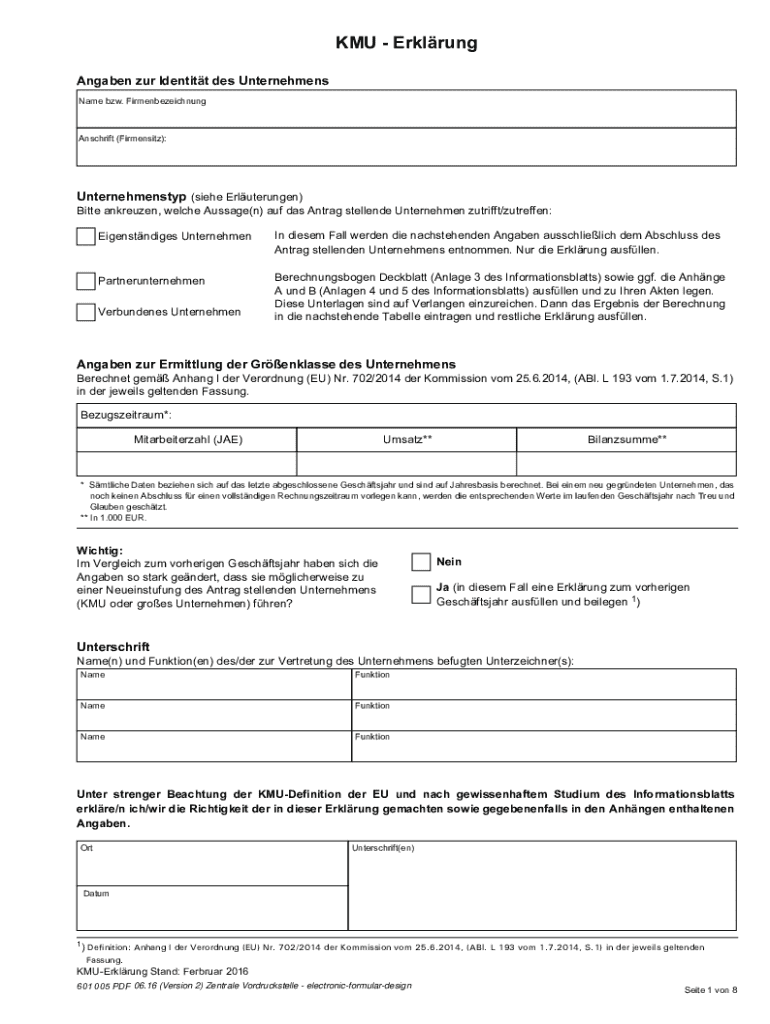
Check All Applicable Statements Form
Use a Bitte Ankreuzen, Welche Aussagen Auf Das Antrag Stellende Unternehmen Zutrifftzutreffen template to make your document workflow more streamlined.
What this checkbox form does
The Check All Applicable Statements Form is a company declaration document that records which listed statements apply to the organization completing it. In signNow, a sender uploads the form, reviews detected fillable areas, adds or corrects checkbox and signature fields, assigns them to authorized representatives, and sends the document for completion. The signer selects only accurate statements, confirms intent, and signs electronically. The completed PDF and audit trail can then be retained as evidence. ESIGN and UETA support electronic records when consent, attribution, intent, and reproducibility requirements are met.
Who uses this checkbox form
Company representatives
Business owners and authorized representatives use the form to select statements that apply to their company, then sign the completed record through an attributable electronic workflow.
Administrative teams
Operations, finance, and compliance teams use reusable templates to collect declarations, verify required selections, and retain completed forms with audit evidence.
Features for completing this form
The workflow keeps checkbox selections, signer responsibility, review evidence, and the completed company form together in one controlled record.
Structured preparation
Upload the completed checkbox form and let signNow identify fillable areas, helping preserve the document’s original structure while preparing it for review and signature.
Assigned fields
Assign each checkbox, text, and signature field to the responsible person so every statement is completed by the correct business representative.
Signing order
Send the form through a defined signing order when multiple representatives must review the company’s selected statements before completion.
Audit evidence
Use signNow audit trails to record signer identity, timestamps, actions, and document history for later business or compliance review.
Secure records
Store the finished form with its completion record so the selected statements and signing event remain connected and reproducible.
Mobile access
Open and complete the form from signNow mobile apps when authorized staff need to review company statements away from the office.
 Best ROI. Our customers achieve an average 7x ROI within the first six months.
 Scales with your use cases. From SMBs to mid-market, airSlate SignNow delivers results for businesses of all sizes.
 Intuitive UI and API. Sign and send documents from your apps in minutes.
How the form workflow works
This sequence keeps the form’s selected statements, signer assignments, and final evidence connected from preparation through archival.
Upload form: Upload the source PDF and inspect its pages. Prepare fields: Review detected fields and add missing checkboxes. Assign roles: Assign statements and signatures to each signer. Complete record: Send, sign, and retain the completed record.
Steps to complete the form
Use this sequence to prepare, route, sign, and retain the completed checkbox form without losing field responsibility or signing evidence.
Upload:
Upload the form PDF to signNow. Prepare:
Review detected fields and add checkboxes. Assign:
Assign each field to its signer. Send:
Send the form for review and signature. Store:
Download or retain the completed record.
Recommended form workflow settings
Use documented controls for identity, signing intent, evidence, retention, encryption, and administrator-managed access when processing this checkbox form.
| Setting | Recommendation |
|---|---|
| Authentication method | Email verification with SMS OTP |
| Signature type | Electronic signature with signer intent |
| Audit trail | Retain completion certificate and action history |
| Document retention | Follow the applicable business record schedule |
| Encryption | TLS 1.2 or 1.3 and AES-256 at rest |
What the audit trail records
The audit trail documents how the company’s selections and signature moved from invitation through completion and record retention.
Authenticate signer:
Timestamp event:
Record actions:
Seal record:
Link evidence:
Export trail:
Authentication and signing security
Signer authentication:
Two-factor authentication:
SMS OTP:
ID verification:
Digital certificates:
Signing evidence:
Documents requiring special handling
Wills and codicils
Court orders
Family law decrees
Real-estate deeds
Troubleshooting this checkbox form
Resolve field, identity, consent, retention, and review issues before relying on the completed form in a U.S. business transaction.
Upload the source document again as a readable PDF, then review signNow’s detected fields before sending. If the checkbox layout is image-based, place checkbox fields manually and assign each field to the correct signer.
The signNow Business plan includes templates, audit trails, mobile apps, and legally binding eSignatures. Business Premium adds bulk send, while Enterprise adds conditional and formula fields for more complex document logic.
Use signNow’s audit trail and completion certificate to show the signer, timestamps, and actions. Under ESIGN and UETA, enforceability also depends on intent, consent, attribution, and retaining a reproducible electronic record.
For a consumer-facing transaction, provide the ESIGN consumer disclosure, explain the right to receive paper records, confirm electronic access, and provide a withdrawal process under 15 U.S.C. §7001(c).
If the form contains protected health information, use a signNow configuration with a business associate agreement. HIPAA requires covered entities to retain required policies and procedures for six years under 45 CFR §164.530(j).
A signing link identifies the transaction but does not replace document review. Verify every selected statement, signer email, assigned field, and required attachment before sending the final form.
Key performance indicators that demonstrate SignNow's proven track record.
BE READY TO GET MORE
Get this form now!

If you believe that this page should be taken down, please follow our DMCA take-down process.