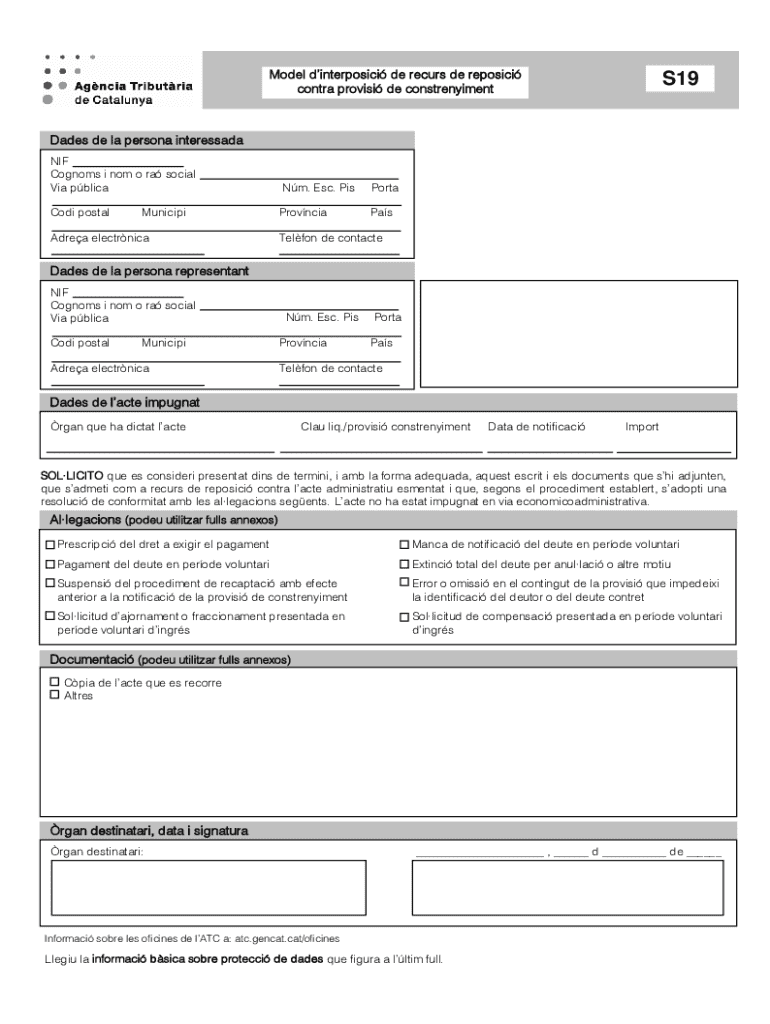
Model D Interposici DE Recurs DE Reposici Contra Provisi DE Constrenyiment Form
Use a Model D interposici De Recurs De Reposici Contra Provisi De Constrenyiment template to make your document workflow more streamlined.
What this form is used for
Model D Interposici DE Recurs DE Reposici Contra Provisi DE Constrenyiment Form is a document used to challenge or seek review of a provisional enforcement measure. Its exact legal effect depends on the issuing authority, governing jurisdiction, and proceeding identified on the form. A filer generally completes the identifying information, states the grounds for objection or reconsideration, attaches supporting records, and signs before submitting it through the required channel. Because no U.S. agency, statute, deadline, or official form instructions are provided here, confirm the controlling requirements with the issuing authority before relying on this template.
How the signing workflow works
A controlled signNow workflow keeps the form, signer actions, and completion record connected from preparation through storage.
Review notice: Identify notice Prepare document: Upload form Add fields: Place fields Send securely: Route signature
Steps to prepare and sign
Use the official notice and instructions as the source of truth while preparing this form in signNow.
Upload form:
Upload the official form PDF. Review fields:
Check detected fields and add missing ones. Add signer:
Add the authorized signer and recipient. Complete workflow:
Send, monitor, and export the completed record.
Recommended form workflow settings
Use documented identity, signature, access, and retention controls before sending this form for review.
| Setting | Recommendation |
|---|---|
| Authentication method | Email verification with SMS OTP |
| Signature type | Intent-based electronic signature |
| Audit trail | Export the certificate of completion |
| Document retention | Follow the issuing authority’s schedule |
| Encryption | TLS 1.2/1.3 and AES-256 |
 Best ROI. Our customers achieve an average 7x ROI within the first six months.
 Scales with your use cases. From SMBs to mid-market, airSlate SignNow delivers results for businesses of all sizes.
 Intuitive UI and API. Sign and send documents from your apps in minutes.
What the audit trail records
The audit trail connects the form’s signing event to identity, timing, document integrity, and the final downloadable record.
Authentication:
Timestamp:
Document hash:
Tamper evidence:
Action history:
Audit export:
Legal standing of the completed record
For a U.S. transaction, an electronic record may be admissible when the signer demonstrates intent, consents where required, can be identified, and the record remains accessible and reproducible under the ESIGN Act, 15 U.S.C. chapter 96, and applicable state law such as UETA. Wills, certain court orders, and other statutory exceptions remain outside that framework.

Key timing points for filing
No verified statutory deadline is provided for this form, so use the date and delivery instructions shown on the underlying notice.
Document preparation
Delivery to signers
Signer turnaround
Completion and archival
Platform requirements for this workflow
Complete the form through Chrome, Firefox, Safari, or Edge on Windows or macOS, or use signNow mobile apps on iOS and Android. A current browser and an internet connection are needed to upload, route, and retrieve the signed document.
Supported browsers Chrome, Firefox, Safari, and Edge Desktop systems Windows and macOS desktop access Mobile access iOS and Android mobile apps
Organizations should apply managed-device, access-control, and retention policies appropriate to the proceeding. If the issuing authority requires a specific portal, certificate, notarization method, or paper submission, signNow does not replace that requirement; confirm the filing instructions before routing the form.
Security controls for signed records
Data at rest:
Data in transit:
Security certification:
Information security:
Electronic signatures:
Protected health data:
Risks requiring careful review
Submission may be rejected
Review right may lapse
Objection may lack support
Electronic record may be challenged
Questions about completing this form
These answers address the signing workflow while separating platform functions from requirements imposed by the issuing authority or applicable law.
Upload the form as a clear PDF, then inspect every detected field before sending. If auto-detection misses a field, place it manually and compare the finished layout with the official document. Do not assume an automatically detected field matches the authority’s required location.
Business includes templates, audit trails, and legally binding eSignatures at $8/user/month with annual billing. Business Premium is $15/user/month annually and adds bulk send. Select the plan based on the workflow, not on assumptions about this form’s legal requirements.
The ESIGN Act and UETA can support electronic signatures when intent, consent, attribution, and record access are established. Confirm the proceeding’s own instructions first, because an authority may require a portal, notarization, wet ink, or paper delivery.
Use signNow’s SMS OTP or another available signer-authentication control when the recipient’s identity needs stronger evidence. Record the authentication event in the audit trail and retain the notice, completed form, and completion certificate together.
Export the completed document and certificate of completion after signing. signNow records timestamps and action history, while the applicable authority or state rule determines how long the underlying proceeding records must be retained.
If the form contains health information, signNow identifies HIPAA compliance as requiring a BAA. Do not place protected health information in the workflow unless the organization has confirmed that the applicable agreement and administrative controls are in place.
Key performance indicators that demonstrate SignNow's proven track record.
BE READY TO GET MORE
Get this form now!

If you believe that this page should be taken down, please follow our DMCA take-down process.