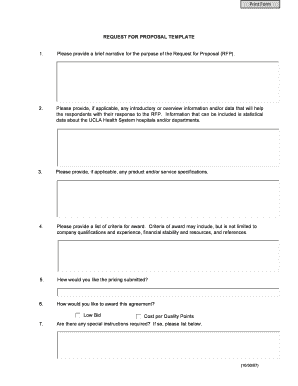
Proposal Downloads Form
Use a Proposal Template Downloads template to make your document workflow more streamlined.
What Proposal Downloads Form does
Proposal Downloads Form is an online proposal document that lets a business present defined services, pricing, deliverables, and acceptance terms for client review and signature. With signNow, the sender uploads the proposal, reviews automatically detected fillable fields, adds signer and date fields, and sends the document by email or signing link. The recipient reviews and signs from a supported device, while signNow records the signing history and provides a completed copy. Electronic enforceability depends on intent, consent, attribution, record retention, and applicable U.S. law.
Why teams look for DocuSign alternatives
Organizations seek alternatives when they need different pricing models, stronger native automation, simpler bulk affidavit workflows, or more flexible identity-verification options than those available in a legacy envelope-based vendor.

Documents that fit proposal workflows
Sales proposals
Business development teams send proposals describing scope, pricing, deliverables, and acceptance terms.
Service engagements
Consultants and agencies collect client approval for project plans, fees, and milestones.
Business types using proposal workflows
Proposal Downloads Form supports client-approval workflows ranging from individual consulting engagements to coordinated enterprise sales operations.
Solo consultants use Proposal Downloads Form to define a project’s scope, fee, deliverables, and acceptance terms before beginning client work. Real-estate businesses use proposal workflows to present services and transaction-related terms for client review, including mobile signing through signNow. Enterprise sales teams use shared templates, delegated sending, and audit trails to manage proposals across departments and customer accounts.
These tasks are executed by both individual contributors and centralized administrators depending on organizational policy and required controls.
 Best ROI. Our customers achieve an average 7x ROI within the first six months.
 Scales with your use cases. From SMBs to mid-market, airSlate SignNow delivers results for businesses of all sizes.
 Intuitive UI and API. Sign and send documents from your apps in minutes.
How the proposal workflow works
Proposal Downloads Form moves from document preparation to client signature through a recorded signNow workflow.
Upload document: Upload the proposal document and let signNow detect fillable fields. Review fields: Review detected fields, then add proposal-specific signer and date fields. Send proposal: Send the prepared proposal to clients by email or signing link. Archive record: Store the completed proposal with its signNow audit trail.
What the proposal audit trail records
The signNow audit trail connects signer activity, timestamps, document history, and completion evidence to the executed proposal.
Authenticate signer:
Capture timestamp:
Log actions:
Seal document:
Review history:
Export evidence:
Features for Proposal Downloads Form
signNow combines proposal preparation, remote execution, signer verification, and audit evidence in one document workflow.
Field detection
Upload a proposal and review automatically detected fields before adding signer, date, and approval controls.
Remote signing
Send the prepared proposal by email or shareable signing link without requiring a separate in-person meeting.
Reusable templates
Use reusable templates to keep approved proposal language and field placement consistent across client transactions.
Audit trail
Capture signer actions, timestamps, and document history for later contract review or internal audit.
Signer verification
Apply SMS OTP and other available authentication controls when proposal sensitivity requires stronger signer attribution.
Record storage
Keep the completed proposal and completion evidence available for authorized business records and follow-up.
Recommended proposal workflow setup
Configure signer identity, signing evidence, protection, and retention before sending Proposal Downloads Form to external recipients.
| Setting | Recommendation |
|---|---|
| Authentication method | Email verification with SMS OTP |
| Signature type | Typed or drawn electronic signature |
| Audit trail | Enable certificate of completion |
| Document retention | Retain completed records by policy |
| Encryption | TLS 1.2/1.3 and AES-256 encryption |
Signer authentication and certificates
PKI support:
X.509 certificates:
Two-factor authentication:
SMS OTP:
ID verification:
Audit trail:



Best practices for Proposal Downloads Form
Accurate fields, controlled templates, documented consent, and linked archival records make signed proposals easier to review and reproduce.
Maintain one approved proposal template
Match fields to proposal terms
Archive the proposal evidence package
Document consent before electronic signing
Documents requiring extra legal review
Notarized documents
Wills and codicils
Family law
Real-estate deeds
Key performance indicators that demonstrate SignNow's proven track record.
Proposal Downloads Form troubleshooting
Use these answers to resolve plan, signer, integration, and electronic-record questions before distributing a proposal.
The Business plan includes templates and audit trails at $8 per user per month when billed annually. Business Premium adds bulk send at $15 per user per month. Choose the plan based on the proposal volume and routing requirements.
A proposal can be signed electronically when the signer demonstrates intent, consents to electronic records where required, and the record remains attributable and reproducible. ESIGN and applicable state law, including UETA or New York ESRA, govern the transaction.
Use signNow’s signer authentication options, including email verification and SMS OTP, when proposal terms or internal policy require stronger attribution. Advanced signer authentication is listed for Enterprise, while exact availability depends on configuration.
The 7-day free trial requires no credit card. Paid signNow plans include 100 signature invites per user per year, with overage fees applying to subscription plans. The Site License uses $1.50 per signature invite for qualifying high-volume use.
SignNow lists Salesforce, Microsoft Dynamics 365, NetSuite, Google Workspace, Google Drive, Box, Egnyte, and Procore among its integrations. Availability depends on the plan and connector, so confirm the selected configuration before deployment.
For consumer-facing electronic records, ESIGN requires disclosure of the right to paper records, access to the electronic format, and procedures for withdrawing consent. Capture the required disclosure before sending Proposal Downloads Form to a consumer.
BE READY TO GET MORE
Get this form now!

If you believe that this page should be taken down, please follow our DMCA take-down process.