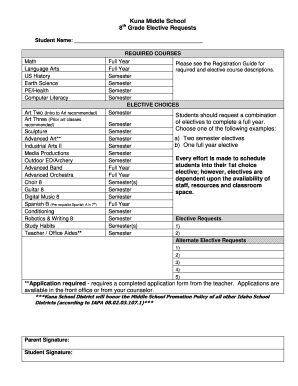
8TH Grade Electives Form
Use a 8th Grade Electives template to make your document workflow more streamlined.
What the 8TH Grade Electives Form does
The 8TH Grade Electives Form records a student’s elective-course selections for the eighth-grade school year. A student or guardian completes the requested choices, reviews the entries, and signs when the school requires consent or acknowledgment. School staff can upload the form to signNow, place or confirm fillable fields, route it to the required signer, and retain the completed PDF with its audit trail. Because the form’s exact fields and school deadlines can vary, verify instructions with the issuing school before submitting it.
Who uses this elective-selection form
Students and guardians
Students and guardians use the 8TH Grade Electives Form to record course preferences, confirm required acknowledgments, and provide signatures when the school requests them. A signNow workflow keeps the submitted selection record readable and links the final PDF to signer events, timestamps, and completion evidence.
School counseling offices
Middle-school counseling offices use the form to collect elective choices, check required fields, route guardian approvals, and organize completed records. Staff can reuse a controlled template while preserving each student’s individual selections and the audit trail for later review.
How to complete the form in signNow
Follow this sequence to prepare, route, sign, and retain the 8TH Grade Electives Form in signNow.
Upload the form:
Upload the school’s 8TH Grade Electives Form PDF. Check elective fields:
Review detected fields and add missing choice fields. Assign signers:
Assign student or guardian signature fields. Send for signing:
Send the completed form for electronic signature. Store the record:
Download the signed PDF and audit trail.
Features for the 8TH Grade Electives Form
signNow connects the school form, required signers, completed PDF, and audit evidence in one controlled workflow.
Field detection
Upload the school’s PDF and review detected fields before sending. This reduces manual recreation of elective choices while keeping the original form layout available for comparison.
Signer routing
Assign student, guardian, counselor, or administrator fields in the required order. Each recipient receives only the actions assigned to that signing stage.
Required fields
Capture signatures, dates, and acknowledgments in one completed record. The workflow makes missing required fields visible before the form reaches school staff.
Audit trail
Download the signed PDF and completion evidence after signing. The audit trail records signer activity and supports later review of the submission history.
Reusable template
Reuse an approved 8TH Grade Electives Form template for a school or grade level. Staff can update the source template without changing completed student records.
Mobile signing
Use the web or mobile app to collect selections when students or guardians are away from campus. Mobile workflows support school-managed devices and remote review.
 Best ROI. Our customers achieve an average 7x ROI within the first six months.
 Scales with your use cases. From SMBs to mid-market, airSlate SignNow delivers results for businesses of all sizes.
 Intuitive UI and API. Sign and send documents from your apps in minutes.



Mobile options for school submissions
The signNow mobile apps support completing the 8TH Grade Electives Form on iOS and Android devices. Use a current app version, a secure connection for synchronization, and camera capture when the school provides a paper copy.
iOS iOS 16 or later Android Android 11 or later Mobile tools Camera capture and offline signing
Managed school devices should use approved signNow accounts, screen-lock controls, and restricted storage. Offline work should be synchronized promptly, then checked in the web app so the completed elective form, signer evidence, and audit trail remain together.
Privacy pitfalls in elective records
Student names, identification numbers, or elective choices may remain visible to unintended recipients when a completed PDF is shared through unrestricted email or public links. A guardian may sign without a clear electronic-consent disclosure, leaving the school unable to demonstrate consent for the electronic record under 15 U.S.C. §7001(c). Shared templates can expose one student’s elective selections to another recipient when fields, signer roles, or prefilled values are mapped incorrectly. A counselor may retain the signed PDF but omit the completion certificate or audit trail, weakening evidence of who signed and when.
Recommended workflow setup
Configure the 8TH Grade Electives Form around verified signers, controlled access, audit evidence, and the school’s records policy.
| Setting | Recommendation |
|---|---|
| Authentication method | Email verification with SMS OTP |
| Signature type | Electronic signature with signer intent |
| Audit trail | Export with completion certificate |
| Document retention | School-approved FERPA record schedule |
| Security and provisioning | TLS 1.2/1.3 with administrator-managed users |
Security controls for student submissions
Transport encryption:
Storage encryption:
Security certification:
Information security:
Education records:
Health information:
Retention periods for related records
Use the school’s approved schedule for this education form; the periods below apply only when the record also falls within the named federal category.
School policy period
Six years for HIPAA records
Three years for tax records
Six years for major understatement
Indefinite fraud retention
Record-keeping practices for this form
Preserve the completed elective-selection record, signer evidence, and access history according to the school’s written records policy.
Set a documented retention rule
Export the audit trail
Limit access to student records
Archive records securely
Legal standing of the completed form
A completed 8TH Grade Electives Form can support a school’s record of elective selection when the signer demonstrates intent, consents to electronic records, and the school can reproduce the signed record and audit evidence. ESIGN, 15 U.S.C. chapter 96, and applicable state law generally recognize qualifying electronic signatures; school policy and student-record rules still control.

Troubleshooting the 8TH Grade Electives Form
Resolve field, signer, plan, privacy, and record-retention questions before submitting elective selections to the school.
Upload the original PDF to signNow and use its field-detection tools to identify fillable areas. Review every detected field manually because school-specific elective labels, student identifiers, and signature requirements may not be recognized identically.
The signNow Business plan includes legally binding eSignatures, templates, audit trails, and mobile apps at $8 per user per month when billed annually. Confirm the current plan and annual billing before assigning workflow costs.
Business Premium includes bulk send, which can help distribute the same elective-selection form to multiple recipients. Individual student choices still require careful recipient and field mapping before sending.
For student or guardian records containing protected health information, signNow states that HIPAA compliance requires a business associate agreement. FERPA obligations remain the school’s responsibility under its education-records policies.
If a guardian cannot sign electronically, confirm the school’s paper alternative and consent procedure. ESIGN and UETA support electronic signatures when intent, consent, attribution, and record retention requirements are satisfied; they do not override school policy.
If the completed PDF is missing from the workflow, check the recipient status, download the signed document and certificate of completion, and export the audit trail. Store all three with the student’s record rather than relying on an email attachment.
Key performance indicators that demonstrate SignNow's proven track record.
BE READY TO GET MORE
Get this form now!

If you believe that this page should be taken down, please follow our DMCA take-down process.