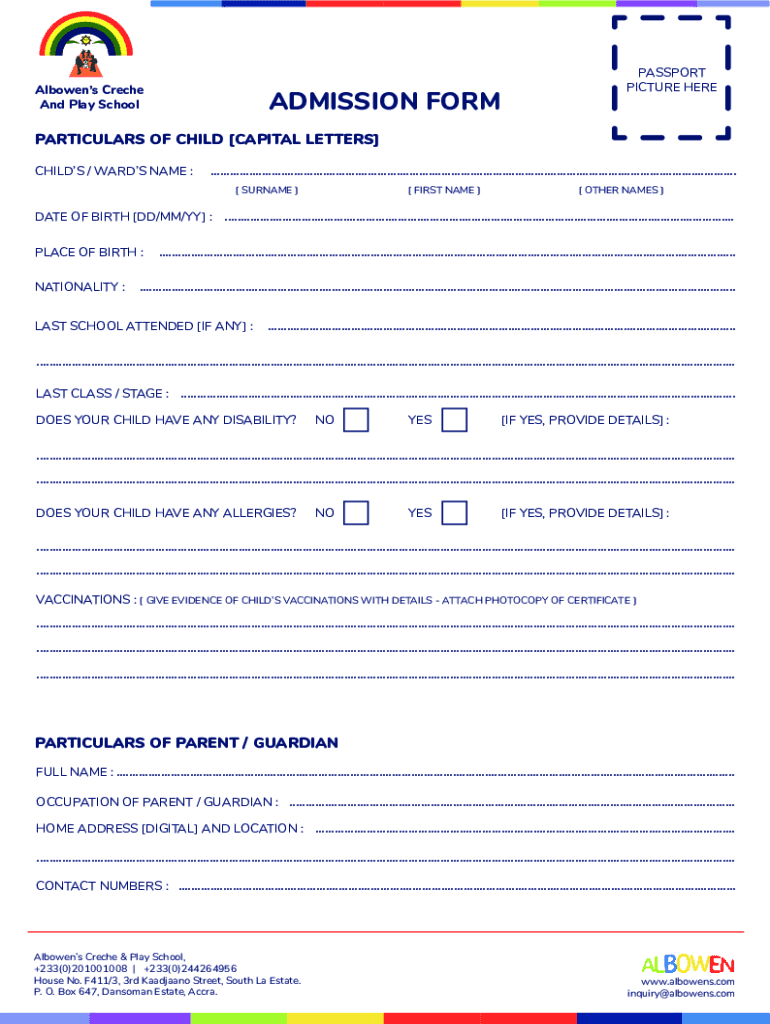
Albowen's Creche And Play School Admission Form
Use a Albowen's Creche And Play School ADMISSION FORM template to make your document workflow more streamlined.
What this admission form does
Albowen's Creche And Play School Admission Form is the enrollment record used to collect a child's and guardian's information for admission review. It organizes details such as the child's identity, requested placement, emergency contacts, health information, and parent or guardian consent when those fields appear on the school-issued document. In a U.S. workflow, the school should confirm which information is required, review submissions, and retain the completed record under its own privacy and record-management policy. signNow can route the form for an electronic signature when the school accepts that method.
Who uses this admission form
Parents and guardians
Parents and legal guardians use the form to provide the child's identifying information, requested enrollment details, emergency contacts, health information, and consent required by the school. They benefit from a clear signing sequence that reduces omitted fields and creates a retrievable copy of the submitted admission record.
School administrators
Admissions staff use the form to review applications, request corrections, route guardian signatures, and organize accepted enrollment records. The workflow can support reusable templates, controlled access, audit history, and secure storage without changing the school's responsibility for its own privacy and retention policies.
Complete the admission form
Use this sequence to prepare Albowen's Creche And Play School Admission Form, collect the guardian signature, and preserve the completed record.
Upload the form:
Upload the completed admission form and confirm every child and guardian field. Check fields:
Review auto-detected fields and correct missing or misplaced information. Add signer:
Add the parent or guardian as the signer and send securely. Archive records:
Store the completed admission record with its audit trail.
Recommended admission workflow setup
Configure the admission workflow around guardian identity, consent, controlled access, and the school's documented record-retention requirements.
| Setting | Recommendation |
|---|---|
| Authentication method | Email verification for guardians |
| Signature type | Electronic parent or guardian signature |
| Audit trail | Enable completion history and signer events |
| Document retention | Follow the school's written retention policy |
| Encryption | TLS 1.2/1.3 and AES-256 protection |
 Best ROI. Our customers achieve an average 7x ROI within the first six months.
 Scales with your use cases. From SMBs to mid-market, airSlate SignNow delivers results for businesses of all sizes.
 Intuitive UI and API. Sign and send documents from your apps in minutes.
Ways to send and sign the form
- Use the signNow web app when admissions staff prepare the school-issued PDF, assign guardian fields, and monitor completion from an administrative workstation.
- Use the signNow mobile app when a parent or guardian reviews and signs the admission form from an iOS or Android device.
- Use kiosk mode when the school manages an on-site enrollment station and needs families to complete forms on a controlled device.
- Use a shareable signing link when the school distributes the same admission template through an approved channel and verifies each intended guardian.
Features for admission processing
The admission workflow combines guardian consent, structured information collection, electronic signing, and documented handling of each completed school submission.
Guardian consent
Place guardian signature, date, and consent fields on the school’s admission document so the completed submission identifies the approving adult and the relevant enrollment decision.
Secure delivery
Send the admission form to a parent or guardian by email and keep the request connected to the correct child record.
Audit trail
Capture signer actions, timestamps, and completion history with the admission document for later administrative review.
Reusable template
Use a reusable template for repeated enrollment cycles while preserving fields specific to Albowen's Creche And Play School.
Mobile access
Collect completed applications from a desktop or supported mobile device when families cannot attend the school office.
Connected records
Connect completed records with supported storage or business systems when the school's records process requires centralized administration.



Signer authentication and certificates
PKI support:
X.509 certificates:
Two-factor authentication:
SMS OTP:
ID verification:
Signing evidence:
Mobile options for admission signing
Parents or guardians can review the admission form through supported signNow mobile apps for iOS and Android. The school should confirm current app support, device permissions, and connectivity before sending a signing request.
Mobile apps iOS and Android signing apps Document capture iOS and Android camera capture Offline signing Offline signing availability depends on workflow
School administrators should use managed devices when admission records contain sensitive child or family information. Before deployment, confirm access controls, storage destinations, signer authentication, and any school policy governing mobile signing, camera capture, and offline work.
How the audit trail records consent
For this admission form, the audit trail connects the guardian's signing event with the final school record and its document history.
Authenticate signer:
Capture timestamps:
Hash document:
Seal document:
Log activity:
Export trail:
Admission form challenges to address
Admission forms can expose a child's address, health details, or emergency contacts when completed records are shared outside approved school channels. A guardian may sign before reviewing every field, leaving missing medical, pickup, or emergency-contact information that delays the school's enrollment review. Unclear consent language can make it difficult to show what the guardian approved and whether electronic records were accepted for this admission process. Broad staff access can expose family information to employees who do not need it for enrollment, attendance, health, or administrative duties.
Risks requiring administrative review
School policy conflict
Missing guardian fields
Unclear signature intent
Uncontrolled sharing
Admission form troubleshooting
These answers address specific signing, consent, access, and plan questions that can arise when processing Albowen's Creche And Play School Admission Form.
Check that all required child and guardian fields are present before sending. In signNow, upload the school-issued document, review the detected fields, and add any missing text, date, consent, or signature fields manually before assigning the guardian.
Confirm the guardian's email address, resend the invitation, or provide a permitted signing link. The signNow Business plan supports legally binding eSignatures and audit trails; the school should verify the recipient before sending child-related information.
Use a signing method accepted by the school and the applicable record policy. ESIGN and UETA generally recognize electronic signatures when intent, consent, attribution, and record reproduction are established, but school policy may require additional approval.
Use signNow's audit trail to review signer identity, timestamps, actions, and completion history. For a consumer-facing process, consider the ESIGN consumer disclosure requirements in 15 U.S.C. §7001(c), including access to electronic records and withdrawal procedures.
Restrict access to staff who process admissions, use role-based permissions, and avoid sending completed records through unapproved channels. FERPA obligations may apply when the school is an educational institution subject to the statute.
Business Premium includes bulk send, while Business does not include that feature. For repeated admission cycles, administrators can use a reusable template and select a plan that matches the school's actual sending volume and operational needs.
Key performance indicators that demonstrate SignNow's proven track record.
BE READY TO GET MORE
Get this form now!

If you believe that this page should be taken down, please follow our DMCA take-down process.