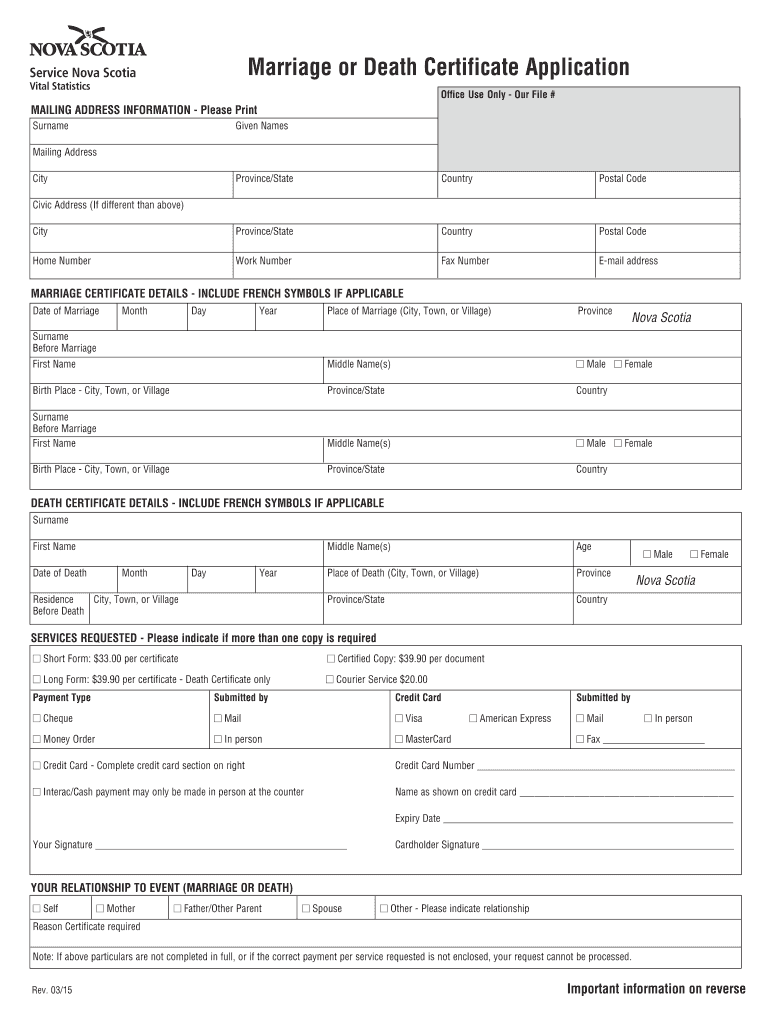
Marriage Certificate Application Form Here Novascotiaca
Use a Marriage Certificate Application Form Pdf Here Novascotiaca template to make your document workflow more streamlined.
What this marriage certificate application does
Marriage Certificate Application Form Here Novascotiaca is a request document for people seeking an official marriage certificate or related marriage record from the responsible issuing office. Complete the applicants’ names, marriage date and location, requested copies, contact details, delivery address, and any required identification or authorization exactly as the office instructs. signNow can convert the form into a fillable workflow, route signatures, record consent and transaction events, and preserve the completed PDF with its Audit Trail. State or local authorities decide filing methods, fees, notarization, and acceptance.
Complete the application in signNow
Use this sequence to prepare Marriage Certificate Application Form Here Novascotiaca, collect required signatures, and preserve the resulting record for submission or review.
Upload form:
Upload the marriage certificate application PDF or image. Check fields:
Review detected fields and add missing applicant details. Assign signers:
Assign each signature, date, and supporting-document field. Complete record:
Send, monitor completion, and download the signed record.
Features for marriage certificate applications
signNow organizes this application from field preparation through signature collection, audit evidence, and storage while leaving state or local filing rules to the responsible authority.
Field detection
Upload the marriage certificate application and let signNow identify fillable areas, then verify applicant names, dates, locations, and supporting-document fields before sending.
Reusable template
Convert repeated applications into a reusable template with defined applicant, officiant, witness, or records-office fields, reducing omissions when the same jurisdictional document is processed repeatedly.
Signer routing
Send the completed application to named participants in sequence or parallel, keeping each signature and required field attached to the correct person.
Audit trail
Capture timestamps, IP information, authentication events, and signing actions in an Audit Trail that can accompany the completed application for review.
Mobile signing
Use signNow mobile apps to review or sign applications while coordinating records collection away from a desktop workstation.
Secure storage
Store the completed application and signing evidence in an authorized repository, helping staff retrieve the exact record submitted for a marriage-record request.
 Best ROI. Our customers achieve an average 7x ROI within the first six months.
 Scales with your use cases. From SMBs to mid-market, airSlate SignNow delivers results for businesses of all sizes.
 Intuitive UI and API. Sign and send documents from your apps in minutes.
Configure the application workflow
Configure identity checks, signatures, audit evidence, retention, encryption, and user access before processing marriage certificate applications.
| Setting | Recommendation |
|---|---|
| Authentication method | Email link with SMS OTP |
| Signature type | Typed or drawn electronic signature |
| Audit trail | Enable completion certificate export |
| Document retention | Follow issuing authority requirements |
| Encryption and provisioning | AES-256 storage with role-based users |



Complete the application on mobile devices
The signNow mobile apps support marriage certificate application review and signing on iOS 15 or later and Android 10 or later. Camera capture can digitize paper records, while offline signing supports work without continuous connectivity.
iPhone app iOS 15 or later Android app Android 10 or later Mobile tools Camera capture and offline signing
For regulated deployments, use managed iOS or Android devices, configure access through organizational controls, and confirm API, SSO, certificate, or long-term validation requirements before rollout. Offline work should be synchronized and reviewed when connectivity returns so the completed application and audit history remain available.
Review the application audit trail
The signNow Audit Trail records who handled this marriage certificate application, what changed, when actions occurred, and how the completed record can be retrieved.
Authenticate signer:
Timestamp actions:
Hash document:
Seal record:
Track evidence:
Export history:
Verify signers and protect application records
PKI:
X.509 certificates:
Two-factor authentication:
SMS OTP:
ID verification:
Audit trail:
Avoid privacy and disclosure mistakes
Applicant names, prior surnames, dates, and places of marriage can appear in the completed record; restrict sharing to the issuing office and authorized participants. A signer may complete fields without accepting electronic-record terms; capture ESIGN consumer consent before collecting the electronic signature. Unrestricted template or completed-document permissions can expose identification details; assign access by role and remove unnecessary collaborators. A scanned certificate or identification attachment may remain visible after signing; separate sensitive attachments and define an approved recipient list.
Troubleshoot marriage certificate applications
These answers address field detection, signer identity, electronic consent, plan limits, acceptance, and record handling for this application.
Upload the original marriage certificate application as a PDF or image, then review detected fields manually. signNow Business includes templates and audit trails; verify that every applicant name, date, county, and mailing detail matches the issuing authority’s requirements before sending.
The application may require a government-issued identification number or supporting record that signNow cannot validate by itself. Add signer instructions, request an appropriate authentication method, and confirm the issuing office’s identity requirements before relying on the completed electronic record.
Business is listed at $8 per user per month with annual billing and includes 100 signature invites per user per year. Business Premium is $15 and adds bulk send; Enterprise is $30 and adds advanced signer authentication.
signNow supports ESIGN and UETA compliance, but legal acceptance of a marriage certificate application depends on the responsible state or local authority. Confirm whether that office accepts electronic signatures, electronic delivery, or only printed submissions before filing.
Consumer-facing electronic records require disclosure of the right to paper records, access to the electronic format, and procedures for withdrawing consent under 15 U.S.C. §7001(c). Provide that disclosure before requesting an applicant’s electronic signature.
Export the completed application and its Audit Trail from signNow, then store both together under the applicable records policy. Do not use a generic retention period: state and local marriage-record requirements can differ, so confirm them with the issuing authority.
Key performance indicators that demonstrate SignNow's proven track record.
BE READY TO GET MORE
Get this form now!

If you believe that this page should be taken down, please follow our DMCA take-down process.