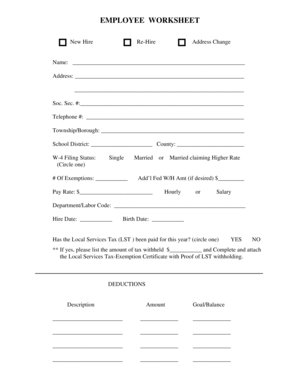
New Hire Worksheet Form
Use a New Hire Worksheet template to make your document workflow more streamlined.
What the New Hire Worksheet Form does
The New Hire Worksheet Form collects the employee information an organization needs to begin onboarding. It can organize contact details, start-date information, emergency contacts, payroll inputs, and internal acknowledgments in one record, although the exact fields depend on the employer’s approved worksheet. In signNow, a sender uploads the worksheet, reviews or adds fillable fields, assigns the new hire, and sends the document for completion. The employee reviews the information, signs when required, and receives an electronic record while the organization retains the completed document and audit trail under its personnel-record policy.
Who uses the New Hire Worksheet Form
Human resources
Human resources teams use the New Hire Worksheet Form to collect employee details, tax information, start dates, emergency contacts, and payroll setup data before onboarding. Centralized completion helps standardize records and route the finished worksheet for review or signature when the employer requires documented acknowledgment.
Small businesses
Small businesses and department administrators use the worksheet to gather consistent information from new employees before creating payroll, benefits, access, and personnel records. A reusable signNow template reduces rekeying, preserves a completion history, and lets authorized staff review sensitive information in one controlled workflow.
Business types that use new hire worksheets
The New Hire Worksheet Form fits organizations that need consistent employee information before onboarding tasks begin.
A solo professional can collect each new employee’s contact, payroll, and emergency information through one reusable worksheet before granting workplace access. A growing business can standardize onboarding across managers, preserving consistent employee data while reducing manual copying into payroll and personnel systems. An enterprise HR department can distribute controlled worksheets, assign completion responsibilities, and retain signed records with role-based access and audit history.
These tasks are executed by both individual contributors and centralized administrators depending on organizational policy and required controls.
Complete the New Hire Worksheet Form
Use this signNow workflow to prepare the worksheet, collect the new hire’s information, obtain acknowledgment, and preserve the completed record.
Upload worksheet:
Upload the worksheet into signNow. Check fields:
Review detected fields and add missing employee fields. Send securely:
Enter the employee’s email address and send the worksheet. Archive record:
Store the completed worksheet with its audit trail.
 Best ROI. Our customers achieve an average 7x ROI within the first six months.
 Scales with your use cases. From SMBs to mid-market, airSlate SignNow delivers results for businesses of all sizes.
 Intuitive UI and API. Sign and send documents from your apps in minutes.
Key features for new hire worksheets
signNow provides a document workflow for preparing, completing, signing, tracking, and retaining the New Hire Worksheet Form during employee onboarding.
Field preparation
Upload the worksheet and let signNow identify existing fillable areas, reducing manual preparation before the HR sender assigns employee fields and instructions.
Secure sending
Send the worksheet to a named new hire by email, then track completion without passing sensitive employee details through ordinary email attachments.
Employee completion
Collect typed information, dates, acknowledgments, and signatures in one assigned document workflow for each employee.
Reusable template
Reuse an approved worksheet template so HR teams apply the same onboarding questions and field structure across departments.
Audit trail
Review timestamps and action history when confirming who completed the worksheet and when the onboarding record was finalized.
Mobile access
Use mobile apps when a new hire needs to complete the worksheet away from a desktop workstation.
Protect New Hire Worksheet Form data
Transport encryption:
Stored data:
Security report:
Information security:
Privacy framework:
Health information:



Best practices for new hire worksheets
A controlled template, limited access, careful review, and documented archiving make the New Hire Worksheet Form more reliable for onboarding.
Maintain one approved worksheet template
Restrict access to employee information
Review every field before acknowledgment
Archive completed records securely
Privacy pitfalls in new hire worksheets
Employee Social Security numbers, addresses, or banking details can be exposed when completed worksheets are emailed without protected access controls. A missing electronic-record disclosure can weaken consent evidence when a consumer-facing workflow requires the signer to agree electronically. Overbroad workspace permissions may let managers view employee information unrelated to their onboarding responsibilities. Incomplete emergency-contact or payroll fields can force HR staff to request corrections and re-enter information manually.
Risks of incomplete worksheets
Delayed onboarding
Privacy exposure
Weaker evidence
Signature dispute
Key performance indicators that demonstrate SignNow's proven track record.
New Hire Worksheet Form troubleshooting
These answers address field setup, plan selection, employee-data protection, electronic-signature evidence, and record handling for this worksheet.
Business includes legally binding eSignatures, templates, audit trails, and mobile apps. Upload the worksheet, place or confirm fields, and send it through signNow. The completed record can support an electronic transaction when intent, consent, attribution, and record reproduction requirements are satisfied under ESIGN and applicable state law.
Business Premium includes bulk send, which is useful when the same New Hire Worksheet Form must be distributed separately to multiple employees. Business supports templates and audit trails but does not include the verified bulk-send feature listed for Business Premium.
Use signNow’s field tools to check the uploaded worksheet, then add any missing text, date, acknowledgment, or signature fields before sending. A sender should preview the document and confirm that each employee-facing field is assigned to the correct participant.
For employee personal information, restrict workspace permissions and use an authentication method appropriate to the organization’s risk assessment. signNow identifies HIPAA compliance as requiring a BAA; HIPAA applies only when the workflow handles protected health information.
The Business plan is listed at $8 per user per month when billed annually, with month-to-month pricing of $20 per user per month. Paid plans include unlimited users, while subscription plans include 100 signature invites per user per year and may charge overages.
signNow’s audit trail records signing activity, including timestamps and action history, helping preserve evidence of the worksheet workflow. Keep the completed document and audit information in a repository that supports the organization’s personnel-record retention policy.
BE READY TO GET MORE
Get this form now!

If you believe that this page should be taken down, please follow our DMCA take-down process.