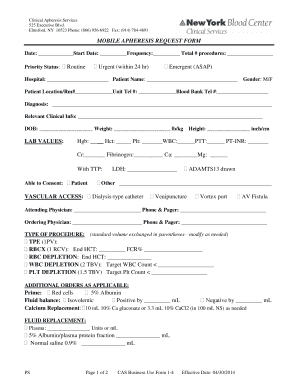
Apheresis Request Form New York Blood Center Nybloodcenter
Use a Apheresis Request Form New York Blood Center Nybloodcenter template to make your document workflow more streamlined.
What this apheresis request form does
The Apheresis Request Form from New York Blood Center is a healthcare request document used to organize information needed for an apheresis-related service or review. The available source material does not identify its official field list, filing deadline, or issuing department, so users should follow the current New York Blood Center instructions. With signNow, an authorized staff member can upload the form, review detected fillable areas, add missing fields, route it to designated signers, and preserve the completed copy with an audit trail.
Who handles this healthcare request
Apheresis coordinators
Apheresis coordinators can prepare the request, verify required clinical information, and route it to the appropriate clinician or department. A controlled signing workflow helps preserve signer identity, timestamps, and document history when the request contains protected health information. The form’s exact clinical fields and approval sequence should come from the current New York Blood Center version.
Healthcare organizations
Healthcare organizations can use signNow to circulate the request among authorized personnel without repeatedly scanning paper copies. Access controls, audit trails, and a HIPAA-compliant configuration with a business associate agreement support accountable handling, while the responsible organization remains responsible for validating patient information and retention requirements.
How the request moves through signNow
The Apheresis Request Form follows a controlled path from document preparation through signer review, completion, and record retention.
Upload form: Upload the New York Blood Center request. Check fields: Review detected fields and add missing entries. Send securely: Send the completed request to authorized signers. Archive record: Store the signed copy with its audit trail.
Complete the request in signNow
Follow these steps to prepare, route, sign, and preserve the current New York Blood Center request.
Upload form:
Upload the current Apheresis Request Form PDF. Place fields:
Review detected fields and add required controls. Add signers:
Assign authorized New York Blood Center recipients. Complete workflow:
Send, monitor, and archive the completed request.
Recommended request workflow setup
Configure the Apheresis Request Form workflow around authenticated signing, protected health information, auditability, and controlled retention.
| Setting | Recommendation |
|---|---|
| Authentication method | Two-factor signer authentication |
| Signature type | Electronic signature with signer intent |
| Audit trail | Export certificate of completion |
| Document retention | Six years under HIPAA 45 CFR 164.530(j) |
| Encryption | TLS 1.2 or 1.3 and AES-256 |
 Best ROI. Our customers achieve an average 7x ROI within the first six months.
 Scales with your use cases. From SMBs to mid-market, airSlate SignNow delivers results for businesses of all sizes.
 Intuitive UI and API. Sign and send documents from your apps in minutes.
What the audit trail records
The audit trail documents technical and signer events around the Apheresis Request Form, supporting review without changing the signed record.
Authenticate signer:
Capture timestamp:
Hash document:
Seal record:
Log activity:
Export trail:
Features that fit this healthcare request
signNow provides document preparation, controlled routing, signer authentication, and auditable storage options for the Apheresis Request Form workflow.
Digital preparation
Upload the New York Blood Center request and place signature, initials, date, or text fields where the current document requires them. Staff can review the digital copy before routing it, reducing manual scanning and misplaced pages.
Signer routing
Send the prepared request to named recipients in the required order. Each recipient receives a controlled signing task, helping the healthcare organization distinguish preparation, review, and approval responsibilities.
Audit evidence
Capture signer actions, timestamps, and workflow events in an audit trail. Preserve the exported evidence with the completed request when later review requires proof of how the document was signed.
Signer authentication
Use two-factor authentication or another configured signer control when the request contains protected health information. Stronger attribution helps connect the completed electronic signature with the intended healthcare worker.
HIPAA controls
Apply signNow’s HIPAA-compliant configuration with a business associate agreement when the workflow handles protected health information. The organization must still define access, disclosure, and retention procedures.
Controlled storage
Connect the workflow with Google Drive, Box, Egnyte, or an approved records repository. Storing the completed request in the designated location supports retrieval without relying on email attachments.
Mobile options for this request
Staff can prepare the Apheresis Request Form using the signNow mobile app for iOS 16 and later or Android 11 and later. Camera-based capture can convert a paper request into a digital document for review and field placement. Availability of offline signing should be confirmed for the organization’s configured mobile workflow before use with patient information.
iPhone app iOS 16 and later with signNow mobile app Android app Android 11 and later with signNow mobile app Camera capture Camera capture for paper request pages
Use managed iOS or Android devices when the request contains protected health information. Configure authentication, screen-lock requirements, application updates, and remote-wipe controls through organizational mobile-device management. After connectivity returns, verify that the completed request and audit trail synchronized successfully before treating the record as archived.
Security controls for protected information
Data in transit:
Data at rest:
Health information:
Security reporting:
Information security:
Regulated records:



Privacy pitfalls to avoid
Uploading a request containing patient identifiers to an unrestricted workspace can expose protected health information to staff without a treatment or administrative need. Skipping the consumer electronic-record disclosure when applicable can weaken evidence that a signer consented to receive and sign the request electronically. Routing the request through a shared mailbox can obscure which authorized healthcare worker reviewed or signed the Apheresis Request Form. Granting download access to every workspace member can create unnecessary copies of protected health information outside the approved records repository.
Protect completed apheresis records
Retain the signed request, audit evidence, and related patient information under the applicable healthcare records policy.
Keep the request and supporting records together
Export the audit trail after completion
Apply the six-year HIPAA retention rule
Archive signed forms securely
Ways to send and sign the request
- Use the signNow web app when staff need to upload the current Apheresis Request Form, inspect detected fields, assign recipients, and review the final document on a larger screen.
- Use the signNow mobile app when an authorized coordinator must review or sign the request from an iOS or Android device while away from a workstation.
- Use kiosk mode for supervised, in-person completion on an organization-controlled device; confirm privacy safeguards before displaying patient information to the signer.
- Use a shareable signing link only when the organization can control recipient access, identity verification, and the link’s distribution for this healthcare request.
Troubleshooting this request workflow
Use the issue-specific checks below before resending, changing permissions, or archiving an Apheresis Request Form.
Upload the current New York Blood Center PDF again and inspect its page permissions. signNow’s field-detection workflow can identify fillable areas, but a scanned image may require manually placing fields before sending.
Use signNow Business Premium when the same Apheresis Request Form must be sent to multiple recipients. Business Premium includes bulk send; the Business plan provides templates and audit trails but does not include that feature.
A HIPAA workflow requires a signNow business associate agreement and appropriate access controls. HIPAA compliance does not validate clinical content, authorization, or the New York Blood Center’s own submission rules.
Confirm that every signer has reviewed the request and demonstrated intent before completion. ESIGN and UETA recognize electronic signatures when intent, consent, attribution, and record retention requirements are satisfied.
Check the workspace role, recipient address, and authentication settings before resending. signNow audit trails record workflow activity, so administrators should avoid creating duplicate completed records without documenting the correction.
Business is listed at $8 per user per month when billed annually, with a seven-day free trial. Paid plans include 100 signature invites per user annually; confirm current overage terms before selecting a plan.
Key performance indicators that demonstrate SignNow's proven track record.
BE READY TO GET MORE
Get this form now!

If you believe that this page should be taken down, please follow our DMCA take-down process.