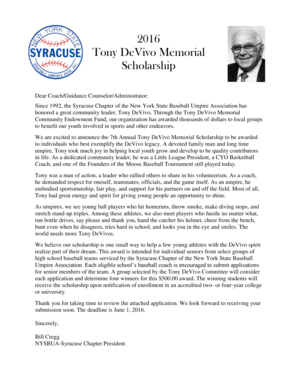
Tony Devivo Memorial Scholarship Phoenixcsd Form
Use a Tony DeVivo Memorial Scholarship Phoenixcsd template to make your document workflow more streamlined.
Tony Devivo Memorial Scholarship Phoenixcsd Form overview
Tony Devivo Memorial Scholarship Phoenixcsd Form is a scholarship application document used to collect an applicant’s information for the Phoenixcsd scholarship process. With signNow, an administrator can upload the form, review automatically detected fillable areas, add or correct fields, assign the applicant as signer, and send the document electronically. The applicant reviews the entered information, signs where required, and receives a completed copy. signNow records signing actions, timestamps, and document history in an audit trail that can be retained with the finished scholarship record.
Who uses this scholarship form
Scholarship applicants
Applicants use the Tony Devivo Memorial Scholarship Phoenixcsd Form to provide the information requested by the Phoenixcsd scholarship process and sign their completed submission.
Scholarship administrators
Phoenixcsd scholarship administrators use signNow to prepare the document, assign applicants, review completed forms, and preserve audit evidence with each submission.
Features for this scholarship workflow
signNow organizes the Tony Devivo Memorial Scholarship Phoenixcsd Form from upload through applicant signing, while keeping field placement, completion evidence, and access controls visible.
Field detection
Upload the scholarship document and inspect detected fields before sending, reducing manual recreation of applicant information and signature areas.
Signer roles
Assign the applicant as signer and place signature, date, and required response fields in the correct locations.
Mobile signing
Let applicants review and sign from a browser or supported mobile app without printing and scanning the completed scholarship form.
Audit trail
Capture timestamps, signer actions, and document history in an audit trail associated with the completed scholarship document.
Record control
Save the finished form and completion evidence together so reviewers can confirm which document version the applicant signed.
Reusable template
Use templates for repeated scholarship cycles while limiting editing and sending rights to authorized program administrators.
How this scholarship form works
The signNow workflow converts the scholarship document into a controlled signing package while preserving the completed form and its audit evidence.
Upload form: Upload the scholarship form into signNow. Check fields: Review detected fields and add missing ones. Assign signer: Assign the applicant signature and required fields. Store record: Complete signing and preserve the audit trail.
 Best ROI. Our customers achieve an average 7x ROI within the first six months.
 Scales with your use cases. From SMBs to mid-market, airSlate SignNow delivers results for businesses of all sizes.
 Intuitive UI and API. Sign and send documents from your apps in minutes.
Quick steps to complete the form
Follow these steps to prepare, send, sign, and preserve the Tony Devivo Memorial Scholarship Phoenixcsd Form in signNow.
Upload form:
Upload the source scholarship document. Check fields:
Review detected fields and correct placement. Assign signer:
Add the applicant as signer. Send form:
Send the form for electronic signing. Archive record:
Download the signed form and audit trail.
Ways to send and sign this form
- Use the signNow web app when an administrator prepares the scholarship form, checks its fields, and sends it from a desktop browser to the designated applicant.
- Use the signNow mobile app when an applicant or administrator needs to review and sign the scholarship form from an iOS or Android device.
- Use kiosk mode for supervised, on-site completion only when the organization’s scholarship process permits shared-device signing and protects each applicant’s information.
- Use a shareable signing link only after confirming access controls, recipient instructions, and privacy safeguards for the scholarship form.
Mobile options for this scholarship form
Use the signNow web app or mobile app over TLS 1.2 or later with current Chrome, Firefox, Safari, or Edge. iOS and Android apps support mobile document review and signing.
iOS app iOS 15 and later support the signNow mobile app. Android app Android 10 and later support the signNow mobile app. Camera capture Camera capture creates a digital document for signing.
For administrators, managed iOS and Android devices can centralize access to the scholarship document. Confirm offline availability, camera permissions, and storage policies before collecting applicant information, then retain the completed form and audit trail under the organization’s documented records policy.
Security for scholarship records
Data encryption:
Security certification:
Information security:
Signer authentication:
Completion evidence:
Electronic signatures:
Challenges when completing this form
Applicants may leave required eligibility or contact fields blank, forcing administrators to request clarification before the scholarship review can proceed. A scanned or outdated scholarship form can omit signature fields, instructions, or required disclosures included in the organization’s current source document. Sending the form to an incorrect email address can expose applicant information and delay completion, especially when no recipient verification step exists. Saving the signed form without its audit trail can make it harder to demonstrate signer identity, timing, and document integrity later.
Risks of an incomplete submission
Review delay
Privacy exposure
Unfinished submission
Weaker evidence
Troubleshooting this scholarship workflow
These answers address field detection, applicant delivery, signing evidence, plan selection, and electronic-signature requirements for this scholarship document.
Confirm that the uploaded PDF is the current Tony Devivo Memorial Scholarship Phoenixcsd Form, then inspect each detected field. signNow allows the sender to add or reposition fields before assigning the applicant and sending the document.
Open the recipient settings and verify the applicant’s email address. Resend the signing invitation from signNow after correcting it, rather than forwarding a message that could expose the scholarship document to an unintended recipient.
Ask the applicant to open the signing link in a supported browser or the signNow mobile app, then review required fields before signing. Unfinished required fields prevent completion until they are addressed.
Use signNow’s audit trail and completion record to review timestamps, signer actions, and document history. Preserve those records with the signed scholarship form so the organization can identify the executed version.
The signNow Business plan includes legally binding eSignatures, templates, audit trails, and mobile apps. Business Premium adds bulk send when administrators distribute the same scholarship form to multiple applicants.
Electronic signing under ESIGN and UETA generally depends on intent, consent, attribution, and record retention. For consumer-facing applicants, review the ESIGN disclosure requirements in 15 U.S.C. §7001(c) before deployment.
Key performance indicators that demonstrate SignNow's proven track record.
BE READY TO GET MORE
Get this form now!

If you believe that this page should be taken down, please follow our DMCA take-down process.