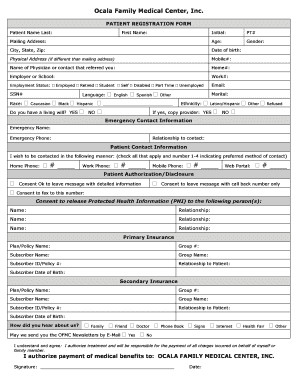
Ocala Family Medical Center Form
Use a Ocala Family Medical Center template to make your document workflow more streamlined.
What Ocala Family Medical Center Form is
Ocala Family Medical Center Form is a healthcare document used by the medical center to collect information, acknowledgments, consent, or signatures from a patient or authorized representative. Its exact legal purpose depends on the form text and the underlying care or administrative workflow, so staff should verify every field before sending. With signNow, staff upload the document, review auto-detected fillable fields, assign signers, and send it electronically. The completed PDF and audit trail can then be retained with the medical center’s records under applicable HIPAA and state requirements.
Who uses Ocala Family Medical Center Form
Healthcare staff
Front-desk staff can prepare Ocala Family Medical Center Form for patient intake, consent, and administrative records while preserving a clear signing sequence and completed copy.
Patients and representatives
Patients and authorized representatives review the form remotely or onsite, provide required information, and sign only after the electronic-record disclosure and document contents are clear.
Business types using this medical form
The form fits healthcare organizations that need patient-facing completion, controlled access, and a retrievable signed record.
Solo healthcare practitioners can send Ocala Family Medical Center Form directly to patients, reducing paper handling while preserving completed copies and audit evidence for office records. Medical-center intake teams can reuse prepared fields, route forms to patients or representatives, and manage access controls for workflows involving protected health information. Enterprise healthcare groups can connect signNow with Microsoft 365, Salesforce, NetSuite, or cloud storage while applying centralized administration and documented retention policies.
These tasks are executed by both individual contributors and centralized administrators depending on organizational policy and required controls.
Key features for this medical center form
Ocala Family Medical Center Form workflows benefit from field placement, controlled routing, mobile access, and evidence that connects each completed signature to its record.
Field placement
Upload an Ocala Family Medical Center Form PDF, then place patient, representative, date, and signature fields where the document requires them.
Signer routing
Send the prepared form to a patient or authorized representative by email, controlling signer order when multiple people must complete it.
Reusable template
Use signNow templates for repeated medical-center workflows without rebuilding the same Ocala Family Medical Center Form fields each time.
Audit trail
Capture completion events, signer actions, and timestamps in an audit trail attached to the finished form.
Mobile signing
Support patient completion from a desktop browser or mobile device while retaining the same document workflow.
HIPAA workflow
Store completed forms with access controls and HIPAA compliance support when a business associate agreement is in place.
How this medical form works in signNow
signNow turns the Ocala Family Medical Center Form into a controlled digital workflow from upload through signed-record storage.
Upload form: Upload the medical center form PDF. Check fields: Auto-detect and verify fillable fields. Route signing: Send assigned fields to signers. Archive record: Store the signed copy with audit evidence.
 Best ROI. Our customers achieve an average 7x ROI within the first six months.
 Scales with your use cases. From SMBs to mid-market, airSlate SignNow delivers results for businesses of all sizes.
 Intuitive UI and API. Sign and send documents from your apps in minutes.
Ways to send and sign this medical form
- Use the signNow web app when staff prepare fields, review the Ocala Family Medical Center Form, and coordinate several patient or representative signers from a desktop browser.
- Use the signNow mobile app when patients or staff need to review and sign the medical form from iOS or Android during a visit or away from the office.
- Use kiosk mode when a patient completes the Ocala Family Medical Center Form on a medical-center device under staff supervision, with the Business Premium plan feature.
- Use a shareable signing link when the same prepared form must reach an approved audience without creating a separate invitation for each recipient.
How the Ocala Family Medical Center Form audit trail works
signNow records the technical events that connect each signer to the completed Ocala Family Medical Center Form.
Authenticate signer:
Capture timestamps:
Hash document:
Seal document:
Create certificate:
Export history:
Mobile options for Ocala Family Medical Center Form
Use the signNow app on iOS 16–18 or Android 12–15 to complete Ocala Family Medical Center Form workflows. TLS 1.2 or 1.3 protects browser traffic, while camera capture helps digitize paper pages before field placement.
iOS app iOS 16–18 with the signNow mobile app Android app Android 12–15 with the signNow app Mobile tools Offline signing and camera document capture
Offline signing can help staff complete Ocala Family Medical Center Form when connectivity is limited, with synchronization after reconnection. Camera capture is useful for paper records, but review every captured field for legibility, patient identifiers, and consent accuracy before sending the completed document.
Security and data protection for healthcare forms
HIPAA protection:
Transport encryption:
Stored encryption:
Security certification:
Management certification:
Regulated records:
Privacy and disclosure challenges
Patient identifiers can appear in downloaded copies shared through unsecured email or unmanaged storage. Missing electronic-record consent can weaken evidence that the signer agreed to use digital records. Unrestricted template access can expose patient information to staff without a documented business need. Incomplete witness, representative, or consent fields can create disputes about authorization and document meaning.
Record-keeping practices for medical forms
Retain the completed form, consent evidence, and audit evidence together, then apply the healthcare record rule and any longer state requirement.
Apply the six-year HIPAA record rule
Export the audit trail with every form
Restrict access to patient information
Document holds before secure disposal
Processing stages for this medical form
The workflow moves from field preparation to signer delivery, completion, and controlled archival of the finished Ocala Family Medical Center Form.
Document preparation
Signer delivery
Signer turnaround
Completion and archival



Troubleshooting Ocala Family Medical Center Form
These answers address field detection, patient access, HIPAA handling, electronic consent, plan selection, and mobile completion.
Upload the original Ocala Family Medical Center Form PDF again and inspect auto-detected fields before sending. signNow templates can preserve corrected field placement for later patient-intake workflows, reducing repeated manual positioning without changing the form’s substantive text.
Confirm that the recipient email is correct, the signer role is assigned, and required fields are present. Resend the signNow invitation or provide a controlled signing link only after verifying that the intended patient or representative will receive it.
For PHI, use a signNow workflow covered by the required business associate agreement and apply access controls. HIPAA compliance supports the workflow, but staff must still limit disclosure, verify recipients, and retain records under 45 CFR 164.530(j).
A patient-facing electronic record may require consent under ESIGN, 15 U.S.C. §7001(c). Provide the required disclosure, show that the signer can access the record, and explain withdrawal procedures before relying on electronic delivery.
The signNow Business plan is listed at $8 per user per month with annual billing and includes audit trails and templates. Business Premium is listed at $15 and adds bulk send and kiosk mode; plan limits and overages should be reviewed.
If a signer cannot complete the form on a phone, send the same prepared document through the web app or provide a supported desktop browser. Review the final PDF and audit trail before placing it in the medical record.
Key performance indicators that demonstrate SignNow's proven track record.
BE READY TO GET MORE
Get this form now!

If you believe that this page should be taken down, please follow our DMCA take-down process.