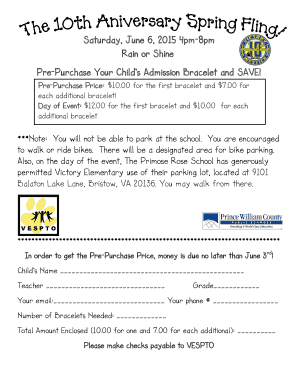
Spring Fling Bracelet Order Form Victory Elementary School
Use a Spring Fling Bracelet Order Form Victory Elementary School template to make your document workflow more streamlined.
What the bracelet order form does
The Spring Fling Bracelet Order Form Victory Elementary School is a school-specific order record for collecting bracelet selections and approval details for the Spring Fling event. A parent, guardian, student, or authorized staff member completes the requested information, reviews the order, and signs when required by the school. With signNow, the school can upload the form, detect or add fillable fields, route it to the responsible signer, and retain the completed document with its audit trail. The form’s exact prices, deadlines, and payment instructions remain controlled by Victory Elementary School.
Who uses this school order form
Parents and guardians
Families use the form to select bracelets, provide the requested student or contact details, review school instructions, and approve the order electronically when Victory Elementary School permits electronic signing.
Victory Elementary School staff
School staff use the completed record to organize Spring Fling orders, confirm approvals, and preserve the signed document and audit trail in the school’s approved records system.
Features for the bracelet order process
signNow connects form preparation, signer routing, approval evidence, and record export for Victory Elementary School’s Spring Fling bracelet orders.
Form preparation
Upload the approved Victory Elementary School layout and place response or signature fields without rebuilding the bracelet order from scratch.
Signer routing
Route the order directly to the parent, guardian, or staff member responsible for approval and completion.
Audit evidence
Capture each signing action with an audit trail linked to the completed school order.
Mobile access
Let authorized staff review and complete orders from supported desktop or mobile devices.
Reusable template
Reuse a controlled template when the school repeats the same Spring Fling ordering process.
Record export
Keep the signed order and audit trail together for later school review.
How the order workflow works
The Victory Elementary School process moves from the approved paper or PDF layout to a reviewed, signed, and archived bracelet order.
Upload: Upload the approved Victory Elementary School bracelet order form. Prepare: Review detected fields and add missing response or signature fields. Send: Send the order to the assigned parent, guardian, or staff signer. Complete: Collect approval and store the signed order with its audit trail.
 Best ROI. Our customers achieve an average 7x ROI within the first six months.
 Scales with your use cases. From SMBs to mid-market, airSlate SignNow delivers results for businesses of all sizes.
 Intuitive UI and API. Sign and send documents from your apps in minutes.
Quick steps for the school order
Use this sequence to prepare, route, complete, and preserve the Victory Elementary School Spring Fling bracelet order.
Upload form:
Upload the approved school order form. Review fields:
Check detected fields and add missing ones. Send order:
Assign the signer and send the order. Save records:
Export the signed order and audit trail.
Platform requirements for school staff
Staff can prepare the Victory Elementary School order in Chrome, Firefox, Safari, or Edge on Windows or macOS. signNow also provides mobile apps for iOS and Android, allowing authorized users to review or sign from supported mobile devices.
Browsers Chrome, Firefox, Safari, Edge Desktop systems Windows and macOS desktops Mobile apps iOS and Android signNow apps
For school deployment, administrators should use managed accounts, limit access to authorized staff, and confirm that recipients can open the signing link on their device. Organizations needing automated routing can evaluate signNow integrations or API access against their administrative and student-information requirements.
Security for school order records
Transport encryption:
Stored encryption:
Security certification:
Management standard:
Signer verification:
Evidence record:
Processing the bracelet order form
Use these four stages to move the Victory Elementary School bracelet order from preparation through signed recordkeeping.
Prepare the order
Deliver for review
Collect approval
Archive the order
Best practices for school orders
A controlled template, careful field review, limited access, and documented archival process help Victory Elementary School manage signed bracelet orders accurately.
Validate every field before sending
Create a controlled school template
Archive signed records securely
Apply the correct retention policy
Privacy pitfalls for school orders
Including unnecessary student details on a bracelet order increases exposure if the completed document is shared beyond authorized school personnel. Failing to record parent or guardian consent can leave the school unable to show who approved the Spring Fling order. Assigning the signature field to the wrong recipient may produce an order approved by someone without authority. Sending the completed order through unmanaged email or storage can undermine access control and retention practices.
How the audit trail records approval
The audit trail documents who handled the Victory Elementary School bracelet order, when each action occurred, and how the completed record was preserved.
Signer authentication:
Timestamp capture:
Document integrity:
Tamper evidence:
Event history:
Export records:
Legal standing of the signed order
A signed Spring Fling Bracelet Order Form can provide evidence of the signer’s intent, consent, attribution, and completed record when preserved with its audit trail under ESIGN, 15 U.S.C. ch. 96, and applicable state law. ESIGN exceptions include wills, certain court orders, and family law decrees.

Troubleshooting the school order workflow
These answers address specific setup, signing, security, and plan questions for the Victory Elementary School bracelet order form.
Confirm the uploaded file is readable and that fields were placed on the correct lines. In signNow, review the detected fields before sending, then add or adjust fields where the Victory Elementary School form requires a parent, guardian, or staff response.
Open the document in signNow’s editor and inspect every required field. A field may be outside the visible page, assigned to the wrong recipient, or missing a required setting. Test the signing flow before distributing the school order form.
The Business plan includes templates and audit trails, while Business Premium adds bulk send. For one Spring Fling Bracelet Order Form Victory Elementary School, Business can support a single recipient workflow; confirm plan limits before sending many orders.
Use signNow’s audit trail to confirm the recipient, timestamps, and signing actions. If a parent or guardian disputes approval, preserve the signed order and exported audit trail together, and follow the school’s records policy for access and review.
A signNow electronic signature can support a school order when the signer demonstrates intent, consents to electronic records, and the record remains reproducible. ESIGN, 15 U.S.C. ch. 96, and applicable state law govern; obtain any required school-specific consent.
Do not place unnecessary student or family information in the order. Restrict access through signNow user controls, use two-factor authentication where appropriate, and retain only the completed form and audit evidence required by Victory Elementary School’s policy.
Key performance indicators that demonstrate SignNow's proven track record.
BE READY TO GET MORE
Get this form now!

If you believe that this page should be taken down, please follow our DMCA take-down process.