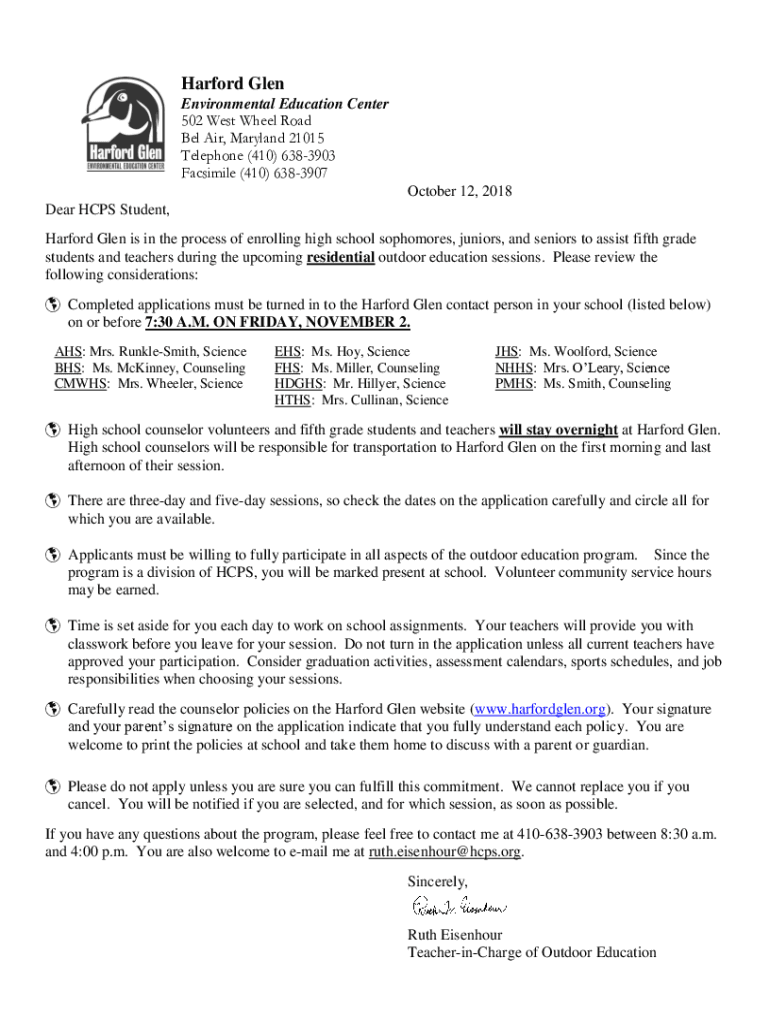
Harford Glen Home Page Harford County Public Schools Form
Use a Harford Glen Home Page Harford County Public Schools template to make your document workflow more streamlined.
Harford Glen school form overview
The Harford Glen Home Page Harford County Public Schools Form is a school-specific electronic document used to collect information and required acknowledgments from the people connected with Harford Glen. In signNow, an authorized sender uploads the form, reviews automatically detected fields, assigns parent, guardian, student, or staff recipients, and sends the document through email or a signing link. Each signer reviews the displayed content, completes assigned fields, and signs electronically. The completed PDF and audit trail can then be retained under district procedures, including applicable FERPA safeguards.
Who uses the Harford Glen form
District enrollment coordinators can send reusable Harford Glen forms to parents and guardians, route signatures to the correct recipients, and retain completed records with an audit trail for authorized administrative review. Teachers, counselors, and school office staff can collect permission or student-information forms from families without rekeying every response, while district administrators control templates, signer access, and storage procedures for educational records.
Key features for Harford Glen forms
signNow connects field preparation, recipient routing, electronic signatures, and audit evidence around the specific information-collection needs of the Harford Glen school form.
Field detection
Upload the school’s PDF and review automatically detected fields before assigning parent, guardian, student, or staff recipients. Required fields and routing can be checked before the form leaves the district workflow.
Flexible delivery
Send the Harford Glen form by email or a shareable signing link, then track each recipient’s progress without requiring every signer to create a signNow account.
Recipient routing
Assign fields to specific recipients so each parent, guardian, or staff member completes only the information and acknowledgments intended for that person.
Audit trail
Capture timestamps, signer actions, IP information, and completion history in an audit trail that accompanies the signed school record.
Mobile signing
Use mobile apps to let families review and sign the Harford Glen form from supported iOS or Android devices when district policy permits.
Controlled records
Store the completed PDF and audit trail according to district retention, FERPA, and authorized-access procedures rather than relying on unmanaged email attachments.
How to complete the Harford Glen form
Prepare the school form once, verify every assigned field, and preserve the signed PDF with its audit evidence after completion.
Upload form:
Upload the current Harford Glen PDF to signNow. Check fields:
Review detected fields and add missing fields. Assign recipients:
Assign fields to each parent, guardian, or staff signer. Send request:
Send the form and monitor completion status. Store record:
Download the signed PDF and audit trail.
 Best ROI. Our customers achieve an average 7x ROI within the first six months.
 Scales with your use cases. From SMBs to mid-market, airSlate SignNow delivers results for businesses of all sizes.
 Intuitive UI and API. Sign and send documents from your apps in minutes.
How the school form audit trail works
The audit trail documents who handled the Harford Glen school form, what changed, and when completion occurred, supporting review by authorized school staff.
Signer authentication:
Timestamp capture:
Document hashing:
Tamper-evident seal:
Action history:
Audit export:
Recommended school-form workflow setup
Configure the Harford Glen form around verified signer identity, restricted student-record access, an exportable audit trail, and the district’s records schedule.
| Setting | Recommendation |
|---|---|
| Authentication method | Email link with SMS verification |
| Signature type | Typed or drawn electronic signature |
| Audit trail | Retain completion certificate and action log |
| Document retention | Follow the district records schedule |
| Encryption | TLS 1.2/1.3 and AES-256 at rest |
Platform requirements for school forms
Complete the Harford Glen Home Page Harford County Public Schools Form in signNow using Chrome, Firefox, Safari, or Edge on Windows, macOS, iOS, or Android. A current browser and reliable internet connection help parents, guardians, and school staff review fields and sign without installing desktop software.
Browsers Chrome, Firefox, Safari, Edge Operating systems Windows 10+, macOS, iOS, Android Supported devices Desktop, tablet, smartphone
District administrators should test the workflow on managed devices before distribution. Confirm that school networks permit signNow traffic, that mobile users can receive email or SMS authentication, and that access permissions restrict student information to authorized personnel. Store completed forms according to district records schedules and FERPA-related procedures.
Security controls for school records
Transport encryption:
Stored-data encryption:
Security certification:
Information security:
Privacy framework:
Signature validity:



Privacy pitfalls for school forms
Sending the completed form to an unintended email address can expose student or family information outside the authorized school workflow. Collecting a parent or guardian signature without documenting electronic consent can weaken the record of agreement under the ESIGN Act. Giving broad template or document permissions can expose educational records to staff without a legitimate educational interest. Saving signed forms in personal drives or inboxes can bypass district retention, deletion, and access-control procedures.
Troubleshooting Harford Glen school forms
Resolve field, routing, consent, plan, and student-record questions before sending the Harford Glen form for completion.
Upload the current Harford Glen form as a PDF, then confirm signNow’s detected fields against the school’s required parent, guardian, student, or staff information. Auto-detection does not replace reviewing labels, required status, or routing before sending.
Use signNow’s recipient routing to send the form to the intended parent, guardian, or staff member. Check the email address, signing order, and field assignments before sending; a corrected recipient may require creating a new request rather than editing a completed record.
A signer can usually open the request from the email link without a signNow account. If the school requires stronger attribution, configure available authentication such as SMS verification and retain the resulting audit trail with the completed form.
For a consumer-facing electronic record, provide the ESIGN Act disclosure required by 15 U.S.C. §7001(c), including paper-record access and consent withdrawal procedures. School administrators should confirm applicable FERPA and district policies before collecting student information electronically.
Business plans include audit trails, templates, and mobile apps, while Business Premium adds bulk send and kiosk mode. Confirm the selected plan before distributing repeated Harford Glen forms to many recipients.
signNow states HIPAA compliance requires a business associate agreement, but FERPA obligations depend on the school’s educational-record practices and contracts. Review district policy, access controls, and vendor terms before placing student records in a workflow.
Key performance indicators that demonstrate SignNow's proven track record.
BE READY TO GET MORE
Get this form now!

If you believe that this page should be taken down, please follow our DMCA take-down process.