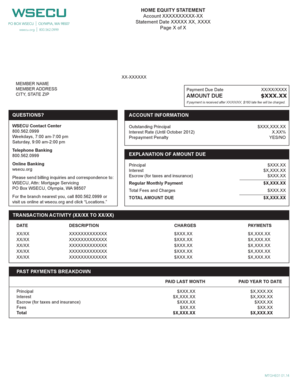
Duexxx Form
Use a Duexxx Form template to make your document workflow more streamlined.
What Duexxx Form is and how it works
Duexxx Form is a U.S. document identified by that name, but its issuing authority, purpose, fields, filing deadline, and signature rules are not specified here. To complete it accurately, confirm the official instructions and source version before entering information. signNow can upload the document, detect or let you place fillable fields, assign fields to signers, send the form, capture electronic signatures, and preserve the completed file with an audit trail. Check whether the receiving authority permits electronic completion and submission before relying on the workflow.
Who uses Duexxx Form
Business teams
Organizations can use Duexxx Form for internal approvals, customer records, vendor exchanges, or other workflows defined by the form’s issuing authority. Upload the correct source version, assign fields carefully, and preserve the completed document with its audit trail.
Individual filers
Individuals and small organizations can prepare Duexxx Form in signNow when electronic completion is permitted. They should verify the form’s instructions, signer requirements, submission destination, and retention rule before relying on an electronic record.
Features for completing Duexxx Form
signNow connects document preparation, assigned signer fields, electronic signatures, audit evidence, and controlled record handling for Duexxx Form.
Document upload
Upload the Duexxx Form and prepare its existing fields without rebuilding the document. Reviewing the source file first helps preserve required wording, instructions, and field placement.
Assigned fields
Add signer, initials, date, or text fields where the Duexxx Form requires participant input. Assigned fields clarify responsibility before the document is sent.
Signer delivery
Send the prepared Duexxx Form by email or a shareable signing link. Signers can review the same controlled document without exchanging editable attachments.
Electronic signing
Capture the signer’s intent through a completed electronic signature workflow. The signed Duexxx Form remains associated with its completion record and transaction history.
Audit trail
Use signNow’s audit trail to review signing actions, timestamps, and document history for Duexxx Form. Export the record when internal controls require supporting evidence.
Secure records
Keep the completed Duexxx Form and related transaction record in an access-controlled location. Apply your organization’s retention policy and any applicable authority’s requirements.
How to complete Duexxx Form
Use this sequence to prepare Duexxx Form in signNow while preserving the document’s original instructions and capturing a traceable signing record.
Upload form:
Upload the source document to signNow. Prepare fields:
Review existing fields and add required signer fields. Assign roles:
Assign each Duexxx Form field to the right signer. Send document:
Send the prepared document for electronic signature. Store records:
Download the completed form and audit trail.
 Best ROI. Our customers achieve an average 7x ROI within the first six months.
 Scales with your use cases. From SMBs to mid-market, airSlate SignNow delivers results for businesses of all sizes.
 Intuitive UI and API. Sign and send documents from your apps in minutes.
How the Duexxx Form workflow works
Duexxx Form moves through signNow in four controlled stages, from source-document upload to completed record retention.
Upload: Upload the Duexxx Form source file. Prepare: Review or place fillable fields. Send: Send assigned fields to signers. Complete: Complete, download, and retain the record.
Recommended Duexxx Form workflow setup
Configure Duexxx Form around signer identity, signature intent, audit evidence, retention, encryption, and controlled access.
| Setting | Recommendation |
|---|---|
| Authentication method | Email link with SMS verification |
| Signature type | Electronic signature with intent capture |
| Audit trail | Export with completed document |
| Document retention | Apply organization policy and authority |
| Encryption | TLS 1.2/1.3 and AES-256 |
Audit evidence for Duexxx Form
signNow records the technical events surrounding Duexxx Form signing so reviewers can connect signer activity, timing, document history, and completion evidence.
Authenticate signer:
Capture timestamp:
Link document:
Seal record:
Track activity:
Export evidence:
Platform requirements for Duexxx Form
Duexxx Form can be prepared and signed through signNow in Chrome, Firefox, Safari, or Edge on Windows and macOS. Mobile access is available through signNow apps for iOS and Android, subject to current app requirements and organizational policy.
Browser support Chrome, Firefox, Safari, and Edge Desktop systems Windows and macOS desktops Mobile access iOS and Android mobile apps
Organizations handling Duexxx Form should use managed devices, current browser security updates, and access controls appropriate to the document. Enterprise deployments can evaluate API access, SSO provisioning, and certificate or long-term-validation requirements against their internal governance and applicable U.S. obligations.



Why teams look for DocuSign alternatives
Organizations seek alternatives when they need different pricing models, stronger native automation, simpler bulk affidavit workflows, or more flexible identity-verification options than those available in a legacy envelope-based vendor.

Duexxx Form troubleshooting questions
These answers address document preparation, signer access, plan selection, electronic-signature requirements, disclosures, and record handling for Duexxx Form.
Upload the original Duexxx Form file again and inspect whether its fields are editable. If the source is a scanned image, signNow may require manually placed text, date, or signature fields before sending. Preserve the original wording and verify every field visually.
A signer can open a signNow invitation without creating an account when the workflow permits guest signing. If stronger attribution is required for Duexxx Form, configure available authentication controls, such as SMS verification, according to the selected plan and policy.
The Business plan includes legally binding eSignatures, templates, audit trails, and mobile apps at $8 per user per month when billed annually. Business Premium adds bulk send at $15, while Enterprise adds advanced signer authentication at $30.
Electronic signing of Duexxx Form should demonstrate intent, consent, attribution, and record retention. ESIGN, 15 U.S.C. chapter 96, and applicable UETA provisions support electronic records, but the form’s issuing authority or transaction may impose additional requirements.
If Duexxx Form contains consumer-facing records, review the ESIGN consumer-disclosure requirements in 15 U.S.C. §7001(c), including paper-record rights and electronic-access capability. Capture consent before signing when those requirements apply to the transaction.
Export the completed Duexxx Form together with its signNow audit trail and store both under the organization’s approved retention policy. The correct period depends on the form’s issuing authority, transaction type, and applicable federal or state requirements.
Key performance indicators that demonstrate SignNow's proven track record.
BE READY TO GET MORE
Get this form now!

If you believe that this page should be taken down, please follow our DMCA take-down process.