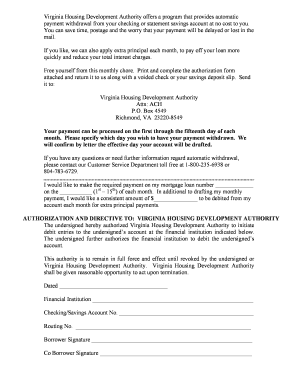
Vhda Quick Pay Form
Use a Vhda Quick Pay template to make your document workflow more streamlined.
What the Vhda Quick Pay Form does
The Vhda Quick Pay Form is a payment-related document that records the information and approvals needed for a transaction. Because the form’s issuing agency, official fields, and filing deadline are not identified, users should confirm those details with the organization requesting it before submission. In signNow, upload the form, review automatically detected fillable fields, add missing payment and signature fields, identify the signer, and send it electronically. After signing, signNow provides a completed record and audit trail for controlled storage, subject to applicable ESIGN, UETA, tax, privacy, and state-law requirements.
Who uses the payment form
Accounts payable
Accounts-payable teams can use the form to collect payment approvals, payer details, and signatures before releasing funds. They should confirm the requesting department, authorized signer, payment destination, and supporting invoice or agreement before sending.
Small businesses
Small businesses and contractors can use the form to document payment requests and approvals with customers. The sender should confirm whether the recipient requires an original, notarization, tax attachment, or separate submission outside signNow.
Complete the form in signNow
Use this signNow workflow to prepare the Vhda Quick Pay Form, route it to the correct signer, and preserve evidence of completion.
Upload form:
Upload the Vhda Quick Pay Form PDF to signNow. Check fields:
Review detected fields and place missing payment or signature fields. Send request:
Enter the authorized signer’s email and send the form. Complete record:
Review, e-sign, download, and store the completed record.
 Best ROI. Our customers achieve an average 7x ROI within the first six months.
 Scales with your use cases. From SMBs to mid-market, airSlate SignNow delivers results for businesses of all sizes.
 Intuitive UI and API. Sign and send documents from your apps in minutes.
Legal standing of the form
A completed Vhda Quick Pay Form can carry electronic-signature evidence when the signer demonstrates intent, consents where required, can be identified, and the record remains reproducible. ESIGN, 15 U.S.C. ch. 96, and UETA generally support this treatment, but they exclude wills, certain court orders, and specified family-law records.

Signer authentication and certificates
PKI certificates:
X.509 certificates:
Two-factor authentication:
SMS OTP:
ID verification:
Audit trail evidence:
Recommended workflow configuration
Configure the Vhda Quick Pay Form workflow around signer identity, payment-data protection, audit evidence, and the retention rule governing the transaction.
| Setting | Recommendation |
|---|---|
| Authentication and provisioning | Invite authorized signers by verified email |
| Signature type | Use an electronic signature with clear intent |
| Audit trail | Enable completion evidence and signer activity |
| Document retention | Follow the transaction’s governing retention rule |
| Encryption | Use TLS in transit and AES-256 at rest |
Record-keeping practices for payment forms
Retain the signed Vhda Quick Pay Form with enough evidence to explain who signed, what they signed, and when the transaction was completed.
Export the completed form and audit trail
Match retention to the transaction
Limit access to payment information
Preserve the document version history
Documents requiring extra review
Notarization required
Real-estate deed
Will or codicil
Court order
Family-law document
Pricing and plan facts
For Vhda Quick Pay Form workflows, signNow pricing and capabilities are verified below; competitor figures are marked Not verified when unavailable.
| Features | signNow | DocuSign | Adobe Sign | PandaDoc | Dropbox Sign |
|---|---|---|---|---|---|
| Annual Business price | $8/user/month, billed annually | Not verified | Not verified | Not verified | Not verified |
| Free trial availability | 7 days, no credit card required | Not verified | Not verified | Not verified | Not verified |
| Bulk send availability | Business Premium includes bulk send | Not verified | Not verified | Not verified | Not verified |
| Audit trail availability | Business includes audit trails | Not verified | Not verified | Not verified | Not verified |
| HIPAA availability | Compliant with BAA required | Not verified | Not verified | Not verified | Not verified |
Vhda Quick Pay Form troubleshooting
Resolve field-detection, authentication, plan, consent, and retention questions before distributing a completed Vhda Quick Pay Form.
Upload the original Vhda Quick Pay Form again and check that required fields are not flattened into an image. signNow can detect fillable fields, but scanned or protected PDFs may require manual field placement before sending.
The signNow Business plan includes templates, audit trails, mobile apps, and legally binding eSignatures at $8 per user monthly when billed annually. Add required signature, date, and payment fields manually if the source form lacks them.
Use signNow’s SMS authentication or stronger signer authentication options when the payment record requires more than an email link. Authentication supports attribution evidence, but it does not replace checking the payer’s identity or authorization.
ESIGN and UETA generally recognize electronic signatures when intent, consent, attribution, and record retention requirements are satisfied. For consumer-facing records, 15 U.S.C. §7001(c) requires an electronic-record disclosure and access procedures.
Business Premium is the signNow plan that includes bulk send. Business supports individual sending, while Enterprise adds advanced signer authentication, formula fields, conditional fields, payments, and advanced integrations.
Export the completed Vhda Quick Pay Form and its signNow audit trail, then retain both under your organization’s payment-record policy. No universal federal retention period is established here for this unidentified form.
Key performance indicators that demonstrate SignNow's proven track record.
BE READY TO GET MORE
Get this form now!

If you believe that this page should be taken down, please follow our DMCA take-down process.