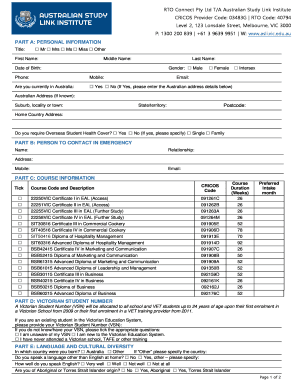
Australian Study Link Institute Photos Form
Use a Australian Study Link Institute Photos template to make your document workflow more streamlined.
What this photo form does
The Australian Study Link Institute Photos Form is a document for collecting or confirming photo-related information from an identified participant. In signNow, upload the form, review or add its fillable areas, assign photo and signature fields, and send it to the responsible signer. The recipient opens the document, supplies the requested information, and signs electronically. signNow records the signing activity in an audit trail and stores the completed document for authorized retrieval. The form’s recipient, purpose, required photo specifications, and submission destination should be confirmed with the organization requesting it.
Who uses this photo form
Study-abroad offices
Study-abroad administrators use the Australian Study Link Institute Photos Form to collect applicant photographs and supporting identifiers before reviewing enrollment or placement records. They should confirm the required image format, consent language, recipient access, and destination because the form name alone does not establish an issuing authority or filing deadline.
Applicants and representatives
Applicants and authorized representatives complete the photo fields, review the displayed information, and sign when the requesting organization permits electronic records. signNow can send invitations, provide mobile completion, and retain the signed form with its audit trail for controlled administrative review.
Features for this photo form
signNow connects the Australian Study Link Institute Photos Form’s photo, identity, signing, delivery, and recordkeeping tasks in one controlled workflow.
Form upload
Upload the existing Australian Study Link Institute Photos Form and prepare its fields without recreating the document from scratch.
Field assignment
Assign photo, text, date, and signature fields to specific recipients before the form is sent.
Mobile completion
Let applicants complete the photo form from desktop or mobile devices when the workflow permits electronic completion.
Flexible delivery
Use invitations or signing links to route the same photo form to the intended audience.
Audit trail
Preserve timestamps, signer activity, and document history with the completed form.
Record storage
Keep the completed document and signing evidence available for authorized administrative review.
How the photo form workflow works
signNow turns the Australian Study Link Institute Photos Form into a trackable signing workflow, from field preparation through secure completion and record storage.
Upload form: Upload the Australian Study Link Institute Photos Form into signNow. Prepare fields: Review detected fields and add missing photo or signature fields. Send document: Enter recipient details and send the form securely. Archive record: Collect signatures, then store the completed form with its audit trail.
 Best ROI. Our customers achieve an average 7x ROI within the first six months.
 Scales with your use cases. From SMBs to mid-market, airSlate SignNow delivers results for businesses of all sizes.
 Intuitive UI and API. Sign and send documents from your apps in minutes.
Complete the photo form online
Prepare the Australian Study Link Institute Photos Form in signNow by adding the fields required for the specific photo-collection process.
Upload form:
Upload the form file to signNow. Add fields:
Add photo, text, date, and signature fields. Assign recipients:
Assign each field to the correct signer. Review record:
Review the completed form and audit trail.
Choose the right signing method
- Use the signNow web app when you need to upload the Australian Study Link Institute Photos Form, place fields, and coordinate signing from a desktop.
- Use the signNow mobile app when applicants or staff need to review, complete, or sign the Australian Study Link Institute Photos Form from a phone.
- Use kiosk mode when a supervised location collects photos and signatures on one device, keeping the Australian Study Link Institute Photos Form process in person.
- Use a shareable signing link when the Australian Study Link Institute Photos Form must reach many applicants without creating separate email invitations.
How signNow records this photo form
The audit trail preserves who handled the Australian Study Link Institute Photos Form, when actions occurred, and how the completed record was finalized.
Authenticate signer:
Capture timestamps:
Record document hash:
Seal signing record:
Link audit events:
Export audit trail:
Mobile options for photo collection
The signNow mobile app supports the Australian Study Link Institute Photos Form on iOS and Android, including camera-based document capture and offline signing workflows.
Mobile apps iOS 15 or later; Android 9 or later Photo capture Camera capture through iOS and Android devices Offline access Offline signing available in the mobile app
Use managed iOS or Android devices when photos contain personal information. Confirm camera permissions, connectivity for synchronization, screen-lock controls, and organizational requirements before allowing offline completion or shared-device kiosk use.
Recommended photo form setup
Set the Australian Study Link Institute Photos Form up with clear signer authentication, assigned fields, audit evidence, encryption, and a documented retention decision.
| Setting | Recommendation |
|---|---|
| Authentication method | Email verification with SMS OTP |
| Signature type | Typed or drawn electronic signature |
| Audit trail | Enable completion history and export |
| Document retention | Apply the organization’s written retention policy |
| Encryption | Use TLS 1.2/1.3 and AES-256 |
Security for submitted photo records
Transport encryption:
Stored data:
Security report:
Information security:
Privacy controls:
Health information:
Best practices for photo form records
Accurate field assignment, limited disclosure, complete audit evidence, and a documented privacy purpose make the Australian Study Link Institute Photos Form easier to administer responsibly.
Review fields before sending
Protect identifying information
Export the complete record
Document the privacy purpose
Legal standing for electronic completion
An electronically completed Australian Study Link Institute Photos Form may be admissible when the signer demonstrates intent, consents to electronic records, can be identified, and the record remains reproducible. ESIGN, 15 U.S.C. ch. 96, and applicable state law support electronic transactions, but wills, certain court orders, and family-law decrees remain excluded.

Troubleshoot photo form signing
Resolve field, access, authentication, compliance, and sending questions before distributing the Australian Study Link Institute Photos Form.
Upload the original Australian Study Link Institute Photos Form again and confirm that its file is a supported document format. If fields are not detected, add photo, text, date, and signature fields manually in the signNow editor before sending.
The signNow Business plan includes templates, audit trails, mobile apps, and legally binding eSignatures. Add the required photo and signature fields manually when automatic field detection does not identify the form’s intended completion areas.
If a recipient cannot open the invitation, verify the email address, resend the request, or provide a signNow signing link. The sender should confirm that the recipient can access the document before requesting a completed photo form.
A completed electronic record can support attribution and intent when the signer consents and the record remains reproducible. ESIGN, 15 U.S.C. ch. 96, and applicable state electronic-transactions law govern the legal analysis.
If the Australian Study Link Institute Photos Form contains health information, configure the organization’s HIPAA workflow separately and confirm that a business associate agreement is required. signNow identifies HIPAA compliance as requiring a BAA.
Subscription plans include 100 signature invites per user per year, with overage fees. Business Premium adds bulk send, kiosk mode, request payments, and quick invite links; confirm plan terms before large-scale distribution.
Key performance indicators that demonstrate SignNow's proven track record.
BE READY TO GET MORE
Get this form now!

If you believe that this page should be taken down, please follow our DMCA take-down process.