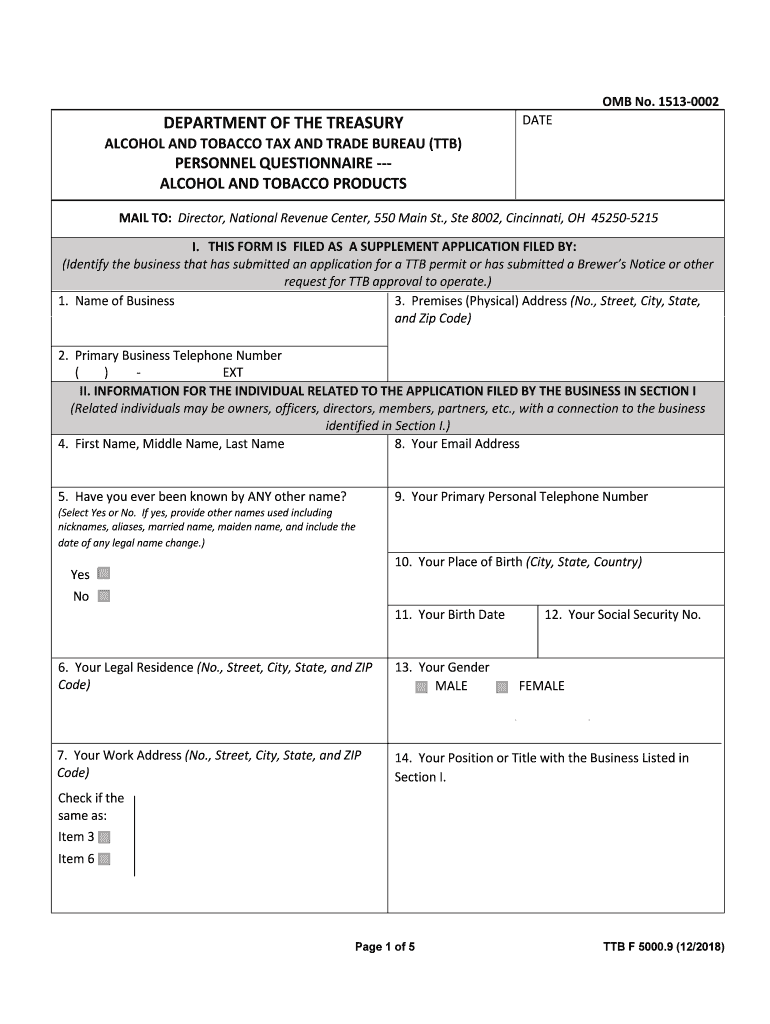
Ttbgov National Revenue Center Form
Use a TTBGov National Revenue Center template to make your document workflow more streamlined.
What the Ttbgov National Revenue Center Form does
The Ttbgov National Revenue Center Form is a government-related document that can be prepared, routed, signed, and retained electronically when the issuing authority and transaction permit electronic records. Because no issuing agency, field schedule, or filing deadline is identified for this form name, verify the source document before relying on it. In signNow, upload the form, review detected fields, assign recipients, send it for signature, and preserve the completed document with its audit trail. ESIGN and applicable state law support electronic signatures when intent, consent, attribution, and record reproduction are established.
Key features for completing this form
signNow combines field preparation, assigned signing, audit evidence, and controlled storage so teams can move this form through a traceable electronic workflow.
Field detection
Upload the Ttbgov National Revenue Center Form and review signNow’s detected fields before adding missing signature, date, initials, or text fields for each participant.
Role assignment
Assign every required field to a named recipient so each person completes only the information and signature areas relevant to their role in this form.
Remote signing
Send the prepared form by email or signing link, allowing recipients to review and sign from a supported desktop or mobile device without paper routing.
Audit trail
Capture timestamps, signer actions, and document history in an audit trail that can accompany the completed form during internal or regulatory review.
Completion controls
Use required fields and validation settings to reduce blank responses, inconsistent entries, and avoidable corrections before the signed document is finalized.
Secure records
Store the finished document and completion evidence in signNow or a connected repository, with access controls suited to the information contained in this form.
Complete this form in signNow
Follow a controlled sequence from upload through signature and evidence storage so each participant completes the right part of the Ttbgov National Revenue Center Form.
Upload form:
Upload the completed source file. Check fields:
Review detected and required fields. Assign roles:
Assign fields to each recipient. Send document:
Send by email or signing link. Store evidence:
Download the signed form and audit trail.
Recommended workflow setup
Configure the Ttbgov National Revenue Center Form around signer identity, field ownership, audit evidence, encryption, and the retention rule that governs the underlying transaction.
| Setting | Recommendation |
|---|---|
| Authentication method | Email verification with SMS OTP |
| Signature type | Typed or drawn electronic signature |
| Audit trail | Enable completion certificate and history |
| Document retention | Apply the governing agency schedule |
| Encryption | TLS 1.2/1.3 and AES-256 protection |
 Best ROI. Our customers achieve an average 7x ROI within the first six months.
 Scales with your use cases. From SMBs to mid-market, airSlate SignNow delivers results for businesses of all sizes.
 Intuitive UI and API. Sign and send documents from your apps in minutes.
Platform requirements for this form
Use an updated Chrome, Firefox, Safari, or Edge browser on Windows or macOS. signNow also provides mobile apps for iOS and Android, with encrypted connections using TLS 1.2/1.3.
Browsers Chrome, Firefox, Safari, and Edge Operating systems Windows 10+, macOS, iOS, Android Mobile apps signNow mobile apps for iOS and Android
Organizations should manage access through approved devices and accounts, especially when the Ttbgov National Revenue Center Form contains sensitive government, taxpayer, or identity information. Confirm browser updates, mobile permissions, authentication settings, and storage controls before assigning the document to external signers.
Security and protection for this form
Data in transit:
Data at rest:
Security reporting:
Information security:
Electronic signatures:
Protected health information:
How the audit trail records this form
After the Ttbgov National Revenue Center Form is sent, signNow records signer activity and completion evidence separately from the form’s visible fields.
Signer authentication:
Timestamp capture:
Document identity:
Tamper evidence:
Action history:
Audit export:
Best practices for this form
Accurate field assignment, controlled access, and complete records reduce rework when this government-related form moves between contributors and reviewers.
Verify every recipient detail before sending
Review detected fields against the source form
Assign fields to the correct signer
Archive the signed record securely
Pricing and plan considerations
signNow pricing and plan capabilities are verified below; competitor figures are marked Not verified where the available source does not provide current details.
| Features | signNow | DocuSign | Adobe Sign | PandaDoc | Dropbox Sign |
|---|---|---|---|---|---|
| Starting price | $8/user/month Business, annual billing | Not verified | Not verified | Not verified | Not verified |
| Free trial | 7 days, no credit card required | Not verified | Not verified | Not verified | Not verified |
| Bulk send | Business Premium includes bulk send | Not verified | Not verified | Not verified | Not verified |
| Audit trail | Included with Business plan | Not verified | Not verified | Not verified | Not verified |
| HIPAA compliance | Available with required BAA | Not verified | Not verified | Not verified | Not verified |
Risks from incomplete form handling
Processing delay
Invalid completion
Weaker evidence
Privacy exposure
Ttbgov form troubleshooting questions
Use these answers to resolve file, signing, authentication, audit-trail, and plan questions before sending the form.
Check that the uploaded file is a supported PDF or document and that required fields are detectable. signNow Business supports templates and audit trails; recreate fields manually if this specific form scans poorly.
The Business plan includes legally binding eSignatures and audit trails, while Business Premium adds bulk send. Use Business Premium only when sending this form repeatedly to multiple recipients.
A signer can often complete a signNow document without creating an account, depending on the sender’s settings. Email delivery, SMS authentication, or stronger verification can be configured for this form.
For consumer-facing electronic records, ESIGN 15 U.S.C. §7001(c) requires consent, access to electronic records, and paper-copy procedures. Configure the disclosure before sending this form when that rule applies.
Business plans include audit trails that record signing events, timestamps, and document history. Export the completed form and its certificate of completion together so the record remains reproducible during review.
signNow’s Business plan is listed at $8 per user per month with annual billing, and its 7-day trial requires no credit card. Confirm current plan terms before deploying this workflow.
Key performance indicators that demonstrate SignNow's proven track record.
BE READY TO GET MORE
Get this form now!

If you believe that this page should be taken down, please follow our DMCA take-down process.