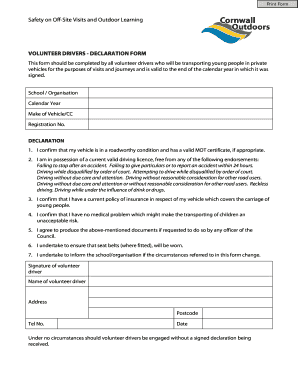
Volunteer Drivers Declaration Form Cornwall Council
Use a Volunteer Drivers Declaration Form Cornwall Council template to make your document workflow more streamlined.
What this volunteer driver form does
The Volunteer Drivers Declaration Form Cornwall Council records a volunteer driver’s declarations for council review and transport-related onboarding. It is a Cornwall Council document, not a U.S. tax form, so its required fields, approval route, and retention period should come from the council’s current instructions. A sender can upload the approved form to signNow, use detected or placed fields, send it to the volunteer, and retain the completed PDF with its audit trail. U.S. ESIGN and UETA may support the electronic record when their requirements apply, but they do not replace council policy.
Who uses this council declaration
Council transport teams
Cornwall Council volunteer transportation teams can send the approved declaration to drivers, collect signatures, and preserve the completed record for internal review. The workflow suits council staff coordinating community transport, driver onboarding, and documentation checks, provided the council’s own instructions determine required fields and retention.
Volunteer drivers
Volunteer drivers complete their personal and driving declarations online, review the record, and sign from a supported device. The form is for the named Cornwall Council process; unrelated contracts, invoices, or tax forms require their own approved templates and retention rules.
How the council declaration workflow works
Follow the approved Cornwall Council form from upload through signature and controlled record storage.
Upload: Upload the council form Check fields: Review detected fields Send: Send to volunteer driver Archive: Store signed record
Complete the declaration in signNow
Use this sequence to prepare the approved Cornwall Council declaration without changing its required content.
Upload form:
Upload the current council-approved form. Check fields:
Review detected fields and add missing signature or date fields. Assign roles:
Assign the volunteer driver and council recipient roles. Send document:
Send the declaration and monitor completion. Save records:
Download the signed PDF and audit trail.
 Best ROI. Our customers achieve an average 7x ROI within the first six months.
 Scales with your use cases. From SMBs to mid-market, airSlate SignNow delivers results for businesses of all sizes.
 Intuitive UI and API. Sign and send documents from your apps in minutes.
Recommended form workflow settings
Use these configuration choices to manage volunteer driver declarations, signer identity, records, and access in signNow.
| Setting | Recommendation |
|---|---|
| Authentication method | Email link with optional SMS OTP |
| Signature type | Typed or drawn electronic signature |
| Audit trail | Export signed record with AES-256 encryption |
| Document retention | Follow Cornwall Council retention policy |
| User provisioning | Assign role-based access to administrators |
Ways to send and sign the declaration
- Upload the approved Volunteer Drivers Declaration Form Cornwall Council template in the signNow web app, then place or review fields for the volunteer driver and council administrator.
- Use the signNow mobile app when a volunteer driver needs to review and sign the declaration from an iOS or Android device away from the council office.
- Use kiosk mode for supervised completion when council staff provide a managed device and need several volunteers to complete declarations at a controlled location.
- Create a shareable signing link for an approved template when the council needs to distribute the same declaration to multiple volunteer drivers.
Mobile options for volunteer drivers
signNow supports web and mobile workflows for completing the Volunteer Drivers Declaration Form Cornwall Council. Use the signNow iOS or Android app, with current TLS-protected connections, when volunteers complete declarations away from a council office.
Mobile apps iOS and Android apps Offline signing Offline signing availability Document capture Camera document capture
A managed device policy should define whether volunteers may use offline signing or camera capture, how completed forms return to council staff, and where signed PDFs and audit trails are archived. Test the declaration template on the council’s approved iOS and Android devices before rollout.
Authenticate volunteer driver signatures
Email authentication:
PKI certificates:
Two-factor authentication:
SMS verification:
Identity verification:
Evidence record:
What the declaration audit trail records
The audit trail provides evidence about how the Volunteer Drivers Declaration Form Cornwall Council was completed, signed, and retained.
Authenticate signer:
Capture timestamp:
Hash document:
Seal record:
Log events:
Export evidence:
Record-keeping practices for declarations
Accurate field completion, controlled access, and paired document-audit records make volunteer driver declarations easier to review and preserve.
Validate every required declaration field
Export the signed record and audit trail
Restrict access to authorized council staff
Apply the council retention policy
Privacy pitfalls in driver declarations
Volunteer drivers may disclose unnecessary personal details when completing declaration fields, increasing exposure in shared or downloaded copies. A declaration may lack clear consent language if the signer reviews fields without an explicit electronic-records disclosure. Unrestricted administrator access can expose driver information beyond the council team members managing volunteer records. Using an outdated template can omit required declarations, vehicle information, or signature fields needed for council review.
Compare tools for council declarations
signNow provides verified plan details for this workflow; competitor pricing and feature values are marked Not verified when the supplied source does not confirm them.
| Features | signNow | DocuSign | Adobe Sign | PandaDoc | Dropbox Sign |
|---|---|---|---|---|---|
| Starting price | $8/user/month annually | Not verified | Not verified | Not verified | Not verified |
| Free trial | 7 days, no card | Not verified | Not verified | Not verified | Not verified |
| Bulk send | Business Premium included | Not verified | Not verified | Not verified | Not verified |
| Audit trails | Business plan included | Not verified | Not verified | Not verified | Not verified |
| HIPAA compliance | Compliant, BAA required | Not verified | Not verified | Not verified | Not verified |
Key performance indicators that demonstrate SignNow's proven track record.
Troubleshoot the council declaration workflow
These answers address field detection, signer authentication, plan capabilities, audit evidence, and the legal limits of electronic records.
Upload the current council-approved PDF again and use signNow’s field detection before manually placing missing signature, date, or text fields. Compare the detected layout with the source form so required declarations are not omitted or shifted before sending.
The Business plan includes legally binding eSignatures, templates, and audit trails. If the council needs bulk sending for multiple volunteer drivers, Business Premium includes bulk send; plan availability should be checked against the account’s current configuration.
Use signNow’s SMS OTP or another configured authentication method, then verify the recipient’s phone number or email address. Stronger identity proofing may be appropriate when council policy requires more than an email link.
ESIGN and UETA generally recognize electronic signatures when intent, consent, attribution, and record retention requirements are met. They do not decide Cornwall Council’s internal approval or retention rules, which must be confirmed with the council.
Download the completed PDF together with its signNow audit trail. The audit trail records signer actions and timestamps, helping council staff connect the final declaration to its execution history during later review.
Do not use this template for wills, court orders, family law decrees, or another document excluded by 15 U.S.C. §7003. Those exclusions require separate legal handling and are outside this council declaration workflow.
BE READY TO GET MORE
Get this form now!

If you believe that this page should be taken down, please follow our DMCA take-down process.