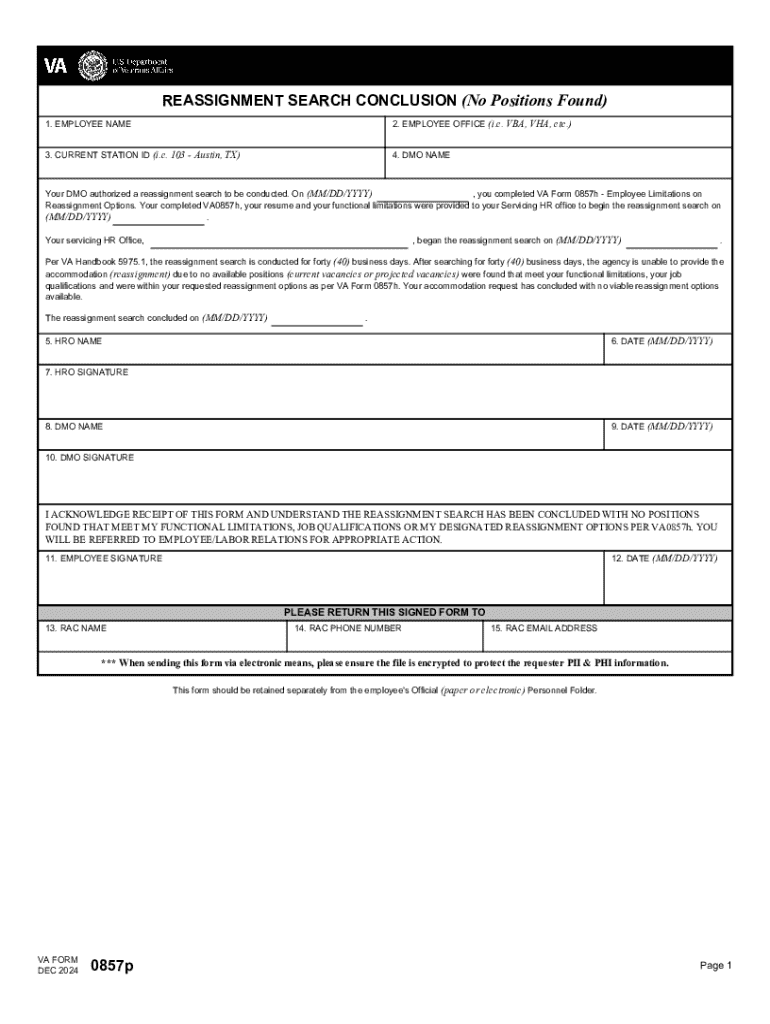
VA Form 0857P
Use a Va Form 0857p template to make your document workflow more streamlined.
What VA Form 0857P is
VA Form 0857P is a Veterans Affairs form whose exact purpose, required fields, signer roles, and submission instructions must be confirmed from the current agency-issued document. signNow can upload the PDF, detect fillable areas, let an authorized sender review and assign fields, and route the form for electronic signatures where the agency permits that method. The completed PDF and audit trail can then be retained together. ESIGN and UETA may support the electronic record, but they do not replace VA instructions, identity checks, or agency-specific filing requirements.
Who may use VA Form 0857P
Veterans
Veterans and authorized representatives can use VA Form 0857P when its instructions require their information, acknowledgment, or signature.
Agency workflows
Veterans Affairs staff or designated administrators may prepare, route, and retain the completed form according to agency procedures.
Business types using VA Form 0857P
VA Form 0857P should be used only by the individuals and organizations identified in its current Veterans Affairs instructions.
A veteran completing an assigned VA Form 0857P can use signNow to review designated fields, sign electronically where permitted, and receive a reproducible copy with completion evidence. A Veterans Affairs program office can route VA Form 0857P through controlled signer steps, preserve audit records, and restrict access to authorized staff handling veteran information. An authorized representative can prepare VA Form 0857P for a veteran, but must verify agency authority, signer identity, and submission requirements before sending or archiving the document.
These tasks are executed by both individual contributors and centralized administrators depending on organizational policy and required controls.
How to complete VA Form 0857P
Use signNow to prepare the document, route assigned fields, collect signatures, and retain the completed record for the authorized VA Form 0857P workflow.
Upload form:
Upload the VA Form 0857P PDF. Check fields:
Review automatically detected fields. Assign signers:
Assign fields to each signer. Send form:
Send the completed workflow. Store record:
Download the signed record.
 Best ROI. Our customers achieve an average 7x ROI within the first six months.
 Scales with your use cases. From SMBs to mid-market, airSlate SignNow delivers results for businesses of all sizes.
 Intuitive UI and API. Sign and send documents from your apps in minutes.
Mobile options for VA Form 0857P
VA Form 0857P can be prepared on supported iOS and Android devices through the signNow mobile app.
Mobile apps signNow mobile app supports iOS and Android document workflows Camera capture Camera capture imports paper copies into signNow Offline signing Offline signing supports later synchronization when connected
Confirm that the completed VA Form 0857P remains suitable for its intended Veterans Affairs workflow before relying on mobile signing. Offline work, camera capture, and later synchronization can improve access, but agency-specific submission, identity, or signature rules still control the final process.
Recommended VA Form 0857P workflow setup
Configure the signing workflow around the current Veterans Affairs instructions, signer identity, evidence preservation, and controlled access.
| Setting | Recommendation |
|---|---|
| Authentication method | Email verification with SMS 2FA |
| Signature type | Electronic signature with signer intent |
| Audit trail | Retain certificate and action history |
| Document retention | Follow current VA instructions |
| Encryption | AES-256 at rest and TLS 1.2/1.3 in transit |
What the VA Form 0857P audit trail records
A signNow audit trail connects signer activity, timestamps, document integrity, and the final VA Form 0857P record.
Authenticate signer:
Record timestamp:
Hash document:
Seal document:
Log activity:
Export evidence:
Security for VA Form 0857P records
Data at rest:
Data in transit:
Control assurance:
Security framework:
Protected health information:
Electronic validity:
Privacy challenges when handling VA Form 0857P
Personal identifiers may remain visible when the completed VA Form 0857P is downloaded, emailed, or stored outside approved systems. A signer may complete VA Form 0857P without a clear electronic-record consent disclosure when consumer-facing requirements apply. Unrestricted template or folder permissions can expose veteran information to staff without a documented business need. A missing audit trail may weaken proof of signer identity, intent, timing, and document integrity during review.
Legal standing of VA Form 0857P
An electronic VA Form 0857P record can support admissibility when the signer demonstrates intent, consents to electronic records, can be identified, and the record remains reproducible. ESIGN, 15 U.S.C. chapter 96, and applicable state law support electronic transactions, but they do not override agency instructions or exclude wills, court orders, and family-law decrees.

State rules and excluded documents
Agency rejection
Invalid testament
Filing failure
Recording delay
Best practices for VA Form 0857P
Accurate field mapping, controlled access, and complete evidence records reduce avoidable problems when preparing VA Form 0857P electronically.
Confirm the current agency instructions
Review every detected field
Preserve the complete evidence record
Limit access to veteran information
Troubleshooting VA Form 0857P workflows
These answers address field detection, signer access, legal acceptance, plan selection, protected information, and record retention for VA Form 0857P.
Upload the current VA Form 0857P PDF rather than an altered scan. signNow can detect fillable fields, but the sender must verify field placement, required status, and signer assignments before sending.
A signer can often complete a signNow request without a paid account, depending on the workflow. If stronger attribution is needed, configure SMS authentication or another available verification method and retain the resulting audit trail.
ESIGN and UETA recognize qualifying electronic signatures, but agency instructions control VA Form 0857P acceptance. Confirm that Veterans Affairs permits electronic completion, signing, and submission for this exact form.
The signNow Business plan includes audit trails and templates at $8 per user per month with annual billing. Business Premium adds bulk send at $15 per user per month.
For health information handled with VA Form 0857P, signNow identifies HIPAA compliance as requiring a BAA. Confirm that the workflow involves protected health information before selecting the applicable controls.
Download the signed PDF and certificate of completion, then retain them under the current VA records policy. Do not substitute a generic retention period for an agency-specific instruction.
Key performance indicators that demonstrate SignNow's proven track record.
BE READY TO GET MORE
Get this form now!

If you believe that this page should be taken down, please follow our DMCA take-down process.