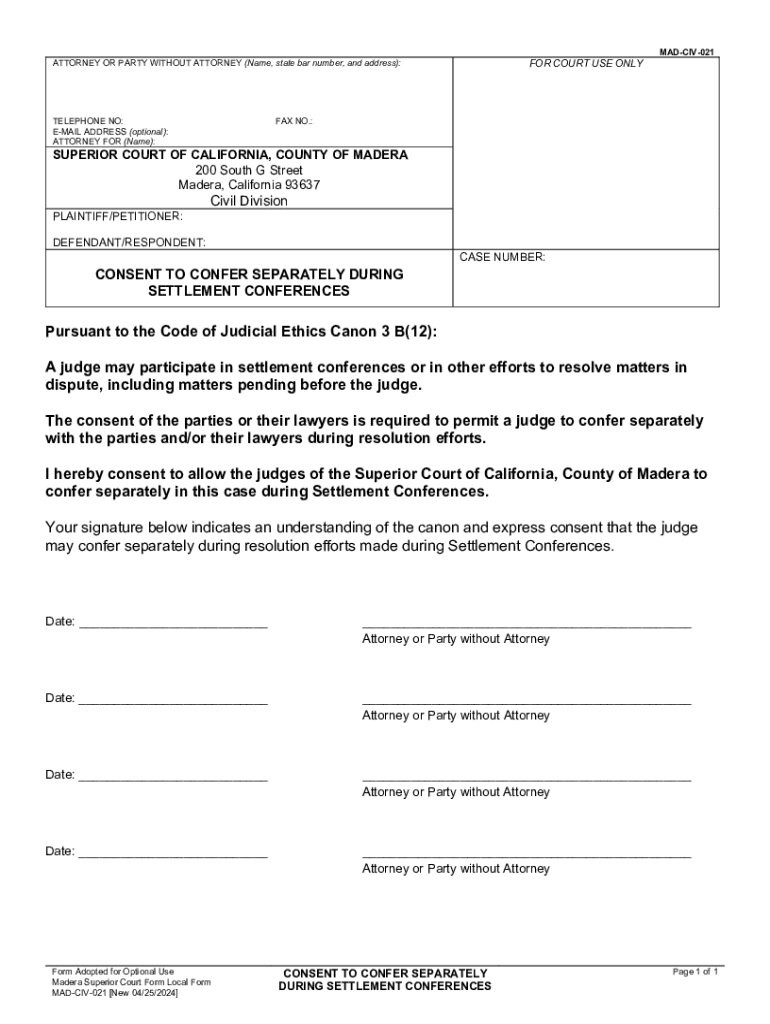
Mad Civ 021 Form
Use a Mad civ 021 template to make your document workflow more streamlined.
What Mad Civ 021 Form is
Mad Civ 021 Form is a specific document that can be prepared, routed, signed, and retained electronically when its issuing authority and transaction rules permit electronic completion. In signNow, upload the provided file, review automatically detected fillable areas, add or assign missing fields, and send it to named signers. Each signer reviews the form and applies an electronic signature; signNow then stores the completed document with an audit trail. Confirm any filing, notarization, retention, or submission requirements with the authority responsible for Mad Civ 021 Form.
Who uses Mad Civ 021 Form
Individual and business use
Individuals or businesses preparing Mad Civ 021 Form can upload the document, complete assigned fields, sign electronically, and download the finished record.
Team administration
Administrators can assign signers, route the document, preserve the audit trail, and control access to the completed Mad Civ 021 Form.
Who benefits from Mad Civ 021 Form
The form can support individual preparers, small businesses, and enterprise teams when its fields, signers, and retention requirements are clearly assigned.
Solo practitioners can prepare and sign Mad Civ 021 Form from a browser or mobile device, preserving the completed document and audit trail without coordinating paper copies. Small businesses can route Mad Civ 021 Form to designated employees or customers, assign fields by signer, and maintain a searchable electronic record for internal review. Enterprise teams can connect Mad Civ 021 Form workflows to controlled permissions, shared templates, and named integrations while retaining administrative oversight of completed records.
These tasks are executed by both individual contributors and centralized administrators depending on organizational policy and required controls.
Recommended Mad Civ 021 Form setup
Configure authentication, signing, audit records, retention, encryption, and access according to the organization’s handling requirements for this document.
| Setting | Recommendation |
|---|---|
| Authentication method | Email link with SMS OTP |
| Signature type | Electronic signature with signer intent |
| Audit trail | Enabled with completion certificate |
| Document retention | Organization policy with audit export |
| Encryption and provisioning | AES-256 storage with role-based access |
 Best ROI. Our customers achieve an average 7x ROI within the first six months.
 Scales with your use cases. From SMBs to mid-market, airSlate SignNow delivers results for businesses of all sizes.
 Intuitive UI and API. Sign and send documents from your apps in minutes.
How the Mad Civ 021 Form audit trail works
The audit trail records who handled Mad Civ 021 Form, when each action occurred, and how the completed file can be verified later.
Authenticate signer:
Capture timestamp:
Hash document:
Seal record:
Create certificate:
Export audit trail:
Mad Civ 021 Form processing stages
Use a controlled preparation, signing, and archival sequence for the provided Mad Civ 021 Form.
Prepare the document
Deliver to signers
Signer turnaround
Complete and archive
Best practices for Mad Civ 021 Form
Accurate field assignment, informed consent, and complete record preservation reduce avoidable issues when Mad Civ 021 Form moves through signNow.
Verify every field before sending
Assign fields to named signers
Explain signing and consent requirements
Preserve the signed record securely
Mobile options for Mad Civ 021 Form
signNow provides iOS and Android apps for preparing or signing Mad Civ 021 Form on supported mobile devices. Camera-based capture can help create a digital document when a paper source must be converted before field placement.
Mobile apps iOS and Android apps Offline signing Offline signing available Document capture Camera-based document capture
Offline signing can support work away from a continuous connection, subject to the application’s current capabilities and synchronization conditions. Organizations should manage mobile access, confirm signer identity, and verify that the final Mad Civ 021 Form and audit trail are uploaded successfully before archival.
Signer authentication for Mad Civ 021 Form
PKI controls:
X.509 certificates:
Two-factor authentication:
SMS OTP:
ID verification:
Authentication records:



Mad Civ 021 Form challenges
Missing or incorrectly assigned fields can leave Mad Civ 021 Form incomplete or attribute a required signature to the wrong person. Using an outdated source file can create discrepancies between the prepared Mad Civ 021 Form and the organization’s approved version. Sending without confirming signer identity, routing order, or consent disclosures can weaken the record supporting an electronic transaction. Storing only the signed PDF without its audit trail can make later review of signer actions and completion history more difficult.
Mad Civ 021 Form troubleshooting
These answers address field detection, delivery, plan selection, consent, audit evidence, and authority checks for Mad Civ 021 Form workflows.
Upload the source PDF again and compare its pages with the detected signNow fields. Add any missing fields manually, then preview the signer experience before sending Mad Civ 021 Form. Auto-detection can assist preparation but does not replace a page-by-page review.
Check that every assigned signer has a valid email address and that the routing order matches the intended completion sequence. signNow supports email delivery and signing links; resend only after confirming the recipient and document version.
A Business plan includes legally binding eSignatures, templates, mobile apps, and audit trails at $8/user/month when billed annually. Business Premium adds bulk send at $15/user/month annually; choose it only when repeated distribution requires that feature.
For consumer-facing electronic records, ESIGN requires disclosure of the right to receive paper, access to the electronic format, and procedures for withdrawing consent under 15 U.S.C. §7001(c). Provide those disclosures before requesting a Mad Civ 021 Form signature.
Use signNow’s audit trail and completion certificate to preserve signer identity details, timestamps, and action history with the completed document. ESIGN and UETA establish electronic-signature recognition, but the underlying transaction must still satisfy applicable document-specific law.
Do not use signNow alone to decide whether Mad Civ 021 Form has a filing deadline, agency requirement, notarization rule, or retention period. Confirm those obligations with the issuing authority or applicable state law before distributing the form.
Key performance indicators that demonstrate SignNow's proven track record.
BE READY TO GET MORE
Get this form now!

If you believe that this page should be taken down, please follow our DMCA take-down process.