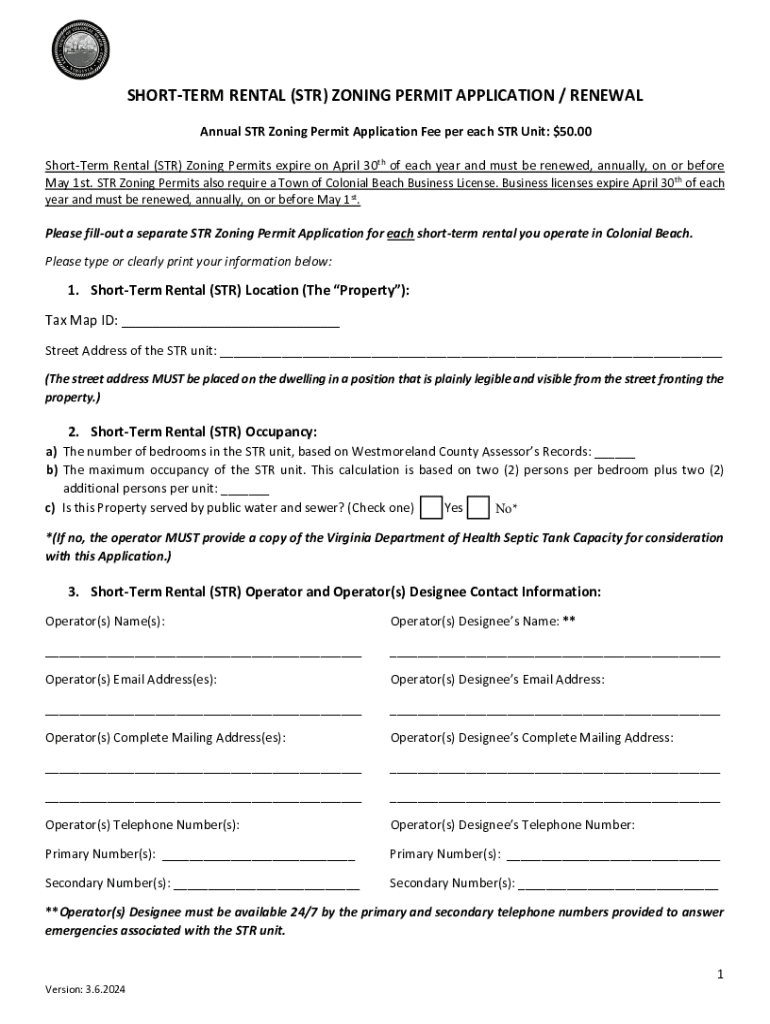
Short Term Rental Str Zoning Permit Application Form
Use a SHORT TERM RENTAL STR ZONING PERMIT APPLICATION template to make your document workflow more streamlined.
What this zoning permit application does
The Short Term Rental Str Zoning Permit Application Form is a local-government application used to request authorization for operating a short-term rental at a specified property. It generally collects the property address, ownership or management information, proposed rental activity, zoning details, and applicant attestations. Requirements differ by city and county, so the issuing authority’s instructions control the exact fields, attachments, fees, inspections, and submission method. With signNow, an operator can upload the form, review detected fields, route assigned sections, collect signatures, and retain the completed application with its audit trail.
Who benefits from short-term rental zoning permits
The form is most useful when property ownership, operating details, and local zoning information must be collected consistently before short-term rental activity begins.
Independent short-term rental hosts use the form to identify a property, disclose ownership or management details, and submit zoning information required by a city or county permit office. Property management companies use reusable permit templates to coordinate owner information, local operating details, signer approvals, and supporting records across multiple vacation rental properties. Hospitality enterprises use controlled workflows to collect permits from regional teams, preserve completed applications, and connect zoning documentation with property, compliance, and finance systems.
These tasks are executed by both individual contributors and centralized administrators depending on organizational policy and required controls.
Who uses this zoning application
Property operators
Hosts and property managers complete property details, owner information, operating plans, and local zoning disclosures before requesting approval.
Review teams
Municipal reviewers and compliance teams use the signed application with leases, ownership records, site plans, and supporting permit documents.
How to complete the permit application
Use this sequence to prepare the Short Term Rental Str Zoning Permit Application Form, route it to the right parties, and preserve the signed record.
Upload the form:
Upload the Short Term Rental Str Zoning Permit Application Form into signNow. Check fields:
Review detected fields and add missing property or applicant fields. Assign signers:
Assign each required field to the correct applicant or owner. Send for signing:
Send the completed application for review and electronic signature.
 Best ROI. Our customers achieve an average 7x ROI within the first six months.
 Scales with your use cases. From SMBs to mid-market, airSlate SignNow delivers results for businesses of all sizes.
 Intuitive UI and API. Sign and send documents from your apps in minutes.
Features for short-term rental applications
signNow combines field preparation, role-based routing, electronic signatures, audit evidence, and connected storage for short-term rental zoning documentation.
Field detection
Upload the zoning application and review detected fields before adding property-specific information or correcting fields the PDF does not expose.
Role assignment
Route owner, host, manager, or authorized-agent fields to the correct person so each statement receives attributable input and signature.
Reusable templates
Send a reusable application template to multiple properties while keeping each property’s address, parcel data, and applicant information separate.
Audit trail
Preserve timestamps, signer actions, and other audit-trail details with the completed application for municipal or internal review.
Mobile signing
Complete the application from a desktop or mobile device when property managers need to collect information away from the office.
Connected records
Connect completed applications with property, storage, and operations systems through integrations such as Google Drive, Box, Salesforce, and NetSuite.



Recommended permit workflow setup
Configure the application workflow around applicant identity, property records, municipal review, and a retrievable signed record.
| Setting | Recommendation |
|---|---|
| Authentication method | Email verification with SMS OTP |
| Signature type | Typed or drawn electronic signature |
| Audit trail | Capture IP address, timestamps, and actions |
| Document retention | Retain through the local permit period |
| Encryption | TLS 1.2/1.3 and AES-256 at rest |
What the audit trail records
The audit trail provides a technical record of how the Short Term Rental Str Zoning Permit Application Form moved from preparation through completion and retrieval.
Authenticate signer:
Capture timestamps:
Hash document:
Seal record:
Log activity:
Retrieve evidence:
Privacy pitfalls in permit submissions
Owner addresses, phone numbers, and property details can remain visible to recipients who do not need the full application record. An applicant may sign without seeing the required electronic-record disclosure or confirming access to the completed document. Shared links can be forwarded, making it difficult to demonstrate that the intended property owner completed the application. Overbroad folder permissions can expose signed zoning applications and supporting ownership records to unrelated staff.
Recordkeeping practices for permit applications
A defensible record includes the signed application, its audit trail, required attachments, and a retention decision tied to the property’s governing jurisdiction.
Apply the municipality’s retention policy
Export the application and audit trail
Archive records in restricted storage
Limit unnecessary personal information
Retention periods for permit records
Retain the signed application according to the issuing authority’s policy, then apply any longer rule attached to related tax or business records.
Municipal policy controls retention
Three years for tax records
Six years for larger understatement
Indefinite for fraud cases
Longer state periods may apply
Platform requirements for signing
Prepare the Short Term Rental Str Zoning Permit Application Form through a supported browser on Windows or macOS, or use signNow mobile apps on iOS and Android. Use a current connection protected by TLS when transmitting application information.
Browsers Chrome, Firefox, Safari, Edge Desktop Windows and macOS desktops Mobile iOS and Android mobile apps
Property management teams should use managed accounts, controlled templates, and restricted access when applications contain owner or address information. Enterprise deployments can evaluate SSO, API access, and connected storage requirements before routing completed zoning records into broader property systems.
Troubleshooting the zoning permit workflow
These answers address field detection, signer identity, electronic consent, plan capabilities, municipal approval, and recordkeeping for this application.
Upload the original PDF again and check whether the application contains scans, flattened fields, or unusual page layers. signNow can detect fillable fields, but manually add fields that are not recognized before assigning the application to an applicant.
Use signNow’s SMS OTP or other available signer-authentication controls when ownership or authorized-agent identity matters. The completed record should also preserve the audit trail showing signer actions, timestamps, and related event information.
Business includes legally binding eSignatures, templates, and audit trails. Business Premium adds bulk send, which is useful when a property manager sends substantially similar applications for multiple properties.
For consumer-facing applications, obtain consent to electronic records and demonstrate access to the electronic format under ESIGN, 15 U.S.C. §7001(c). Store the disclosure and completed application together for later reproduction.
signNow is ESIGN- and UETA-compliant, but local zoning approval remains controlled by the issuing city or county. Electronic signing does not replace required inspections, notarization, attachments, fees, or municipal submission procedures.
Use role-based access, a restricted shared template, and a final export of the signed application with its audit trail. Apply the municipality’s retention policy and preserve the record in a readable format.
Key performance indicators that demonstrate SignNow's proven track record.
BE READY TO GET MORE
Get this form now!

If you believe that this page should be taken down, please follow our DMCA take-down process.