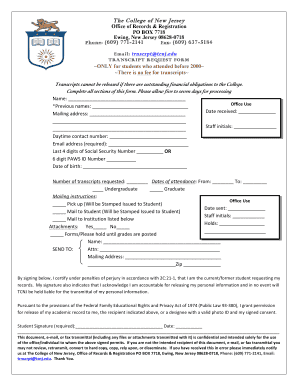
Transcript Request0915 Recreg Tcnj Form
Use a Transcript Request0915 docx Recreg Tcnj template to make your document workflow more streamlined.
What Transcript Request0915 Recreg Tcnj Form does
Transcript Request0915 Recreg Tcnj Form is a document used to request an academic transcript and record the requester’s identifying details, destination, authorization, and signature. In signNow, the form can be uploaded, reviewed for fillable fields, routed to the appropriate signer, and completed electronically. The resulting document and audit trail help the receiving office verify what was submitted and when. The institution’s own registrar procedures, privacy rules, and acceptance requirements still determine whether the request can be processed and how the transcript is released.
Business types that use transcript requests
Transcript Request0915 Recreg Tcnj Form is most useful where education records require consistent requester authorization and controlled delivery instructions.
A school registrar can collect transcript destinations, requester authorization, and signatures while maintaining one auditable request record for processing staff. A student or former student can complete personal information and delivery instructions remotely instead of returning a paper request to the registrar. A multi-campus education system can standardize transcript-request templates, delegate sending, and route completed records to authorized personnel.
These tasks are executed by both individual contributors and centralized administrators depending on organizational policy and required controls.
Who uses this transcript request form
Education offices
Schools and registrar offices can use the form to collect a requester’s identifying information, transcript destination, authorization, and signature in one controlled record.
Requesters and representatives
Students, former students, employers, and authorized representatives can submit transcript requests remotely when the receiving institution accepts electronically signed requests.
How the transcript request workflow works
The signNow workflow converts the Transcript Request0915 Recreg Tcnj Form into a controlled digital request without changing its underlying information requirements.
Upload form: Upload the Transcript Request0915 Recreg Tcnj Form and let signNow identify fillable areas. Check fields: Review detected fields and add missing requester or signer fields. Send request: Enter signer details and send the request through signNow. Store record: Collect the signature and retain the completed form with its audit trail.
 Best ROI. Our customers achieve an average 7x ROI within the first six months.
 Scales with your use cases. From SMBs to mid-market, airSlate SignNow delivers results for businesses of all sizes.
 Intuitive UI and API. Sign and send documents from your apps in minutes.
Complete the transcript request in signNow
Follow these steps to prepare the exact transcript request, route it to the correct signer, and retain evidence of completion.
Upload form:
Upload the approved Transcript Request0915 Recreg Tcnj Form to signNow. Check fields:
Review auto-detected fields and add missing request details. Route request:
Assign the requester or authorized signer and send. Save records:
Download the completed form and audit trail.
Features that support transcript requests
signNow connects the form’s fields, signer routing, completion evidence, and record handling in one workflow for authorized transcript-request teams.
Field detection
Upload the approved Transcript Request0915 Recreg Tcnj Form and review detected fields before assigning requester, authorization, and signature information.
Signer routing
Send the prepared transcript request to the designated signer by email or controlled signing link, reducing manual handoffs between requester and registrar.
Audit trail
Capture signer actions, timestamps, and completion history in an audit trail associated with the completed request.
Reusable template
Reuse an approved request layout for repeated transcript workflows while preserving the institution’s required fields and instructions.
Delegated sending
Let authorized staff prepare or send requests under defined account permissions instead of sharing editable files through untracked channels.
Mobile access
Access the workflow from desktop or mobile browsers when staff or requesters are away from the registrar’s office.
Privacy and disclosure pitfalls
Entering a misspelled recipient address can send the transcript request to the wrong office or delay processing. Leaving authorization, student identification, or destination fields incomplete can cause the registrar to reject the request. Sharing a completed request outside approved staff channels can expose education-record information to unauthorized recipients. Using an outdated institutional template can omit required consent language or current delivery instructions.
Process a transcript request from start to finish
Use a controlled sequence to prepare, send, sign, and preserve each Transcript Request0915 Recreg Tcnj Form record.
Prepare the form
Send to signers
Complete signing
Archive records
Platform requirements for online completion
Complete Transcript Request0915 Recreg Tcnj Form through a current Chrome, Firefox, Safari, or Edge browser on Windows, macOS, iOS, or Android. A reliable internet connection is required for document loading, signer delivery, and audit-trail updates.
Browsers Chrome, Firefox, Safari, Edge Operating systems Windows, macOS, iOS, Android Devices Desktop and mobile web access
Organizations should use managed accounts and access controls when transcript requests contain education records. Confirm that authorized staff can retrieve the completed document and audit trail, and apply institutional retention policies separately from the signing platform.



Best practices for transcript request records
Accurate field review, controlled access, and documented authorization help education offices process Transcript Request0915 Recreg Tcnj Form consistently.
Verify every required request field
Control access before sending
Confirm release authorization
Preserve the signed request record
Legal standing and institutional acceptance
ESIGN and state electronic-transactions laws can recognize an electronic signature when the signer demonstrates intent, consents to electronic records, can be identified, and the record is retained for later review. Transcript Request0915 Recreg Tcnj Form remains subject to the receiving school’s FERPA procedures and acceptance rules.

Key performance indicators that demonstrate SignNow's proven track record.
Transcript request troubleshooting
Resolve field, delivery, signer, privacy, and plan questions before releasing a transcript request or its supporting records.
Upload the institution-approved file again, then inspect every detected field before sending. signNow templates and field placement can standardize repeated Transcript Request0915 Recreg Tcnj Form requests, but staff must confirm that the actual form version matches registrar instructions.
Check the recipient email, resend the signing request, or provide a controlled signing link. The Business plan includes legally binding eSignatures and audit trails; the recipient does not need to edit the original form outside the assigned fields.
Use signNow’s audit trail to review the signer’s email, timestamps, actions, and completion history. Preserve the completed request with its audit trail, then ask the registrar whether additional identity verification is required.
Electronic-signature enforceability depends on intent, consent, attribution, and record retention. ESIGN and applicable state electronic-transactions law may support the signature, but the receiving institution controls whether it accepts this transcript request electronically.
Transcript Request0915 Recreg Tcnj Form may contain education-record information. Apply the institution’s FERPA procedures, limit access to authorized personnel, and confirm the recipient before release; signNow’s HIPAA compliance does not replace FERPA or school policy.
The Business plan is listed at $8 per user per month when billed annually and includes audit trails and templates. Business Premium is $15 per user per month annually and adds bulk send; confirm plan limits before large request campaigns.
BE READY TO GET MORE
Get this form now!

If you believe that this page should be taken down, please follow our DMCA take-down process.