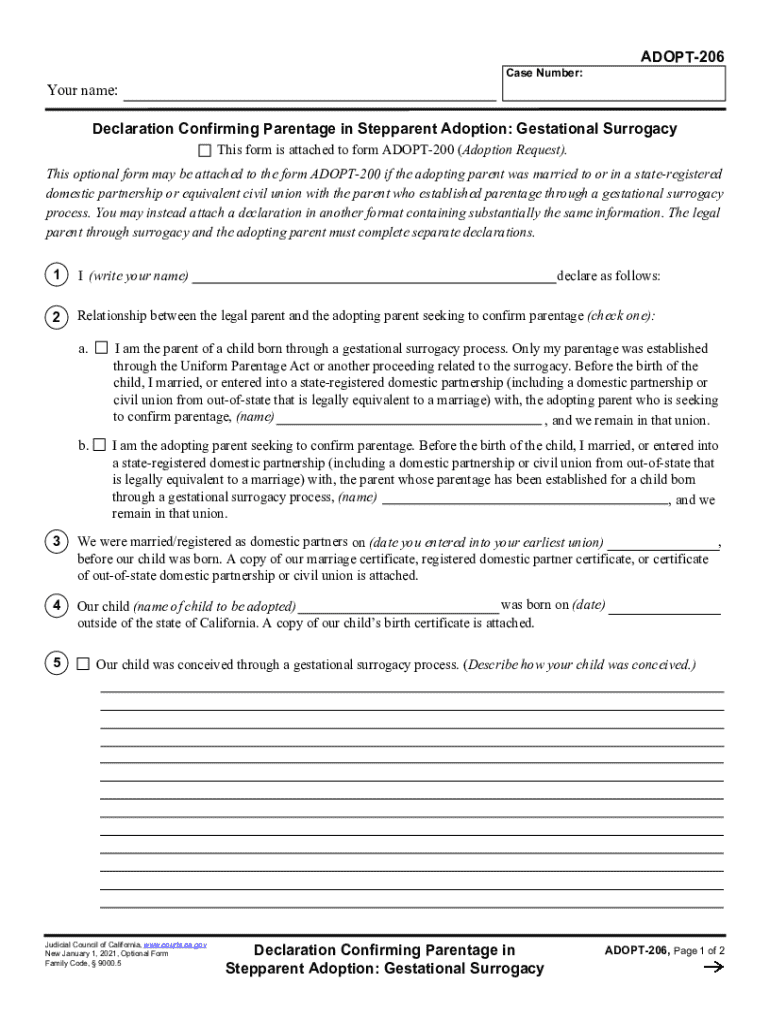
Adopt 206 Declaration Confirming Parentage In Stepparent Adoption Judicial Council Forms
Use a ADOPT 206 Declaration Confirming Parentage In Stepparent Adoption Judicial Council Forms template to make your document workflow more streamlined.
What Adopt 206 is and does
Adopt 206 is a California Judicial Council declaration used in a stepparent adoption case to confirm parentage-related facts for court review. The form is completed by the people identified in the adoption matter, reviewed against the petition and supporting records, and submitted according to the assigned court’s instructions. signNow can help prepare fields, route the declaration for review, capture signer actions, and preserve a completion record. It does not determine parentage, replace legal advice, or guarantee that a court will accept electronic signatures or electronic filing.
Who uses Adopt 206 forms
Adoption parties
Stepparent petitioners and spouses review parentage statements before signing the declaration.
Family-law counsel
Family-law attorneys coordinate preparation, signer order, and case-file preservation.
Legal standing and document limits
Adopt 206 is a California Judicial Council family-law declaration, not a commercial contract. A signed electronic copy may preserve evidence of the signer’s intent when permitted by court procedure, but ESIGN excludes adoption decrees, court orders, and official court filings. Confirm filing, signature, and notarization rules with the California court.

Useful signNow features for Adopt 206
signNow features can organize preparation and evidence for Adopt 206 while the parties and counsel remain responsible for court-compliant completion and filing.
Field placement
Upload the Adopt 206 PDF and place fields for each identified signer without recreating the Judicial Council form.
Signer routing
Route the declaration to authorized parties in the required review order while keeping signer assignments visible.
Audit evidence
Capture timestamps, recipient actions, and completion evidence in an audit trail connected to the signed record.
Remote review
Let signers review the exact declaration on desktop or mobile before applying a typed or drawn signature.
Record export
Export the completed declaration and supporting audit record for controlled case-file storage.
Protected handling
Use encryption and access controls to reduce exposure of parentage and family information during handling.
How to complete Adopt 206 online
Prepare the exact California Judicial Council declaration, route it only to authorized participants, and preserve the completion evidence for legal review.
Upload form:
Upload the current Adopt 206 PDF. Check fields:
Review auto-detected fields and add missing signer fields. Assign signers:
Assign each field to the correct adoption participant. Send securely:
Send the declaration through a verified invitation. Complete record:
Review, sign, and export the completed record.
 Best ROI. Our customers achieve an average 7x ROI within the first six months.
 Scales with your use cases. From SMBs to mid-market, airSlate SignNow delivers results for businesses of all sizes.
 Intuitive UI and API. Sign and send documents from your apps in minutes.
Ways to send and sign Adopt 206
- Use the web app when counsel prepares the Adopt 206 template, checks fields, and routes the declaration from a desktop workflow.
- Use the mobile app when an authorized signer needs to review the declaration and complete assigned fields away from a computer.
- Use kiosk mode only for an approved in-person signing workflow with controlled device access and clear signer identification.
- Use a shareable signing link only when the recipient and access controls are verified; do not post the link publicly.
Recommended Adopt 206 workflow settings
Use controlled access, signer verification, and an exportable audit record when preparing this parentage declaration for legal review.
| Setting | Recommendation |
|---|---|
| Authentication method | Email verification with SMS OTP |
| Signature type | Typed or drawn electronic signature |
| Audit trail | Enable completion certificate and action log |
| Document retention | Retain through case closure and court requirements |
| Encryption | TLS 1.2/1.3 and AES-256 encryption |
What the Adopt 206 audit trail records
The audit trail documents signing events and record handling; it does not replace California court review or filing instructions.
Authenticate signer:
Capture timestamps:
Track document version:
Log activity:
Seal completion:
Export audit trail:
Security controls for Adopt 206 records
Transport encryption:
Stored document encryption:
Security reporting:
Information security:
Protected information:
Electronic signatures:
Platform requirements for Adopt 206
Prepare Adopt 206 using Chrome or Edge on Windows, Safari on macOS or iOS, or Chrome on Android. signNow supports browser-based document preparation and mobile signing workflows; verify the court’s accepted submission format separately.
Desktop browsers Chrome and Edge on Windows 10 or later Apple devices Safari on macOS and iOS Android devices Chrome on Android 10 or later
Use a managed device when the declaration contains birth dates, addresses, parentage information, or other protected family details. Limit downloaded copies, confirm recipient identities, and check California court requirements before treating an electronically completed document as ready for filing.
Processing stages for Adopt 206
Processing depends on signer availability and the California court’s filing procedure, not a guaranteed platform turnaround time.
Prepare the declaration
Deliver to signers
Review and sign
Archive the record
Challenges when completing Adopt 206
Entering parentage information inconsistently can create discrepancies between Adopt 206, the petition, birth records, and supporting declarations. Routing the declaration to an unauthorized recipient can disclose sensitive family information outside the adoption case. Using an outdated Judicial Council form can leave required fields or instructions incomplete for the current filing. Treating electronic completion as court submission can overlook local rules governing signatures, notarization, or filing delivery.
Best practices for Adopt 206 completion
Accurate form selection, controlled routing, signer review, and careful record preservation reduce avoidable problems in stepparent adoption filings.
Verify the current Judicial Council form
Reconcile parentage information before signing
Restrict access to authorized recipients
Preserve the signed case record
Key performance indicators that demonstrate SignNow's proven track record.
Adopt 206 troubleshooting questions
These answers address document preparation, signer routing, electronic-signature limits, and secure record handling for Adopt 206.
Upload the current Adopt 206 PDF again and inspect detected fields before sending. signNow Business includes templates and audit trails, but automatic detection does not confirm that California Judicial Council fields or legal instructions are complete.
Check the signer email, resend the invitation, or use a controlled signing link. Business includes legally binding eSignatures and audit trails; SMS authentication can add identity evidence when configured for the workflow.
Business provides audit trails, while Business Premium adds bulk send and Enterprise adds advanced signer authentication. Select the plan based on routing and authentication needs, not on the court’s legal acceptance.
ESIGN and UETA generally recognize qualifying electronic signatures, but federal law excludes court orders and official court filings, and family-law decrees are excluded. Confirm whether the assigned California court accepts this declaration electronically.
Use signNow’s completion certificate and audit trail, then export both with the signed declaration. Store them under the case policy and follow any California court instruction for originals, notarization, service, or filing.
Do not send the declaration to a shared or unverified address. Restrict access, verify each recipient, and review California privacy and court requirements before sharing parentage or household information.
BE READY TO GET MORE
Get this form now!

If you believe that this page should be taken down, please follow our DMCA take-down process.