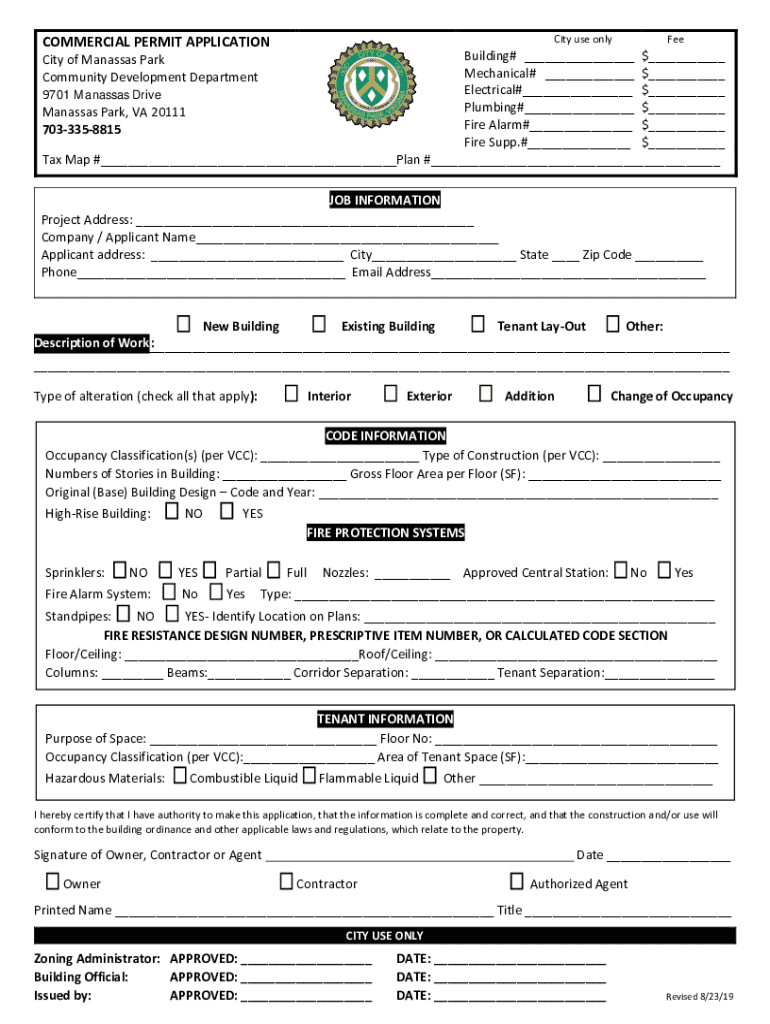
Commercial Permit Application Form
Use a Commercial Permit Application template to make your document workflow more streamlined.
What a commercial permit application does
A Commercial Permit Application Form collects the project, property, applicant, contractor, and authorization details an issuing agency needs to review commercial work. The exact fields, attachments, fees, signatures, and submission method depend on the city, county, or state authority. With signNow, upload the agency’s PDF, review automatically detected fillable fields, add missing signature or date fields, and send it to authorized parties. After signing, download the completed application and audit trail for submission or retention. Electronic signing may be recognized under ESIGN and applicable state law, but agency rules still control acceptance.
Who benefits from digital permit forms
Commercial Permit Application Form supports applicants who must coordinate project information, authorized signatures, and supporting documents before agency review.
A local construction contractor uses the form to obtain signatures on project details, scope information, and supporting plans before submitting a commercial building permit request. A commercial property manager coordinates owner and tenant information, contractor acknowledgments, and authorized representative signatures for permit applications tied to leased business premises. An enterprise facilities department standardizes permit applications across multiple properties, using reusable signNow templates, controlled access, and audit trails for consistent project records.
These tasks are executed by both individual contributors and centralized administrators depending on organizational policy and required controls.
Features for commercial permit workflows
signNow supports the document preparation, signature routing, evidence capture, and record handling required for Commercial Permit Application Form workflows.
Field detection
Upload the agency’s PDF and use automatically detected fields as a starting point, reducing manual placement while preserving the authority’s original wording and layout.
Signer routing
Route the commercial permit application to the property owner, contractor, architect, or authorized representative in a defined signing order.
Audit trail
Capture signer activity, timestamps, and document history so the completed application has organized evidence of the electronic signing process.
Reusable templates
Use reusable templates for recurring commercial properties or permit types while keeping project-specific addresses, plans, and applicant information separate.
Mobile signing
Review and complete commercial permit applications from supported mobile apps when project teams work at construction sites or across multiple properties.
Business integrations
Connect signed permit records with systems such as Procore, Google Drive, Box, Salesforce, or NetSuite when the organization uses those integrations.
How the permit workflow works
signNow turns the agency’s commercial permit PDF into a trackable signing workflow without replacing the authority’s required form.
Upload form: Upload the agency’s commercial permit application PDF. Prepare fields: Review detected fields and add project-specific fields. Request signatures: Send signature requests to authorized parties. Preserve record: Store the signed application with its audit trail.
Complete the commercial permit application
Follow the application from upload through signature, agency submission, and controlled record storage.
Upload the application:
Upload the commercial permit application PDF and supporting schedules. Check required fields:
Review detected fields and add missing applicant, project, and signature fields. Assign authorized signers:
Assign the property owner, contractor, architect, or authorized representative as signers. Send for signing:
Send the completed application for signature and monitor each recipient’s status. Store signed evidence:
Download the signed application and audit trail for agency submission or records.
 Best ROI. Our customers achieve an average 7x ROI within the first six months.
 Scales with your use cases. From SMBs to mid-market, airSlate SignNow delivers results for businesses of all sizes.
 Intuitive UI and API. Sign and send documents from your apps in minutes.
Configure the permit signing workflow
Use a controlled setup that connects authorized signers, agency requirements, signing evidence, and the final commercial permit record.
| Setting | Recommendation |
|---|---|
| Authentication method | Email verification with SMS OTP |
| Signature type | Click-to-sign with signer intent |
| Audit trail | Export with completed application |
| Document retention | Follow issuing authority schedule |
| Encryption | TLS 1.2/1.3 and AES-256 |
Protect commercial permit records
Transport encryption:
Stored data:
Security certification:
Information security:
Electronic signatures:
Signing evidence:
Review the permit audit trail
The signNow audit trail links each commercial permit signing event to the completed document and supports organized record retrieval.
Authenticate signer:
Capture timestamps:
Record document hash:
Seal completed file:
Log document events:
Export audit evidence:
Track commercial permit processing stages
Commercial permit timing depends on the issuing authority, but signNow makes preparation, signer delivery, completion, and archival visible.
Prepare application
Deliver to signers
Monitor signer turnaround
Complete and archive
Retain commercial permit records correctly
Use the issuing authority’s schedule first, then apply any longer federal, state, tax, or industry requirement.
Apply the authority’s retention rule
Export the complete audit trail
Archive every signed permit record
Document disposal and legal holds
Prevent permit application privacy mistakes
Permit applications can expose owner names, addresses, project values, and contractor details when signed PDFs are shared without access restrictions. A consumer-facing electronic process may require ESIGN disclosure of paper-record rights, electronic access, and consent withdrawal procedures under 15 U.S.C. §7001(c). Sending a permit application to the wrong contractor or property representative can disclose project data and weaken evidence of authorized submission. Using a shared link without signer authentication can make attribution harder when several applicants or representatives access the same commercial permit application.
Risks in permit filing
Incomplete submission
Weak attribution
Form rejection
Evidence gap



Commercial permit application troubleshooting
Resolve field, signature, agency-acceptance, privacy, plan, and submission questions before treating the commercial permit application as complete.
Upload the exact PDF issued by the city, county, or state authority, then compare every detected field with the source document. Add only fields needed for authorized signatures, dates, or acknowledgments. Do not remove agency language or alter required instructions before submission.
ESIGN and UETA generally support electronic signatures when intent, consent, attribution, and record reproducibility are established. The issuing authority may impose additional requirements, so confirm whether it accepts electronically signed commercial permit applications before sending the completed file.
Use signNow’s audit trail and certificate of completion to show signer activity, timestamps, and document history. Keep the completed application and evidence together, while following the city, county, or state authority’s retention and submission rules.
Business includes legally binding eSignatures, templates, and audit trails at $8 per user per month when billed annually. If the workflow needs bulk send, Business Premium is $15 per user per month annually and includes bulk send.
Commercial permit applications may contain property addresses, owner information, project values, and plans. Restrict recipients, use signer authentication appropriate to the risk, and avoid public links when the issuing authority or project policy requires controlled access.
A signNow record does not replace agency filing. After all required signatures are complete, export the signed PDF and audit trail, verify attachments and fees, and submit them through the authority’s designated channel.
Key performance indicators that demonstrate SignNow's proven track record.
BE READY TO GET MORE
Get this form now!

If you believe that this page should be taken down, please follow our DMCA take-down process.