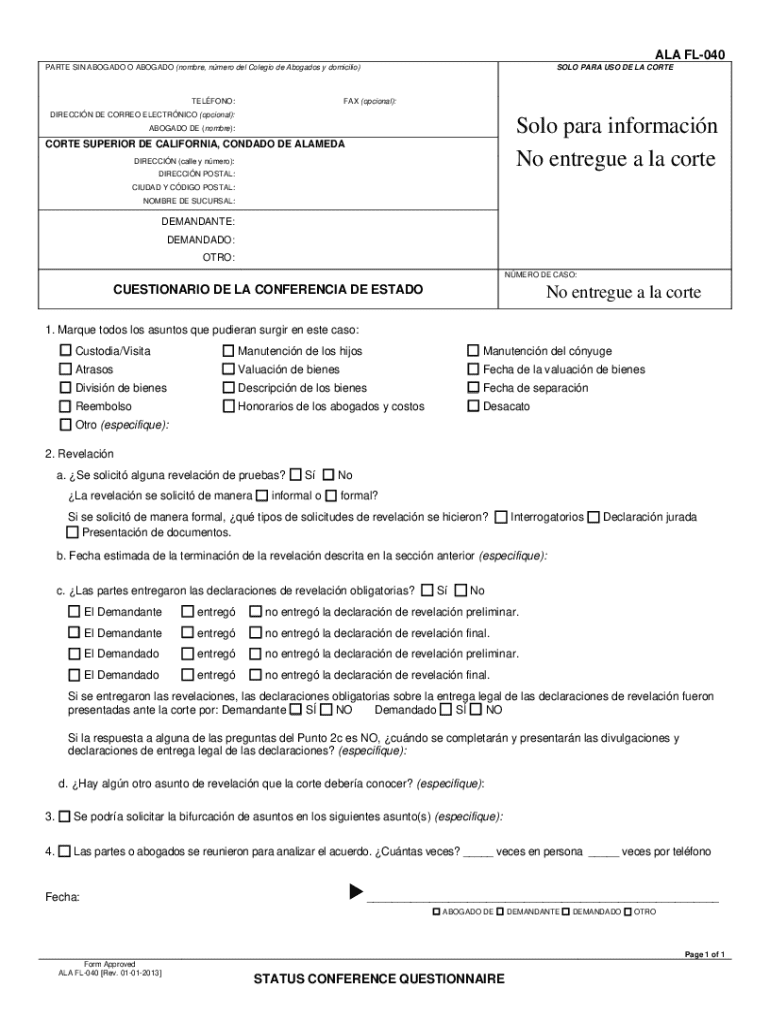
A La Corte No Entregue Informacin Solo Para California Courts
Use a A La Corte No Entregue Informacin Solo Para California Courts template to make your document workflow more streamlined.
What this California court document does
This document is identified as “A La Corte No Entregue Informacin Solo Para California Courts,” but the supplied materials do not specify its issuing court, purpose, required fields, filing deadline, or official California form number. Treat it as a court-related record requiring verification before completion. In signNow, upload the source PDF, review automatically detected fillable fields, add authorized signer roles, and send it for electronic signing when permitted. ESIGN and applicable state law can support electronic records, but they do not establish court acceptance, notarization, recording, or filing requirements.
Legal standing for California court documents
For U.S. business transactions, an electronic record may be admissible when intent, consent, signer attribution, and reliable retention are established under ESIGN and applicable state law. Wills, codicils, testamentary trusts, court orders, official court filings, and specified family-law decrees remain excluded from ESIGN coverage.

Who uses this California court document
Legal services
California attorneys and legal-support teams complete court-related forms, obtain authorized signatures, and preserve audit evidence before following separate filing instructions.
Businesses and agencies
Businesses and agencies use the document workflow for authorized approvals, but must confirm whether the receiving California court accepts electronic records or requires paper, notarization, or recorded submission.
How the California court document workflow works
Complete the document in signNow by uploading it, checking detected fields, assigning signers, and preserving the finished record with its audit trail.
Upload document: Upload the California court document Prepare fields: Review fields and add signer roles Send for signing: Send the completed workflow securely Archive record: Store the signed record and audit trail
 Best ROI. Our customers achieve an average 7x ROI within the first six months.
 Scales with your use cases. From SMBs to mid-market, airSlate SignNow delivers results for businesses of all sizes.
 Intuitive UI and API. Sign and send documents from your apps in minutes.
Features for this California court document
signNow organizes preparation, signer routing, completion evidence, and record storage for this California court document without replacing court-specific filing instructions.
Field detection
Upload the named California court document and inspect detected fields before assigning each signer, reducing omissions in case information and signature areas.
Signer routing
Assign signer roles and signing order so each authorized participant receives only the fields relevant to that person’s responsibility.
Controlled delivery
Send the prepared document by email or controlled link, preserving a clear record of when each signer received access.
Audit evidence
Capture timestamps, signer actions, and completion evidence in an audit trail that accompanies the signed PDF for later review.
Mobile signing
Use mobile apps when authorized participants review or sign away from a desk, while retaining the same completed document record.
Named integrations
Connect storage or business systems such as Google Drive, Box, Salesforce, or NetSuite when the organization needs structured document handling.
Security controls for signed records
Transport encryption:
Storage encryption:
Security certification:
Information security:
Electronic signatures:
Health data controls:
What the audit trail records
The audit trail documents the signing event itself, giving reviewers evidence about access, actions, timing, and the completed California court record.
Authenticate signer:
Capture timestamp:
Hash document:
Seal record:
Log activity:
Retrieve trail:
Processing stages for California court documents
The workflow has four operational stages; signNow records completion events without creating a legal filing deadline for this unnamed document.
Document preparation
Delivery to signers
Signer turnaround
Completion and archival
Record-keeping practices for California court documents
Retain the completed document, completion certificate, and audit history according to the record’s legal purpose and California filing requirements.
Apply the correct retention period
Export the audit trail
Archive records securely
Verify filing requirements separately
California document exclusions and requirements
Notarization
Wills
Family law
Real-estate deeds
Challenges with this California court document
The document name does not identify its court, county, case number, or required filing path, increasing the risk of using an incorrect template. Electronic completion may be mistaken for court submission, even when a California court requires separate filing, service, notarization, or recording. Missing signer roles or incomplete fields can produce a signed copy that lacks information needed for review or acceptance. A downloaded PDF without its completion certificate and audit history may provide weaker evidence of signer identity, consent, and document integrity.
Troubleshooting California court document workflows
These answers address signing, consent, audit evidence, plan limits, and California filing questions for this document.
signNow’s Business plan includes legally binding eSignatures, audit trails, templates, mobile apps, ISO 27001, SOC 2, and GDPR controls. Confirm that this California court document permits electronic signing before sending it, because platform capability does not replace court-specific filing rules.
If signers need stronger identity controls, signNow’s Enterprise plan adds advanced signer authentication. Available methods and required evidence should match the court, agency, or opposing party’s instructions; ESIGN focuses on intent, consent, attribution, and record retention.
Business includes audit trails that record signing activity, while signNow compliance materials identify ESIGN and UETA support. Export the completed document and audit trail together, then retain them according to the record’s purpose and applicable California requirements.
Consumer-facing electronic records require disclosure of the right to paper records, electronic-access capability, and procedures for withdrawing consent under 15 U.S.C. §7001(c). Obtain that consent before using signNow for a consumer-facing court-related record.
Business Premium costs $15 per user per month when billed annually and adds bulk send, kiosk mode, request payments, and quick invite links. It does not by itself establish that a California court accepts electronic filing.
SignNow subscription plans include 100 signature invites per user annually, with overage fees; the Site License uses $1.50 per signature invite. Review the selected plan before sending repeated court documents to multiple signers.
Key performance indicators that demonstrate SignNow's proven track record.
BE READY TO GET MORE
Get this form now!

If you believe that this page should be taken down, please follow our DMCA take-down process.