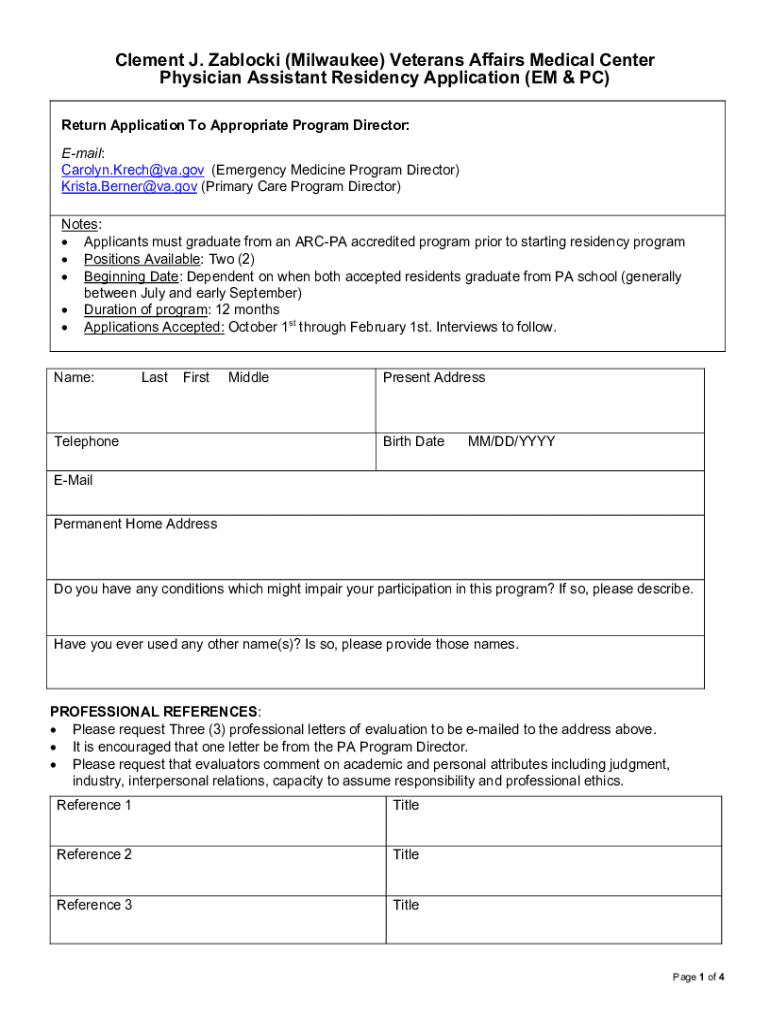
Milwaukee VA Residency Application Form
Use a Milwaukee VA Residency Application template to make your document workflow more streamlined.
What the Milwaukee VA residency application does
The Milwaukee VA Residency Application Form is a document used to collect residency information for a Milwaukee VA-related residency process. Because the available source does not identify the issuing office, field list, filing deadline, or submission channel, applicants should use the instructions supplied with their application. signNow can turn the PDF into a guided workflow: upload it, review detected fields, add signature and date fields, send it to the designated signer, and retain the completed document with an audit trail. Confirm electronic acceptance with the responsible VA office before submission.
Who uses this residency application
VA residency applicants
A Milwaukee VA residency applicant uses the form to provide the information requested by the responsible VA program. signNow can organize fields, route the document for signature, and preserve an auditable completion record, but the applicant must follow the program’s separate eligibility and submission instructions.
VA program coordinators
VA residency coordinators can prepare reusable templates, route applications to applicants, and monitor completion through signNow audit trails. Coordinators should verify the program’s accepted signature method, supporting-document requirements, submission channel, and record-retention policy before relying on an electronic workflow.
Complete the Milwaukee VA residency application
Use this sequence to prepare the Milwaukee VA Residency Application Form, collect the required signature, and preserve the completed record for submission.
Upload form:
Upload the Milwaukee VA Residency Application Form PDF. Check fields:
Review detected fields and add missing fields. Add signer:
Enter signer details and required routing. Send application:
Send the application for electronic signature. Archive record:
Download the completed form and audit trail.
Platform requirements for this application
Complete the Milwaukee VA Residency Application Form in Chrome, Firefox, Safari, or Edge on Windows or macOS. signNow mobile apps support iOS and Android devices, while TLS 1.2 or 1.3 protects data in transit during browser and app connections.
Desktop browsers Chrome, Firefox, Safari, and Edge on Windows or macOS Mobile apps signNow mobile apps for iOS and Android devices Connection security TLS 1.2 or 1.3 supports secure browser connections
Organizations managing VA residency applications should use managed Windows, macOS, iOS, or Android devices with current security updates. Enterprise deployments can configure SSO provisioning, API access, and controlled retention. Confirm certificate, identity, and submission requirements with the responsible VA office before production use.
 Best ROI. Our customers achieve an average 7x ROI within the first six months.
 Scales with your use cases. From SMBs to mid-market, airSlate SignNow delivers results for businesses of all sizes.
 Intuitive UI and API. Sign and send documents from your apps in minutes.
Key features for this VA application
signNow connects document preparation, signer routing, completion evidence, and controlled storage for the Milwaukee VA Residency Application Form.
Field preparation
Upload the Milwaukee VA Residency Application Form and review signNow’s detected fields before adding signature, date, initials, or text fields required by the residency workflow.
Signer routing
Route the prepared application to the designated signer by email, then monitor signing status without requiring the signer to recreate the document.
Audit trail
Capture signer actions, timestamps, and completion history in an audit trail that can accompany the completed residency application during internal review.
Reusable templates
Use reusable templates for recurring Milwaukee VA residency applications, while keeping each applicant’s information separate and limiting access to authorized personnel.
Mobile access
Complete the application through signNow web or mobile apps, allowing applicants and coordinators to review documents on supported desktop and mobile devices.
Protected records
Apply signNow’s encryption and compliance controls to protect application data during transmission and storage, subject to the receiving VA program’s own requirements.
Recommended residency application workflow setup
Configure access, signing, auditability, retention, and encryption around the Milwaukee VA Residency Application Form and the receiving VA program’s requirements.
| Setting | Recommendation |
|---|---|
| Authentication and provisioning | Email invitations with administrator-controlled user access |
| Signature type | Electronic signature with signer intent |
| Audit trail | Capture timestamps, actions, and completion history |
| Document retention | Retain six years when HIPAA records apply |
| Encryption | AES-256 at rest and TLS 1.2 or 1.3 in transit |
Signer authentication for residency applications
PKI identity:
X.509 certificates:
Two-factor authentication:
SMS OTP:
Identity verification:
Enterprise controls:
Milwaukee VA residency application timeline
Processing depends on form completeness, signer availability, and the receiving VA office’s submission requirements; signNow records each workflow stage.
Prepare the document
Deliver to signers
Complete signer review
Archive the record
How signNow records the audit trail
The audit trail documents what happened to the Milwaukee VA Residency Application Form after preparation, signing, completion, and record retrieval.
Authenticate signer:
Capture timestamp:
Hash document:
Seal document:
Preserve evidence:
Export audit trail:
Challenges when completing this form
The responsible VA office may require fields or supporting information not identifiable from the form title alone, making the supplied instructions essential. Automatic field detection can misplace fields on a specialized residency form, requiring manual review before the document reaches a signer. An electronically signed application may still need submission through a separate VA portal, email address, or approved records channel. Applicants can expose sensitive residency information when sharing an unrestricted signing link or storing completed copies outside approved access controls.
Troubleshooting Milwaukee VA residency applications
Resolve field, identity, signature, plan, and record-preservation issues before submitting this application to the responsible VA office.
Use signNow’s field validation and required fields to identify missing residency information before sending. Business includes templates and audit trails; Business Premium adds bulk send. For health information, HIPAA compliance requires a business associate agreement and appropriate access controls.
Upload the current Milwaukee VA Residency Application Form as a PDF, then review signNow’s automatically detected fields. Detection may miss unusual layouts or handwritten areas, so manually add text, date, initials, and signature fields before sending.
Business includes legally binding eSignatures and audit trails, while Enterprise adds advanced signer authentication. ESIGN and UETA generally recognize electronic signatures, but confirm that the receiving VA office accepts electronic submission for this specific application.
A signer can receive the application through an email invitation or signing link. If stronger identity verification is required, Enterprise supports advanced signer authentication. Do not substitute a signing link for any separate VA identity-proofing requirement.
Business and Business Premium plans include 100 signature invites per user annually, with overage fees. Business Premium includes bulk send. For a high-volume residency program, review Enterprise or Site License terms before distributing applications.
signNow provides audit trails, document history, timestamps, and completion records. Export the completed application and audit trail together, then retain them according to the responsible VA program’s records policy and any applicable federal requirements.
Key performance indicators that demonstrate SignNow's proven track record.
BE READY TO GET MORE
Get this form now!

If you believe that this page should be taken down, please follow our DMCA take-down process.