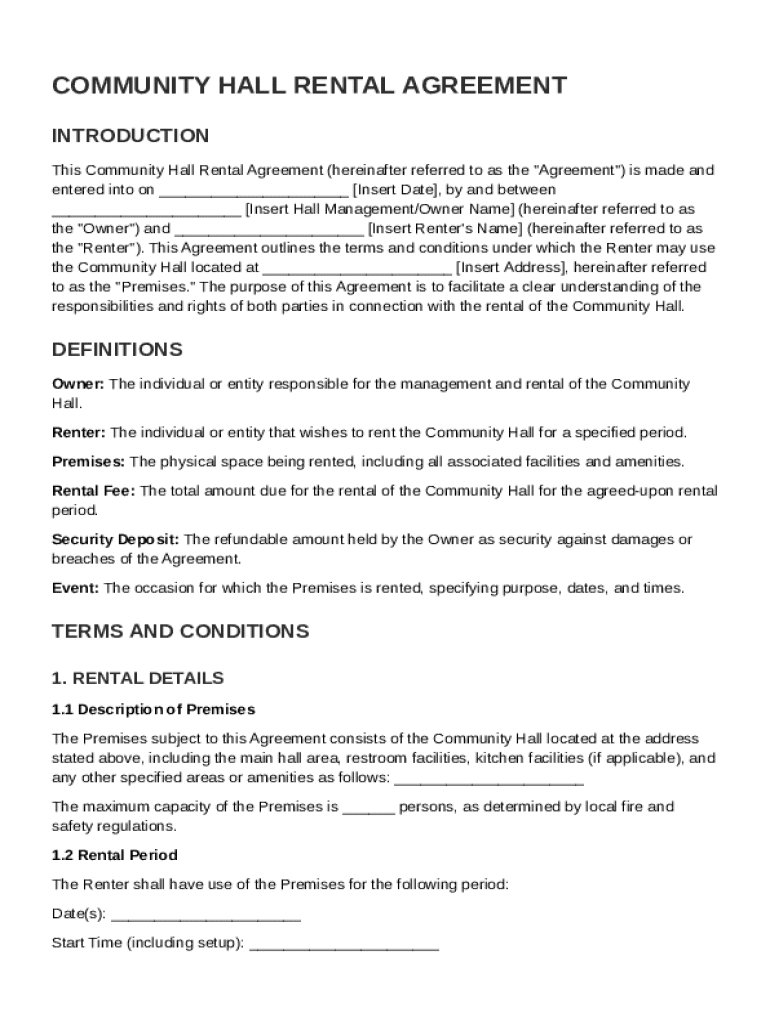
Community Hall Rental Agreement Form
Use a Community Hall Rental Agreement Template template to make your document workflow more streamlined.
What the community hall rental form covers
A Community Hall Rental Agreement Form records the terms under which a person or organization reserves a community hall for a specified event. It identifies the venue and renter, requested date and times, event purpose, fees, deposit, cancellation terms, permitted use, damage responsibilities, insurance or cleanup obligations, and signatures. The completed agreement gives both parties a written record of the reservation and responsibilities. With signNow, the venue uploads the form, reviews detected fields, assigns signers, sends it electronically, and stores the signed PDF with its audit trail.
Who uses this hall rental agreement
Community facilities
Municipal and nonprofit venue teams use the form for reservations, event details, fees, deposits, cancellation terms, cleanup duties, and renter signatures.
Venue operators
Private venue operators and event organizers use it to document dates, permitted activities, responsible contacts, payment obligations, and damage terms.
Organizations that use hall rental agreements
Community facilities, nonprofit groups, and private venue operators use this form to document reservations, responsibilities, fees, and signatures.
Municipal recreation departments can send facility-use agreements for community centers, capture renter signatures, and retain event terms without coordinating repeated in-person visits. Nonprofit and neighborhood organizations can manage recurring hall bookings, deposits, cancellation terms, and responsible contacts through reusable signNow templates and controlled signing workflows. Private venue operators can route rental agreements to customers, managers, and approvers, while preserving signed copies and audit trails for reservation and payment records.
These tasks are executed by both individual contributors and centralized administrators depending on organizational policy and required controls.
Features for community hall rental agreements
signNow organizes the hall’s reservation terms, signer routing, completion evidence, and storage workflow around the actual rental agreement.
Rental terms
Captures dates, times, event purpose, fees, deposits, cancellation terms, and responsibilities in one venue-specific record.
Remote signing
Routes the agreement to the renter and authorized venue representative for electronic signatures without coordinating simultaneous meetings.
Audit trail
Preserves signer actions, timestamps, and completion evidence alongside the signed Community Hall Rental Agreement Form.
Reusable templates
Supports reusable templates for recurring community hall reservations while allowing each event’s details to be reviewed before sending.
Mobile access
Provides mobile access for venue staff reviewing or signing agreements away from an office computer.
Connected records
Connects completed agreements with systems such as Google Drive, Box, Salesforce, Microsoft 365, or NetSuite when configured.
Complete the hall rental agreement online
Use this signNow workflow to prepare, route, sign, and preserve the Community Hall Rental Agreement Form.
Upload document:
Upload the completed rental agreement PDF. Check fields:
Review detected fields and add missing dates, fees, and signatures. Add signers:
Assign the venue representative and renter as signers. Send agreement:
Send the agreement through signNow for electronic signature. Store records:
Download the signed PDF and audit trail.
 Best ROI. Our customers achieve an average 7x ROI within the first six months.
 Scales with your use cases. From SMBs to mid-market, airSlate SignNow delivers results for businesses of all sizes.
 Intuitive UI and API. Sign and send documents from your apps in minutes.
Recommended agreement workflow setup
Use documented controls for signer identity, electronic consent, audit evidence, retention, encryption, and access administration.
| Setting | Recommendation |
|---|---|
| Authentication method | Email verification with SMS OTP |
| Signature type | Electronic signature with signer intent |
| Audit trail | Retain completed audit trail export |
| Document retention | Follow the venue’s written schedule |
| Encryption | TLS 1.2/1.3 and AES-256 |
What the hall agreement audit trail records
The audit trail preserves technical evidence around signing the Community Hall Rental Agreement Form, separate from the agreement’s reservation terms.
Signer authentication:
Timestamp capture:
Document integrity:
Sealing:
Action history:
Audit export:
Security for hall rental documents
Transport encryption:
Stored encryption:
Security certification:
Information security:
Electronic signatures:
Health information:
Mobile signing for hall rental agreements
Venue staff can review and sign Community Hall Rental Agreement Form documents through signNow mobile apps on iOS and Android, including workflows that begin with camera-captured paper documents.
Mobile apps signNow mobile apps support signing Operating systems iOS and Android support venue staff Document capture Camera capture digitizes paper requests
Mobile access helps staff handle rental agreements while working at the venue or away from a desk. Confirm device management, connectivity, authentication, and retention policies before permitting mobile signing for agreements containing personal or payment information.



Record-keeping practices for hall agreements
Preserve the signed agreement, event terms, signer evidence, and retention decision as one traceable record.
Store the agreement with its audit trail
Check every venue term before sending
Limit access and verify exported records
Apply the correct retention rule
Retention periods for related records
Choose the retention period based on the record’s actual business or regulatory purpose, not merely the signature date.
Three years for tax records
Six years for major understatement
Six years for HIPAA records
Three years for payroll records
Five years for injury records
State-law limits and exclusions
Notarization
Wills
Family law
Real-estate deeds
Troubleshoot hall rental agreement workflows
Resolve field-detection, delivery, plan, enforceability, retention, and HIPAA configuration questions before finalizing a hall rental agreement.
Upload the original PDF again and verify that required fields are visible. signNow’s Business plan includes templates and legally binding eSignatures, but a scanned image may require manually placed fields before sending.
Confirm that the renter’s email address is correct and resend the signing invitation. A signer can often access the document without a signNow account, while SMS authentication can add identity verification to the workflow.
Business includes 100 signature invites per user per year when billed annually. Business Premium is $15/user/month annually and adds bulk send, which may help when many similar hall agreements require separate invitations.
For U.S. transactions, ESIGN and applicable state electronic-transactions law support electronic signatures when intent, consent, attribution, and record retention are established. Review any consumer disclosure requirements under 15 U.S.C. §7001(c).
Export the signed PDF and its audit trail after completion, then store both under the venue’s retention policy. signNow supports audit trails, while the organization remains responsible for its record-keeping schedule.
If the agreement includes protected health information, use a HIPAA-compliant signNow configuration with a business associate agreement. HIPAA documentation generally requires six-year retention under 45 CFR §164.530(j).
Key performance indicators that demonstrate SignNow's proven track record.
BE READY TO GET MORE
Get this form now!

If you believe that this page should be taken down, please follow our DMCA take-down process.