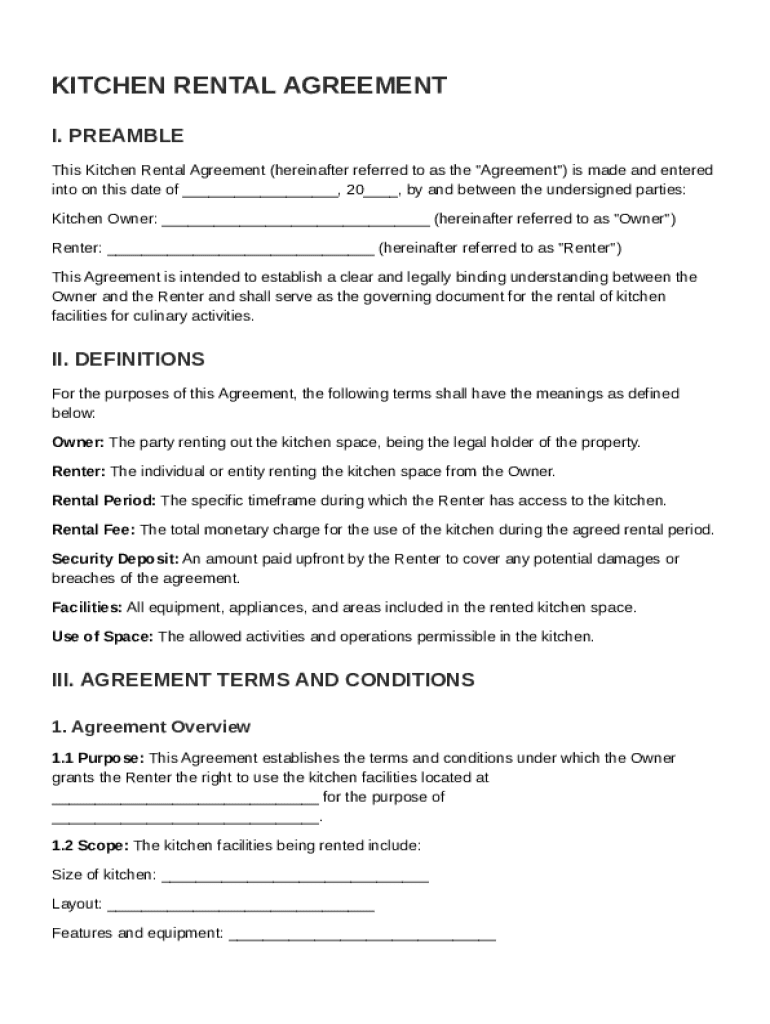
Kitchen Rental Agreement Form
Use a Kitchen Rental Agreement Template template to make your document workflow more streamlined.
What a kitchen rental agreement does
A Kitchen Rental Agreement Form records the terms under which a restaurant, caterer, food producer, or other operator rents commercial kitchen space. It identifies the parties, premises, permitted food activities, rental dates, fees, deposit, equipment access, utilities, sanitation duties, insurance, repairs, and termination rights. The parties complete those terms, sign the agreement, and retain a copy as evidence of their arrangement. With signNow, the sender uploads the agreement, reviews detected fields, assigns signatures, sends it to the parties, and stores the completed file with its audit trail.
Businesses using kitchen rental agreements
Kitchen rental agreements serve food businesses that need written control over space, schedules, equipment, payments, and operating responsibilities.
Solo caterers and food producers can sign a kitchen rental agreement from a mobile device, preserving access terms, payment obligations, and equipment responsibilities without coordinating an in-person meeting. Shared-kitchen operators can reuse approved agreement templates, route signatures to each renter, and retain audit trails for multiple spaces, schedules, deposits, and operating rules. Enterprise food-service groups can connect agreements with Microsoft 365, Google Drive, NetSuite, or Procore while assigning administrators to control templates, permissions, and completed records.
These tasks are executed by both individual contributors and centralized administrators depending on organizational policy and required controls.
Who uses this kitchen rental form
Restaurant owners
Restaurant owners use the agreement to document kitchen access, permitted activities, rent, insurance obligations, cleaning duties, and shared-equipment responsibilities.
Kitchen operators
Commercial landlords and operators use it to record approved users, payment terms, operating hours, maintenance duties, and termination conditions.
Features for kitchen rental agreements
signNow applies document preparation, routing, authentication, and recordkeeping features to the specific terms and signatures required by a kitchen rental arrangement.
Field detection
Upload a kitchen rental agreement and review signNow’s detected fields before assigning signatures, dates, initials, and acknowledgments to the landlord and operator.
Signer routing
Send the agreement to multiple parties in an assigned order, reducing confusion about whose signature, insurance acknowledgment, or equipment responsibility is outstanding.
Audit trail
Capture signer identity, timestamps, document actions, and completion history alongside the executed kitchen rental agreement for later review.
Reusable templates
Reuse an approved kitchen rental agreement template while preserving required terms for rent, access hours, cleaning, equipment, insurance, and termination.
Mobile signing
Allow landlords, operators, and administrators to review or sign the agreement from supported desktop browsers and signNow mobile apps.
Record storage
Keep the signed agreement and its completion record together so rental terms, payment duties, and operational responsibilities remain easy to locate.
How kitchen agreement signing works
The signNow workflow moves the kitchen rental agreement from preparation to signed record without changing its negotiated rental terms.
Upload document: Upload the kitchen rental agreement Check fields: Review detected fields and rental terms Assign signers: Assign signatures to each party Preserve record: Store the completed agreement and audit trail
 Best ROI. Our customers achieve an average 7x ROI within the first six months.
 Scales with your use cases. From SMBs to mid-market, airSlate SignNow delivers results for businesses of all sizes.
 Intuitive UI and API. Sign and send documents from your apps in minutes.
Complete a kitchen rental agreement
Prepare the negotiated rental terms, then use signNow to route the agreement and preserve the completed document with its signing history.
Upload:
Upload the signed-term draft Review:
Review fields and rental details Send:
Send to landlord and operator Store:
Complete signatures and save records
Recommended kitchen agreement setup
Use a controlled signing workflow that identifies each party, preserves the completed agreement, and records the document history for the rental relationship.
| Setting | Recommendation |
|---|---|
| Authentication method | Email verification with SMS OTP |
| Signature type | Typed or drawn electronic signature |
| Audit trail | Capture signer and document events |
| Document retention | Retain through the lease record lifecycle |
| Encryption | TLS 1.2/1.3 and AES-256 protection |
Security for kitchen rental agreements
Transport encryption:
Storage encryption:
Security certification:
Information security:
Signature compliance:
Audit trail:
How the audit trail records signing
The audit trail connects each kitchen rental agreement action to a signer, time, document event, and preserved completion record.
Signer authentication:
Timestamp capture:
Document hashing:
Tamper-evident seal:
Action history:
Trail retrieval:
Platform requirements for signing
Kitchen Rental Agreement Form workflows run in Chrome, Firefox, Safari, or Edge on Windows and macOS. signNow also provides mobile apps for iOS and Android, with encrypted connections using TLS.
Browsers Chrome, Firefox, Safari, and Edge Desktop systems Windows and macOS desktop access Mobile access iOS and Android mobile apps
Organizations should manage access through approved devices, user permissions, and documented retention procedures. Teams connecting kitchen rental agreements to business systems can use signNow integrations or API options, while administrators should configure authentication and access controls according to their internal policies.



Best practices for kitchen rental agreements
Accurate terms, controlled signing, and organized records make a kitchen rental agreement easier to administer and interpret.
Identify every rental obligation
Assign fields to each party
Protect signing and access
Archive the complete record
Pitfalls in kitchen rental agreements
The agreement may omit equipment, sanitation, access-hour, utility, deposit, or repair terms, leaving the parties without clear evidence of their operational responsibilities. Personal contact, payment, insurance, or business information may be exposed when completed agreements are shared through uncontrolled email or broad team permissions. A party may sign the wrong version when amendments, schedules, and the final kitchen rental agreement are not routed and stored together. Missing consent or signer attribution evidence can make it harder to demonstrate intent when an electronic kitchen rental agreement is later disputed.
Kitchen rental agreement troubleshooting
Resolve field, signer, plan, enforceability, and recordkeeping questions before sending a kitchen rental agreement for completion.
Upload the agreement again as a readable PDF or document file, then review signNow’s detected fields. If a field is missing, place the required signature, initials, date, or text field manually before assigning it to the landlord or kitchen operator.
Business plans include legally binding eSignatures, templates, mobile apps, and audit trails. Business Premium adds bulk send and kiosk mode. Select the plan based on the number of kitchen agreements and the required sending workflow, rather than assuming every feature is included.
signNow records signer actions, timestamps, and document history in the audit trail. Keep the completed agreement and audit trail together, restrict access to authorized users, and apply the organization’s retention policy to the rental record.
ESIGN and UETA generally recognize electronic signatures for U.S. business transactions when intent, consent, attribution, and record retention requirements are satisfied. Confirm any state-specific contract, licensing, or notarization requirement before relying on an electronic signature.
Use signNow’s signer routing to send the agreement to the landlord and operator in a defined order or at the same time. Check that each party receives only the fields and documents intended for that signer.
Protect contact, payment, insurance, and business information through access controls and encrypted transmission. signNow states that it uses TLS 1.2/1.3 in transit and AES-256 for data at rest; administrators should still limit template and record permissions.
Key performance indicators that demonstrate SignNow's proven track record.
BE READY TO GET MORE
Get this form now!

If you believe that this page should be taken down, please follow our DMCA take-down process.