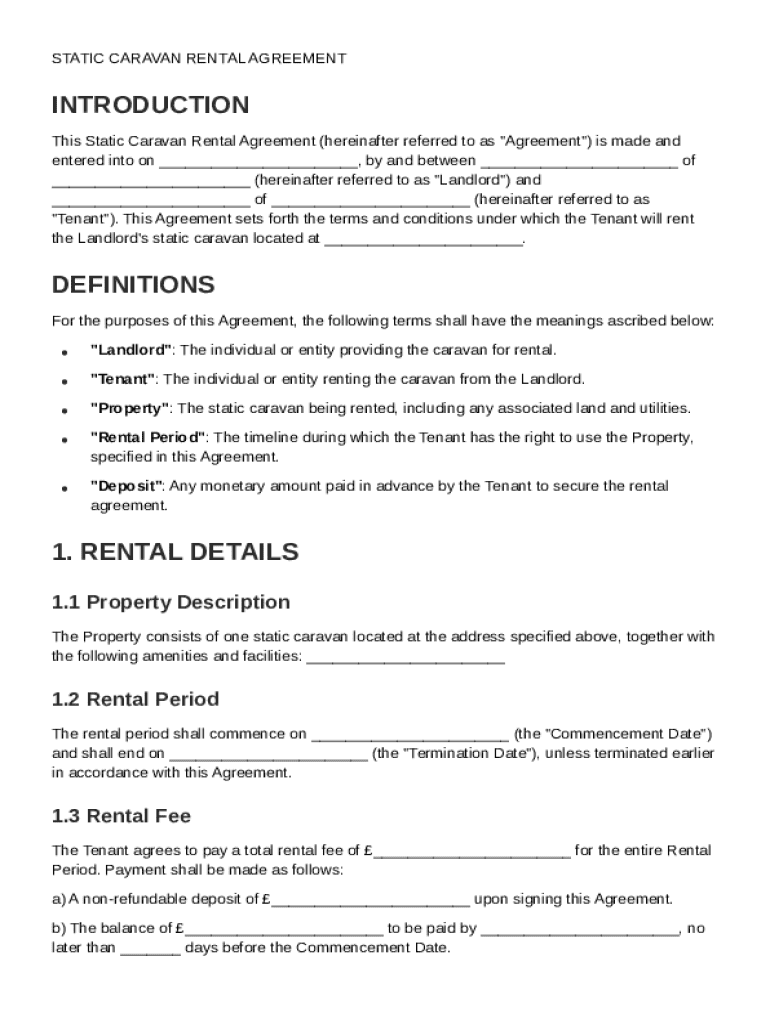
Static Caravan Rental Agreement Form
Use a Static Caravan Rental Agreement Template template to make your document workflow more streamlined.
What this rental agreement does
A Static Caravan Rental Agreement Form records the terms between a caravan owner or operator and a renter for occupation of a specified static caravan. It identifies the parties, caravan or pitch, rental period, rent, deposit, utilities, occupancy limits, maintenance duties, site rules, and cancellation conditions. The parties can upload the form to signNow, add or review fields, assign signatures, and send it electronically. signNow records the signing activity and provides a completed document with an audit trail. State landlord-tenant, contract, consumer-disclosure, and park-specific rules may also apply.
Who benefits from this rental form
The form supports owners, park operators, and property managers who need signed evidence of static caravan rental terms and responsibilities.
Independent caravan owners can document pitch details, rental dates, deposits, utilities, and house rules before sending agreements to individual renters. Holiday-park operators can standardize agreements across multiple static caravans, assign staff sending permissions, and retain signed occupancy records. Property-management companies can coordinate owners, renters, and park administrators through reusable templates, controlled roles, and auditable signing workflows.
These tasks are executed by both individual contributors and centralized administrators depending on organizational policy and required controls.
How to complete the rental agreement
Prepare the caravan details and rental terms first, then use signNow to route the document to every required signer.
Upload form:
Upload the blank rental agreement to signNow. Check fields:
Review detected fields and add missing rent, deposit, dates, and signature fields. Assign parties:
Assign fields to the owner and renter. Send agreement:
Send the agreement for secure electronic signing. Store records:
Download the completed PDF and audit trail.
Best practices for caravan rental agreements
Accurate parties, clear occupancy terms, controlled signing, and organized records reduce disputes over static caravan rentals.
Identify every rental term clearly
Assign signatures to the correct parties
Capture consent and required disclosures
Archive the agreement and audit trail
 Best ROI. Our customers achieve an average 7x ROI within the first six months.
 Scales with your use cases. From SMBs to mid-market, airSlate SignNow delivers results for businesses of all sizes.
 Intuitive UI and API. Sign and send documents from your apps in minutes.
Privacy and disclosure pitfalls
Personal addresses, payment details, and identification information may remain visible when signed caravan agreements are shared without redaction. Unsigned consent language can leave renters uncertain about data collection, marketing contact, or disclosures to park owners and service providers. Unrestricted template access may let unauthorized staff alter rent, deposit, occupancy, or cancellation terms before sending the agreement. Emailing completed agreements without controlled permissions can expose renter information to unintended recipients or create multiple conflicting copies.
Signer authentication and document security
PKI signing:
X.509 certificates:
Two-factor authentication:
SMS OTP:
ID verification:
Signer evidence:
Platform requirements for signing
Sign the Static Caravan Rental Agreement Form through Chrome, Firefox, Safari, or Edge on Windows or macOS. signNow also provides mobile apps for iOS and Android, allowing renters and property managers to review and sign from supported phones or tablets.
Browsers Chrome, Firefox, Safari, and Edge Desktop systems Windows and macOS computers Mobile systems iOS and Android mobile devices
Organizations should manage access through approved devices and user permissions when rental agreements contain addresses, identification details, or payment information. Enterprise deployments can evaluate API access, SSO provisioning, and certificate configuration against their internal security and records-management requirements.
Processing a static caravan rental agreement
Use a defined sequence from rental-term preparation through signer review, completion, and secure archival of the final agreement.
Prepare the agreement
Deliver to signers
Complete signer review
Archive completed records
Recommended rental agreement setup
Configure the workflow around verified parties, clear electronic consent, a complete audit trail, and controlled storage for each rental agreement.
| Setting | Recommendation |
|---|---|
| Authentication method | Email verification with SMS OTP |
| Signature type | Electronic signature with signer intent |
| Audit trail | Enabled certificate of completion |
| Document retention | Retain under documented state-law policy |
| Encryption | TLS 1.2/1.3 and AES-256 |
Inside the rental agreement audit trail
A signNow audit trail records the evidence surrounding the static caravan agreement, from signer authentication through retrieval of the completed record.
Authenticate signer:
Capture timestamps:
Protect document:
Seal activity:
Verify completion:
Export evidence:



Troubleshooting the rental agreement workflow
Resolve field, signer, consent, plan, authentication, and legal-scope questions before relying on a completed caravan rental agreement.
Upload the original PDF again and review signNow’s detected fields. Add explicit fields for the caravan identifier, rental dates, rent, deposit, initials, and signatures; auto-detection cannot determine every business-specific term or signer assignment.
Use signNow’s assigned roles and verify each signer’s email address before sending. A renter should receive renter fields, while the owner or authorized operator receives owner fields; incorrect assignments can leave required terms unsigned.
For a consumer-facing rental transaction, provide the electronic-record disclosure and confirm access to the electronic format under 15 U.S.C. §7001(c). Keep evidence of consent and provide paper-record procedures when required.
Business includes legally binding eSignatures, templates, and audit trails at $8/user/month when billed annually. Business Premium is $15/user/month annually and adds bulk send and kiosk mode, which may help larger rental operations.
Use signNow authentication options appropriate to the agreement’s risk, including email verification, SMS OTP, or stronger signer authentication where available. Review the completed audit trail, signer identity evidence, timestamps, and certificate of completion before archival.
ESIGN and UETA generally support electronic signatures when intent, consent, attribution, and record retention are established. They do not replace state-specific rules for excluded records such as wills, court filings, or family-law decrees.
Key performance indicators that demonstrate SignNow's proven track record.
BE READY TO GET MORE
Get this form now!

If you believe that this page should be taken down, please follow our DMCA take-down process.