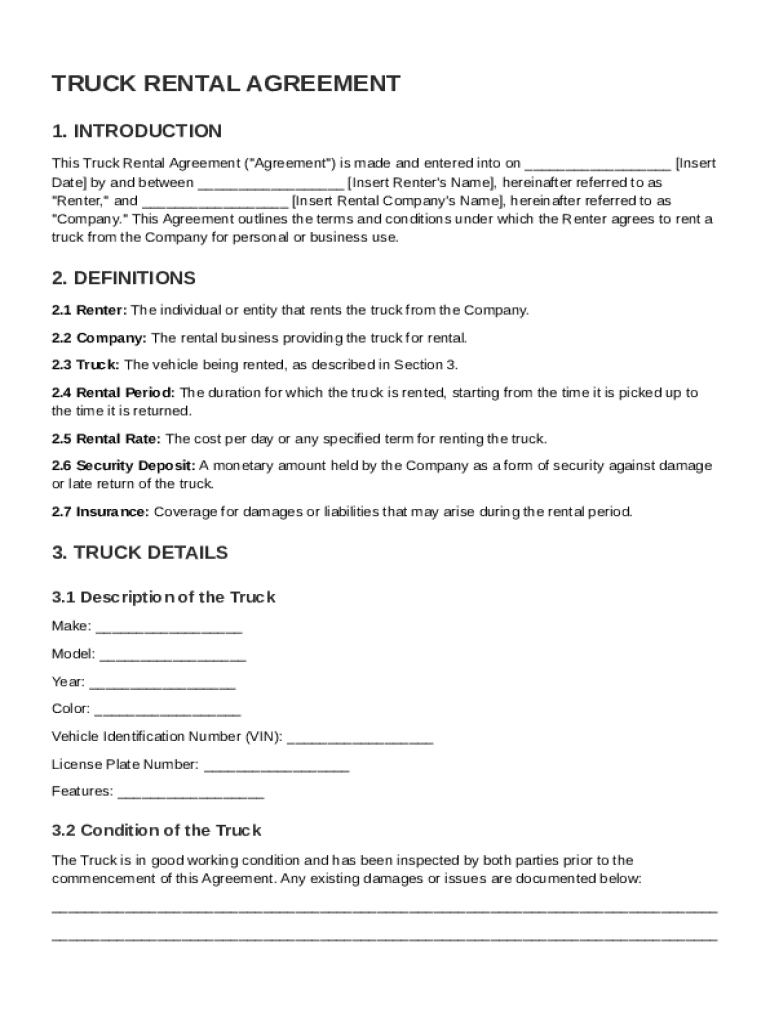
Truck Rental Agreement Form
Use a Truck Rental Agreement Template template to make your document workflow more streamlined.
What a truck rental agreement covers
A Truck Rental Agreement Form records the terms for providing a truck to a renter for a defined period. It identifies the rental company, renter, vehicle, authorized drivers, pickup and return dates, rates, deposits, mileage limits, permitted use, insurance duties, fuel terms, and existing damage. The parties review these details before signing, and the completed record can support billing, inspection, and dispute resolution. In signNow, upload the agreement, detect or add fields, assign signer roles, send it for signature, and retain the signed PDF with its audit trail.
Who uses a truck rental agreement
Rental companies
Rental companies use the form to document the vehicle, renter identity, rental period, payment terms, mileage allowance, permitted use, insurance responsibilities, and pre-existing damage before releasing a truck.
Fleet operators
Fleet operators and commercial customers use signed copies to confirm handoff conditions, authorized drivers, return obligations, and responsibility for damage or excess mileage.
Why teams look for DocuSign alternatives
Organizations seek alternatives when they need different pricing models, stronger native automation, simpler bulk affidavit workflows, or more flexible identity-verification options than those available in a legacy envelope-based vendor.

How the truck rental form works
The workflow turns a truck rental agreement into a controlled signing sequence from document upload through completed record storage.
Upload document: Upload the Truck Rental Agreement Form into signNow. Detect fields: signNow detects fillable fields for rental details. Assign roles: Assign fields to the rental provider and renter. Preserve record: Store the signed agreement with its audit trail.
Complete the truck rental agreement
Prepare the vehicle and renter details, route the agreement for signatures, and preserve the completed record with its audit trail.
Upload the form:
Upload the completed Truck Rental Agreement Form and review detected fields. Complete details:
Add vehicle, renter, dates, rates, mileage, and damage details. Assign signers:
Assign signing fields to the rental company and renter. Send for signature:
Send the agreement and monitor completion in signNow.
 Best ROI. Our customers achieve an average 7x ROI within the first six months.
 Scales with your use cases. From SMBs to mid-market, airSlate SignNow delivers results for businesses of all sizes.
 Intuitive UI and API. Sign and send documents from your apps in minutes.
Recommended agreement workflow setup
Configure the signing workflow around renter identity, vehicle condition evidence, auditability, and controlled access.
| Setting | Recommendation |
|---|---|
| Authentication method | Email verification with SMS OTP |
| Signature type | Legally binding electronic signature |
| Audit trail | Capture IP, timestamps, and action history |
| Document retention | Retain signed records under company policy |
| Encryption | TLS 1.2/1.3 and AES-256 encryption |
Key truck rental agreement features
The workflow keeps truck identification, rental terms, signer actions, and completed records together for clearer handoffs and easier review.
Rental details
Capture the truck’s identifying information, rental period, mileage, rates, deposits, and return obligations in one structured agreement for review before handoff.
Signer roles
Assign provider and renter fields directly, reducing uncertainty about who must complete each part of the truck rental record.
Remote signing
Collect signatures remotely through signNow while preserving the exact agreement that each party reviewed and accepted.
Audit trail
Use audit-trail records to connect timestamps, signer activity, and document history with the completed truck rental agreement.
Mobile access
Use mobile apps during pickup or return to complete the agreement without requiring a desktop workstation.
Record storage
Connect completed agreements with Google Drive, Box, Egnyte, or other supported systems for controlled operational storage.



Truck rental agreement processing stages
Processing depends on accurate vehicle details, signer availability, and the rental company’s record-retention policy.
Prepare agreement
Deliver to signers
Collect signatures
Archive record
Security for truck rental agreements
PKI:
X.509 certificates:
Two-factor authentication:
SMS OTP:
ID verification:
Audit evidence:
Mobile options for truck rental signing
Use the signNow mobile apps on iOS and Android to review and sign Truck Rental Agreement Form during vehicle pickup or return. Camera capture can help add inspection evidence to the rental record.
iOS iOS 15 or later Android Android 10 or later Camera capture Camera capture for inspection records
Fleet teams can manage truck rental agreements from managed iOS or Android devices, then preserve completed records in connected storage. Offline signing availability should be confirmed for the selected workflow and device configuration before relying on it during a pickup without connectivity.
Best practices for truck rental agreements
Accurate vehicle information, clear signer assignments, condition evidence, and controlled archival make the completed agreement more useful during billing, return inspection, or dispute review.
Verify vehicle and rental details
Assign every field carefully
Preserve condition evidence
Archive the complete record
What the audit trail records
The signNow audit trail connects signer activity and document history to the completed Truck Rental Agreement Form.
Authenticate signer:
Capture timestamp:
Record document history:
Seal completed file:
Link agreement events:
Export audit trail:
Risks of incomplete rental records
Condition disputes
Damage liability
Contract ambiguity
Weak execution proof
Truck rental agreement troubleshooting
Resolve field, signing, authentication, and recordkeeping issues by checking the agreement data, signer route, plan capabilities, and applicable U.S. requirements.
Use signNow’s field editor to add or correct vehicle identification, mileage, rental dates, rate, and damage fields before sending. The Business plan includes templates and audit trails, helping preserve the exact agreement presented to the renter.
Check the signer’s email address and resend the invitation from signNow. A signing link can provide an alternative route. Confirm that the renter can access the document and complete any configured email or SMS authentication.
The Business plan includes legally binding eSignatures and audit trails. Under ESIGN and applicable UETA rules, intent, consent, attribution, and record retention support enforceability for this commercial rental agreement.
Use signNow’s audit trail to review signer identity, timestamps, IP information, and document history. Download the completed PDF and audit record together so vehicle handoff evidence remains connected to the agreement.
Business Premium adds bulk send for repeated truck rental agreements, while Enterprise adds advanced signer authentication. Choose the plan based on rental volume and the identity controls required by your fleet process.
Keep the signed agreement and audit trail in a controlled repository such as Google Drive, Box, or Egnyte through available signNow integrations. Apply the rental company’s retention policy and any applicable state requirements.
Key performance indicators that demonstrate SignNow's proven track record.
BE READY TO GET MORE
Get this form now!

If you believe that this page should be taken down, please follow our DMCA take-down process.