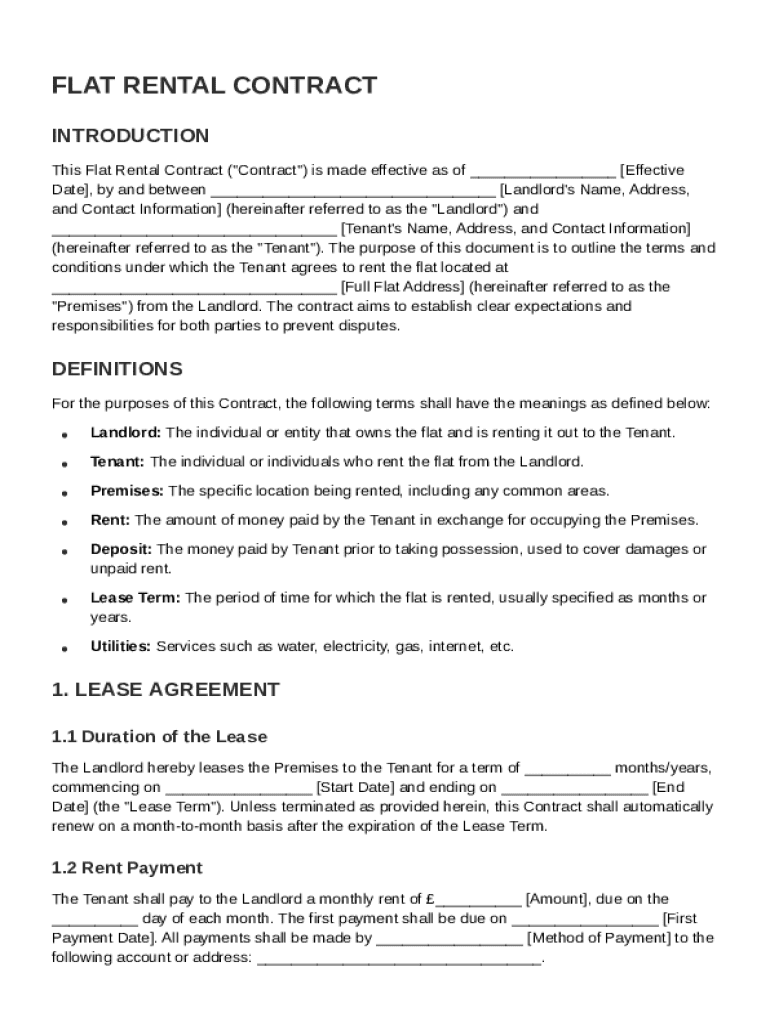
Flat Rental Contract Form
Use a Flat Rental Contract Template template to make your document workflow more streamlined.
What a flat rental contract covers
A Flat Rental Contract Form is a written agreement that records the terms for renting a specific apartment or flat. It identifies the landlord, tenant, property address, rental period, rent amount, deposit, utilities, maintenance responsibilities, access rules, and notice requirements. Both parties review the terms, demonstrate intent, and sign the same document. In the United States, electronic execution may be recognized under the federal ESIGN Act, 15 U.S.C. chapter 96, and applicable state law, but state landlord-tenant rules still govern required disclosures, notices, and enforceability.
Who benefits from flat rental contracts
Flat Rental Contract Form helps housing providers document rent, possession, responsibilities, and signatures in one consistent record.
Independent landlords use the form to record monthly rent, deposits, utilities, maintenance duties, and notice terms before handing keys to a new tenant. Local property managers use one reusable contract for multiple apartments, routing tenant and owner signatures electronically while preserving each unit’s address and payment terms. Multifamily housing companies use standardized rental contracts across leasing teams, connecting signNow with storage or property systems to maintain searchable, auditable occupancy records.
These tasks are executed by both individual contributors and centralized administrators depending on organizational policy and required controls.
Features for flat rental agreements
signNow helps landlords and property teams prepare, route, sign, and preserve Flat Rental Contract Forms while keeping the document’s rental terms visible to every party.
Field detection
Upload the existing rental PDF and review automatically detected fields before adding missing lease terms or signatures.
Party routing
Assign separate fields to the landlord and tenant so each party completes only the information intended for them.
Rental terms
Capture rent, deposit, property, term, and notice details in one signed document rather than scattered messages.
Signing links
Send a signing link when an in-person meeting is impractical, while preserving the same agreement for both parties.
Audit evidence
Keep the completed rental agreement with signNow’s audit trail, timestamps, and action history for later review.
Reusable templates
Use templates for repeated apartment agreements while changing unit-specific addresses, amounts, dates, and occupants.
Complete a flat rental contract
Prepare the rental terms, place the required fields, obtain signatures, and preserve the completed agreement with its audit record.
Upload document:
Upload the rental contract PDF. Review fields:
Check detected fields and add missing terms. Add parties:
Enter landlord and tenant details. Send contract:
Send the completed contract for signatures. Store records:
Download the signed copy and audit trail.
How the rental contract workflow works
The signNow workflow turns a prepared flat rental agreement into a completed, traceable record without changing the underlying rental terms.
Upload: Upload the flat rental contract. Prepare: Review detected fields and rental terms. Assign: Assign landlord and tenant fields. Complete: Send, sign, and archive evidence.
 Best ROI. Our customers achieve an average 7x ROI within the first six months.
 Scales with your use cases. From SMBs to mid-market, airSlate SignNow delivers results for businesses of all sizes.
 Intuitive UI and API. Sign and send documents from your apps in minutes.
What the rental audit trail records
The audit trail adds evidence around the Flat Rental Contract Form after setup: identity events, timestamps, document activity, and exportable completion history.
Authenticate signer:
Capture timestamp:
Link document:
Seal history:
Export evidence:
Archive securely:



Technical requirements for rental contracts
Use signNow through Chrome, Firefox, Safari, or Edge on Windows or macOS. Signers can also review and complete the Flat Rental Contract Form through signNow mobile apps on iOS or Android. Encrypted connections use TLS.
Browser support Chrome, Firefox, Safari, and Edge Operating systems Windows, macOS, iOS, and Android Access devices Desktop browsers and signNow mobile apps
Property teams should manage access through approved devices, role-based permissions, and documented storage policies. Organizations requiring automated intake can evaluate signNow API access, SSO provisioning, and integrations with systems such as Salesforce, Microsoft 365, Google Drive, Box, or NetSuite.
Recommended rental contract setup
Configure the Flat Rental Contract Form around signer attribution, rental-term accuracy, evidence preservation, and controlled access to tenant records.
| Setting | Recommendation |
|---|---|
| Authentication method | Email delivery with SMS verification |
| Signature type | Typed or drawn electronic signature |
| Audit trail | Enable completion history export |
| Document retention | Apply state-approved lease schedule |
| Encryption and provisioning | TLS, AES-256, restricted team access |
Process a flat rental contract
Use these four stages to move a Flat Rental Contract Form from prepared rental terms to a preserved signed record.
Prepare the document
Send to signers
Collect signatures
Complete and archive
Rental contract retention schedule
Use the applicable state and business schedule; federal periods below apply only when the listed record category genuinely exists.
Three years from filing
Six years when required
Three years after filing
Six years from creation
State-required longer period
Preserve rental records responsibly
A defensible record combines the signed rental agreement, supporting disclosures, and signNow audit evidence under a documented retention and access policy.
Set a documented retention period
Export the audit trail
Restrict archived tenant data
Check state retention rules
Security for rental documents
Transport encryption:
Stored encryption:
Security reporting:
Information security:
Electronic records:
Health information:
Compare rental contract pricing
For Flat Rental Contract Form workflows, signNow pricing and features are listed below alongside competitor values that were not verified in the supplied vendor data.
| Features | signNow | DocuSign | Adobe Sign | PandaDoc | Dropbox Sign |
|---|---|---|---|---|---|
| Annual starting price per user | $8 Business plan | Not verified | Not verified | Not verified | Not verified |
| Free trial availability | 7 days, no card | Not verified | Not verified | Not verified | Not verified |
| Bulk sending for leases | Business Premium | Not verified | Not verified | Not verified | Not verified |
| Audit trail availability | Business included | Not verified | Not verified | Not verified | Not verified |
| HIPAA compliance availability | BAA required | Not verified | Not verified | Not verified | Not verified |
Legal standing of rental agreements
A Flat Rental Contract Form can serve as evidence of agreed rental terms when the parties intend to sign, consent to electronic records, can access and reproduce the document, and can be attributed to the signers. ESIGN and applicable UETA or New York ESRA may support electronic execution; wills, court orders, and certain family-law documents remain excluded under 15 U.S.C. §7003.

Troubleshoot flat rental contracts
Resolve field, signing, plan, privacy, and evidence questions before sending a Flat Rental Contract Form to a landlord or tenant.
Upload the original Flat Rental Contract Form as a PDF, then inspect signNow’s detected fields. Add missing landlord, tenant, date, rent, deposit, and signature fields manually before sending. Business includes templates and audit trails; field placement remains the sender’s responsibility.
A tenant can generally sign as a guest through the received signing link, subject to the sender’s authentication settings. For stronger attribution, enable SMS authentication or another available method. The audit trail records the signing event, timestamps, and document activity.
Electronic execution of a rental agreement may be recognized under ESIGN, 15 U.S.C. chapter 96, and UETA or New York ESRA. Confirm state landlord-tenant requirements, consumer disclosures, and any wet-signature or notarization rule before relying on electronic execution.
Business is listed at $8 per user per month with annual billing and includes legally binding eSignatures, templates, and audit trails. Business Premium is listed at $15 per user per month annually and adds bulk send and kiosk mode.
A signed rental contract can contain names, addresses, payment terms, and identity information. Use role-based access, restrict shared links, and retain only necessary copies. signNow states that its platform is ESIGN- and UETA-compliant, with SOC 2 Type II and ISO 27001 certifications.
If a signer disputes the agreement, download the completed PDF and signNow audit trail together. The audit evidence helps show delivery, signer actions, timestamps, and document history; enforceability still depends on intent, consent, attribution, record access, and applicable state law.
Key performance indicators that demonstrate SignNow's proven track record.
BE READY TO GET MORE
Get this form now!

If you believe that this page should be taken down, please follow our DMCA take-down process.