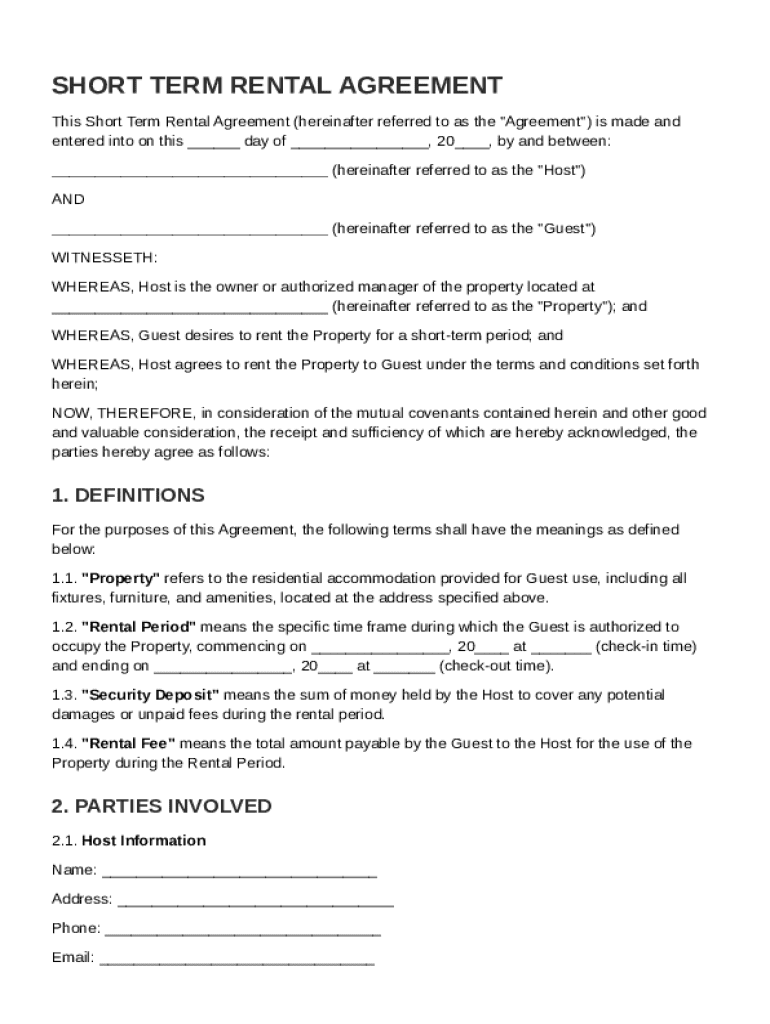
Short Term Rental Contract Form
Use a Short Term Rental Contract Template template to make your document workflow more streamlined.
What a short-term rental contract does
A Short Term Rental Contract Form records the terms for a temporary stay between a property owner or manager and a guest. It identifies the property, occupancy dates, occupants, rental amount, deposit, payment timing, cancellation terms, house rules, damage responsibilities, access instructions, and signatures. Using signNow, the sender uploads the agreement, reviews detected fields, assigns each party’s signing areas, and sends it electronically. Completed copies can include signing evidence and an audit trail. State landlord-tenant, lodging, tax, and local short-term-rental rules may add requirements.
Who benefits from rental contracts
Short-term rental agreements help property operators document the exact terms accepted by owners, managers, guests, and other authorized occupants.
Independent property managers can prepare reusable rental-contract templates, send agreements from mobile devices, and keep each guest’s completed form linked to its property and stay dates. Vacation-rental companies can route agreements among owners, managers, and guests while preserving house rules, deposits, cancellation terms, and signer evidence for each reservation. Real estate and hospitality teams can connect rental-contract workflows to approved storage or CRM systems, controlling access while coordinating high-volume short-term stays.
These tasks are executed by both individual contributors and centralized administrators depending on organizational policy and required controls.
Features for short-term rental contracts
signNow connects field preparation, signer routing, electronic consent, and record preservation to the details that make each short-term rental agreement enforceable and usable.
Field placement
Upload an existing Short Term Rental Contract Form and place fields for property details, dates, occupants, fees, deposits, rules, initials, and signatures without rebuilding the document.
Signer routing
Send the rental agreement to the property owner, manager, guest, or co-signer in a defined order, reducing missed approvals before occupancy begins.
Signing evidence
Capture consent and signatures electronically while preserving timestamps, delivery history, and signer actions for later contract administration or dispute review.
Reusable templates
Reuse an approved rental-contract template while updating each property address, stay period, rate, deposit, and occupancy limit for the next reservation.
Mobile completion
Let property teams manage contracts from signNow mobile apps when guests or managers need to review documents away from a desktop computer.
Controlled records
Store the completed agreement with its certificate and audit trail so the executed version remains connected to the specific short-term stay.
How short-term rental signing works
Prepare the rental agreement in signNow, assign each party’s fields, collect signatures, and preserve the completed record with its audit trail.
Upload: Upload the Short Term Rental Contract Form. Detect fields: Auto-detect fillable fields, then review placements. Add signers: Add property owner and guest signers. Complete: Send, sign, and archive the completed contract.
Ways to send and sign rental contracts
- Use the signNow web app when a property manager prepares a Short Term Rental Contract Form, checks detected fields, and sends the agreement from a desktop workflow to the owner and guest.
- Use the signNow mobile app when a manager or guest needs to review property dates, fees, house rules, and signature fields on an iOS or Android device.
- Use kiosk mode when an in-person property desk or managed check-in process requires multiple guests to complete assigned rental-contract fields on one controlled device.
- Use a shareable signing link when a verified booking workflow needs to distribute the same approved rental-contract template without manually entering each guest’s email address.
 Best ROI. Our customers achieve an average 7x ROI within the first six months.
 Scales with your use cases. From SMBs to mid-market, airSlate SignNow delivers results for businesses of all sizes.
 Intuitive UI and API. Sign and send documents from your apps in minutes.
What the rental contract audit trail records
A Short Term Rental Contract Form audit trail preserves technical evidence about who acted, when they acted, and how the completed record remained unchanged.
Signer authentication:
Timestamp capture:
Document hashing:
Tamper-evident sealing:
Event logging:
Audit retrieval:
Platform requirements for rental contracts
Short Term Rental Contract Form workflows run through supported browsers including Chrome, Firefox, Safari, and Edge on Windows or macOS. signNow also provides mobile apps for iOS and Android, allowing property managers and guests to review and sign rental documents away from a desk.
Browser support Chrome, Firefox, Safari, and Edge Desktop systems Windows and macOS desktop access Mobile access iOS and Android mobile apps
Use an updated browser, reliable internet connection, and a device capable of displaying the complete contract. Organizations handling identification or payment information should manage access through approved devices, role permissions, and security policies rather than relying on an unrestricted shared link.



Security for rental contract records
Transport encryption:
Storage encryption:
Security certification:
Information security:
Electronic signatures:
Protected health information:
Short-term rental contract completion timeline
No federal filing deadline applies to a private rental contract; completion depends on accurate preparation, signer availability, and the scheduled occupancy date.
Prepare the contract
Send to signers
Collect signatures
Archive the agreement
Rental contract retention schedule
Retention depends on the contract’s business purpose, tax use, state requirements, and any legal hold; apply the longest applicable rule.
State-required rental records
3 years for tax records
6 years for larger understatement
7 years for SOX records
Until legal hold ends
Retention and record-keeping practices
Keep each Short Term Rental Contract Form with its signing evidence, applicable retention rule, and controlled archival record.
Apply the governing retention period
Export every audit trail
Secure sensitive rental records
Preserve one authoritative contract copy
Privacy and disclosure pitfalls
Publishing a signed contract with a guest’s address, phone number, or identification details can expose personal information beyond the intended parties. A guest may sign without reviewing cancellation, occupancy, damage, or payment clauses when the document lacks clear consent checkpoints. Shared templates or unrestricted links can let an unauthorized person alter property details, pricing, dates, or signer assignments. Sending the final contract to the wrong recipient can disclose stay dates, access instructions, and payment information.
Risks from incomplete rental contracts
Dispute over obligations
Electronic record challenge
Attribution dispute
Weaker evidence
Short-term rental contract troubleshooting
Use these answers to resolve field, signer, authentication, plan, evidence, and legal-scope questions before relying on an executed rental agreement.
Upload the original Short Term Rental Contract Form again and review signNow’s detected fields. Auto-detection can identify fillable areas, but the sender must confirm property address, dates, fees, occupants, initials, and signature placements before sending.
Open the recipient settings and confirm the guest’s email address, signing order, and assigned fields. signNow’s routing controls can send the same contract to an owner, manager, and guest in a defined sequence.
Use signNow authentication options, including email delivery and SMS-based verification where configured, to strengthen signer attribution. The contract should also show clear intent and consent to electronic records under ESIGN and applicable state law.
The Business plan is listed at $8 per user per month with annual billing and includes legally binding eSignatures, templates, and audit trails. Business Premium adds bulk send at $15 per user per month annually.
Export the completed PDF and certificate of completion from signNow, then retain the audit trail with the agreement. The record should remain reproducible and connected to the exact property, dates, and signer event.
A Short Term Rental Contract Form is not a substitute for a notarized deed, will, family-law decree, or court filing. ESIGN and UETA recognize qualifying electronic transactions, while listed statutory exclusions and state lodging rules still apply.
Key performance indicators that demonstrate SignNow's proven track record.
BE READY TO GET MORE
Get this form now!

If you believe that this page should be taken down, please follow our DMCA take-down process.