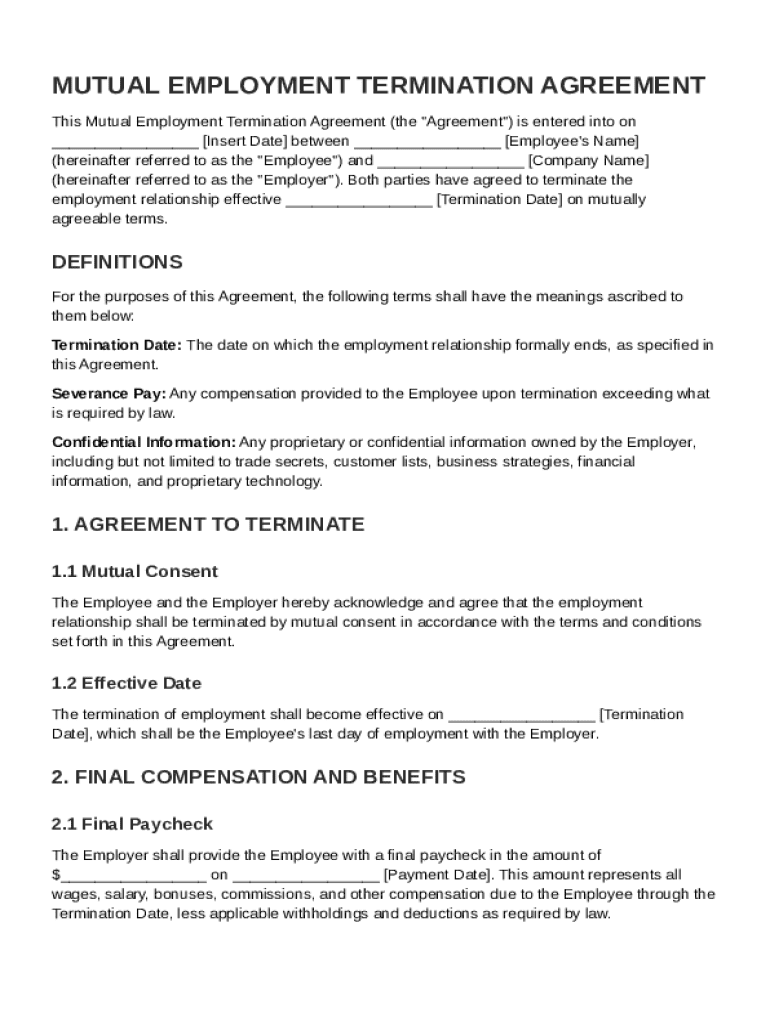
Mutual Employment Termination Agreement Form
Use a Mutual Employment Termination Agreement Template template to make your document workflow more streamlined.
What this termination agreement does
A Mutual Employment Termination Agreement Form records an employer’s and employee’s shared decision to end employment under stated terms. It usually identifies the parties, termination date, payments or benefits, return of company property, confidentiality duties, and any release language. The agreement is a private business record, not an IRS or USCIS filing. Both parties review the terms, demonstrate intent, and sign. Under the federal ESIGN Act, 15 U.S.C. chapter 96, and applicable state law such as UETA or New York ESRA, electronic signatures may carry the same legal effect as handwritten signatures when enforceability requirements are met.
Key performance indicators that demonstrate SignNow's proven track record.
Business types that use this form
The form is most useful when an organization needs consistent separation records and a clear signing path for both parties.
Solo practitioners can prepare a documented separation for a small business, route it to the employer and employee, and preserve the signed agreement without building a separate document system. Growing companies can standardize termination terms in shared templates, assign HR sending permissions, and maintain an audit trail for each employee’s completed agreement. Enterprise HR departments can connect agreement workflows with systems such as Microsoft 365, Salesforce, NetSuite, or secure storage while limiting access through organizational controls.
These tasks are executed by both individual contributors and centralized administrators depending on organizational policy and required controls.
Who uses this termination agreement
Human resources
Human resources teams use the Mutual Employment Termination Agreement Form to document agreed separation terms, effective dates, final-pay arrangements, confidentiality provisions, property return, and any negotiated release. SignNow keeps the signed agreement and completion evidence together for controlled personnel-record access.
Business and legal teams
Small businesses and legal teams use the form when an employer and departing employee need a documented mutual separation. The workflow can cover the agreement, attached schedules, initials, signatures, and completed audit trail without treating the document as an IRS, USCIS, or court filing.
 Best ROI. Our customers achieve an average 7x ROI within the first six months.
 Scales with your use cases. From SMBs to mid-market, airSlate SignNow delivers results for businesses of all sizes.
 Intuitive UI and API. Sign and send documents from your apps in minutes.
How the agreement works in signNow
The signNow workflow turns the agreed employment separation terms into a routed, signed record with field ownership and completion evidence.
Upload the form: Upload the Mutual Employment Termination Agreement Form to signNow. Check the fields: Review detected fields and add missing signature, initials, date, and text fields. Assign the signers: Assign each field to the employer or employee, then send invitations. Complete and archive: Collect signatures and store the completed agreement with its audit trail.
Recommended agreement workflow setup
Configure the agreement workflow to identify both parties, preserve signing evidence, and control access to employment records.
| Setting | Recommendation |
|---|---|
| Authentication method | Email verification with SMS OTP |
| Signature type | Electronic signature under ESIGN and UETA |
| Audit trail | Capture signer actions, timestamps, and IP address |
| Document retention | Retain the signed agreement under company policy |
| Encryption | AES-256 at rest and TLS 1.2 or 1.3 in transit |
What the audit trail records
The audit trail separates signing evidence from the agreement’s substantive employment terms and helps document how each party completed the transaction.
Authenticate signers:
Capture timestamps:
Record document history:
Seal completion:
Export evidence:
Control retrieval:
Choose the right signing method
- Use the signNow web app when HR or an administrator uploads the Mutual Employment Termination Agreement Form and coordinates both parties from one workspace.
- Use the mobile app when an employer or employee must review and sign the agreement away from a desk, including during an exit meeting.
- Use kiosk mode for supervised in-person signing when an HR representative provides one device for the employee and employer to complete the agreement.
- Use a shareable signing link when the responsible administrator needs to distribute the same approved agreement without sending individual invitations.
Track each agreement processing stage
A Mutual Employment Termination Agreement Form has no federal filing deadline, so the parties should set and document an internal completion schedule.
Prepare the agreement
Deliver to signers
Track signer turnaround
Archive completion
Best practices for this form
Accurate terms, controlled signing, and documented retention protect the meaning and evidentiary value of the completed agreement.
Review every termination term before sending
Assign fields to the correct parties
Preserve the signed agreement and audit trail
Document the applicable retention policy
Security for employment records
Encryption at rest:
Transport encryption:
Security certification:
Information security:
Health information:
Electronic signatures:



Pricing and plan features
For this private employment agreement, compare verified signNow plan details with competitor information that has not been verified in the supplied product data.
| Features | signNow | DocuSign | Adobe Sign | PandaDoc | Dropbox Sign |
|---|---|---|---|---|---|
| Starting price | $8/user/month annually | Not verified | Not verified | Not verified | Not verified |
| Free trial | 7 days, no card | Not verified | Not verified | Not verified | Not verified |
| Bulk send | Business Premium included | Not verified | Not verified | Not verified | Not verified |
| Audit trail | Included with Business | Not verified | Not verified | Not verified | Not verified |
| HIPAA compliance | Available with BAA | Not verified | Not verified | Not verified | Not verified |
Termination agreement troubleshooting
Resolve field, signing, plan, and recordkeeping questions before the agreement becomes part of the personnel file.
Upload the completed Mutual Employment Termination Agreement Form as a PDF or supported document, then use signNow’s field detection and review each detected name, date, initials, and signature field manually. Detection does not decide whether release, payment, or confidentiality language is legally sufficient.
The signNow Business plan costs $8 per user per month with annual billing and includes templates, mobile apps, and audit trails. Business Premium costs $15 per user per month annually and adds bulk send, which can help distribute repeated separation agreements.
A signed electronic agreement can satisfy ESIGN and applicable UETA requirements when intent, consent, attribution, and record retention are established. For consumer-facing records, 15 U.S.C. §7001(c) also addresses electronic-record disclosures and access requirements.
Use signNow SMS OTP or another configured authentication control when the agreement contains sensitive employment information. Authentication supports attribution, but it does not replace reviewing state-law requirements for releases, wages, or claims waivers.
SignNow’s subscription plans include 100 signature invites per user per year, with overage fees. The Site License uses $1.50 per signature invite and is designed for 1,000 or more documents annually; confirm plan terms before large HR campaigns.
Export the completed PDF and audit trail after every signature. SignNow provides audit trails and document history, while the employer must apply its own personnel-record policy and any applicable state retention rule; no universal federal period governs this private agreement.
BE READY TO GET MORE
Get this form now!

If you believe that this page should be taken down, please follow our DMCA take-down process.