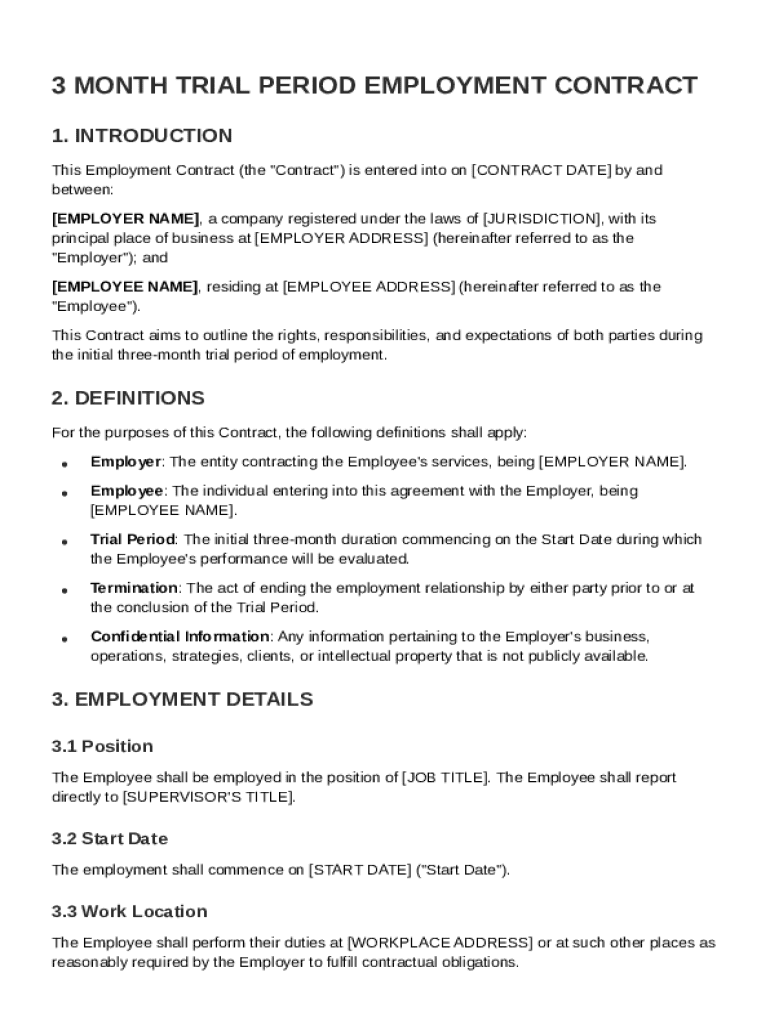
3 Month Trial Period Employment Contract Form
Use a 3 Month Trial Period Employment Contract Template template to make your document workflow more streamlined.
What this employment contract form does
This form records the terms of a three-month trial employment period between an employer and a prospective employee. It identifies the parties, sets the evaluation period, and captures agreed employment conditions such as duties, compensation, dates, and signatures when those fields are included in the document. Upload the form to signNow, review its detected fillable fields, add any missing fields, and send it to the required signers. The completed contract and audit trail create a reproducible record, subject to applicable state employment law and ESIGN or UETA requirements.
Legal standing of the trial employment contract
A signed three-month trial employment contract can provide evidence of the parties’ agreed terms when intent, consent, signer attribution, and reliable record retention are established under ESIGN and applicable state law. Electronic execution does not cover wills, codicils, testamentary trusts, certain court orders, or family law decrees.

How the contract workflow works
The form moves from preparation to signature through a documented signNow workflow designed for the three-month employment evaluation period.
Upload contract: Upload the completed employment contract. Check fields: Review detected fields and add missing signature dates. Request signatures: Send the three-month terms to employee and employer. Archive record: Store the executed contract with its audit trail.
Complete the trial contract online
Use these steps to prepare the three-month employment terms, collect signatures, and preserve the completed agreement.
Upload form:
Upload the employment contract PDF to signNow. Add parties:
Add or confirm employee and employer fields. Place fields:
Place signatures, dates, and initials where required. Finish record:
Send, monitor, and download the completed record.
Recommended contract workflow setup
Configure the three-month employment contract around signer identity, reliable evidence, controlled access, and the retention rule for each related record.
| Setting | Recommendation |
|---|---|
| Authentication method | Email authentication with SMS OTP |
| Signature type | Electronic signature with signer intent |
| Audit trail | Retain completion history with signed PDF |
| Document retention | Apply the matching federal record rule |
| Encryption | TLS 1.2/1.3 and AES-256 protection |
 Best ROI. Our customers achieve an average 7x ROI within the first six months.
 Scales with your use cases. From SMBs to mid-market, airSlate SignNow delivers results for businesses of all sizes.
 Intuitive UI and API. Sign and send documents from your apps in minutes.



Platform requirements for the contract
Use signNow through Chrome, Firefox, Safari, or Edge on Windows or macOS. The signNow mobile apps support contract review and signing on iOS and Android devices.
Browser support Chrome, Firefox, Safari, Edge Desktop systems Windows and macOS desktops Mobile access iOS and Android mobile apps
Organizations should also evaluate managed-device policies, SSO provisioning, and API access before routing employment contracts through a larger HR system. Configure access controls and retention according to company policy, applicable state law, and the record types attached to the contract.
Processing stages for the contract form
No universal federal signing deadline applies to this private employment contract; set dates clearly and retain the executed record.
Prepare contract
Deliver to signers
Signer turnaround
Complete and archive
Risks of incomplete execution
Unclear trial terms
Signer identity gap
No audit trail
Unrecorded performance review
Retention periods for related records
Retention depends on the record’s purpose and industry. Apply the rule that matches the employment contract’s accompanying payroll, tax, health, or safety records.
3 years for payroll records
3 years from tax filing
6 years for HIPAA records
5 years for injury records
30 years for exposure records
Record-keeping practices for trial contracts
Preserve the signed agreement, audit trail, and related records according to their actual business and regulatory purpose.
Export the contract and audit trail
Apply the matching retention rule
Restrict access to authorized users
Review terms before archival
What the contract audit trail records
A signNow audit trail supplements the three-month employment contract with evidence about identity, timing, actions, and final completion.
Authenticate signer:
Capture timestamp:
Bind document:
Seal record:
Retrieve history:
Export evidence:
Challenges when completing the contract
Leaving the three-month start and end dates blank can make the evaluation period difficult to administer or prove later. Omitting pay, duties, review criteria, or termination language creates uncertainty about what the employer and employee agreed. Sending the contract without confirming signer roles can leave the employee or authorized employer representative unsigned. Saving only the signed PDF without its audit trail weakens evidence of timing, identity, and signing activity.
Key performance indicators that demonstrate SignNow's proven track record.
Troubleshooting the trial employment contract
Resolve field, signer, plan, evidence, privacy, and template issues by checking the contract terms and the applicable U.S. requirements.
Upload the contract, then inspect signNow’s detected fields before sending. Add missing signature, date, or initials fields manually so the three-month start and end terms are acknowledged by the correct parties. Business includes templates and audit trails for repeat employment workflows.
Use signNow’s email authentication or add SMS-based two-factor authentication when stronger attribution is needed. ESIGN and UETA focus on intent, consent, attribution, and record retention; choose authentication appropriate to the employment relationship and company policy.
The Business plan is listed at $8 per user per month with annual billing and includes legally binding eSignatures, templates, and audit trails. The seven-day free trial requires no credit card; month-to-month pricing is higher.
Export the signed contract together with its audit trail. The record should preserve the final terms, signer actions, timestamps, and completion evidence so the employer can reproduce the agreement when reviewing the three-month evaluation period.
If the form includes protected health information, signNow identifies HIPAA compliance as requiring a BAA. Limit access to authorized users and apply the organization’s healthcare retention policy, including 45 CFR §164.530(j) where HIPAA records are involved.
For repeat hiring, save an approved template and use role-based access before delegating sending. Review every copy for employee name, dates, compensation, duties, and trial-period language because a template cannot determine whether those business terms are accurate.
BE READY TO GET MORE
Get this form now!

If you believe that this page should be taken down, please follow our DMCA take-down process.