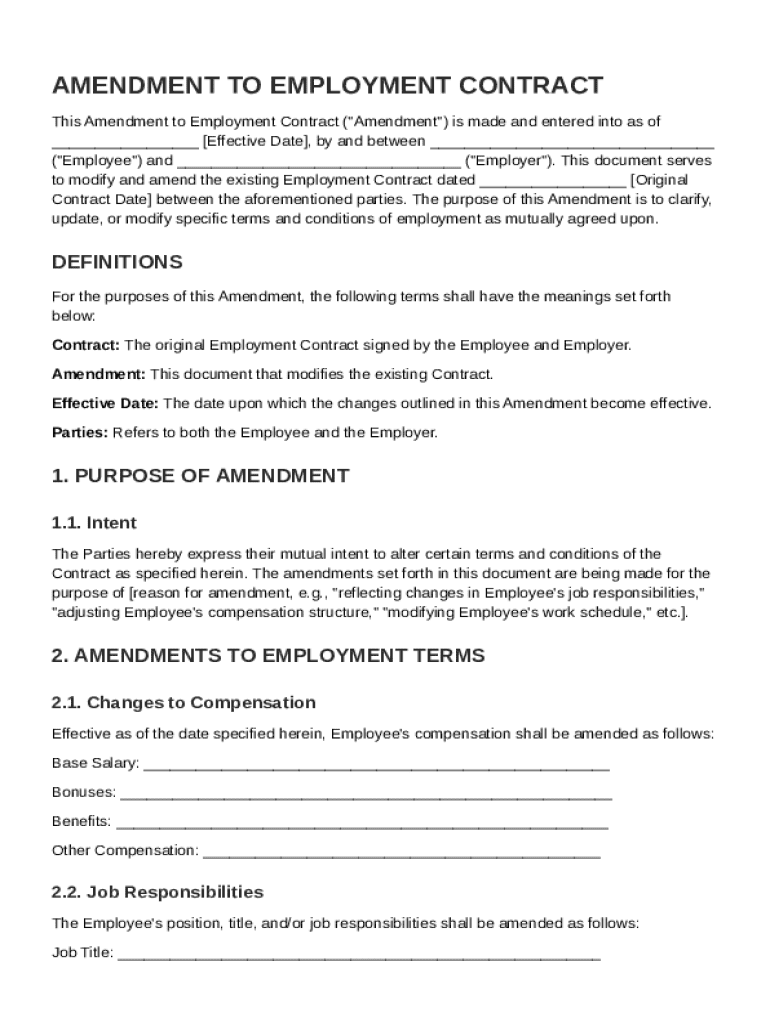
Amendment To Employment Contract Form
Use a Amendment To Employment Contract Template template to make your document workflow more streamlined.
What the employment amendment form does
An Amendment To Employment Contract Form is a written record that changes specific terms of an existing employment agreement without replacing the entire contract. It can identify the original agreement, state the revised compensation, title, duties, work location, schedule, benefits, or effective date, and confirm which provisions remain unchanged. The employee and authorized employer representative review the final language and sign it. With signNow, the sender uploads the amendment, places fields, routes it to signers, and retains the completed document with its audit trail.
Who uses this employment amendment form
Human resources
HR teams use the form to document changes to compensation, title, duties, location, schedule, benefits, or the contract’s effective date. Managers and employees review only the provisions being amended, while legal teams may confirm that the amendment does not conflict with the underlying agreement or state employment law.
Employers and employees
Employers, employees, and authorized representatives use signNow to route the completed amendment, collect assigned signatures, and retain the signed record. The form is suited to bilateral employment changes, but state law and the underlying contract determine whether additional approvals, notices, or formalities apply.
Teams that manage employment amendments
HR administrators can maintain a shared Amendment To Employment Contract Form template, define employee and employer roles, and delegate sending to approved managers. signNow permissions help separate template editing from document dispatch while preserving a consistent signing sequence for personnel records. Legal and operations teams can review amendment language before HR sends it, then use audit trails and completed-document storage to support later questions. Enterprise teams may connect signNow with systems such as NetSuite or Microsoft Dynamics 365 for controlled business workflows.
How the employment amendment workflow works
The signNow workflow converts a completed amendment into a controlled signing process with assigned fields, signer notifications, and an auditable final record.
Upload: Upload the amendment document Prepare fields: Detect and place required fields Send: Send the amendment to employee and employer signers Store record: Complete signatures and retain the audit trail
 Best ROI. Our customers achieve an average 7x ROI within the first six months.
 Scales with your use cases. From SMBs to mid-market, airSlate SignNow delivers results for businesses of all sizes.
 Intuitive UI and API. Sign and send documents from your apps in minutes.
Quick steps for completing the amendment
Prepare the revised employment terms first, then use signNow to place fields, route the amendment, and preserve the completed agreement.
Identify document:
Confirm the amendment identifies the original agreement and effective date. Prepare fields:
Upload the final amendment and place fields for every required signer. Assign signers:
Assign employee and employer roles before sending invitations. Complete record:
Review, sign, download, and store the completed amendment.
Key features for employment amendments
signNow combines field preparation, signer routing, audit evidence, reusable templates, and connected workflows for revised employment terms.
Field detection
Upload the prepared amendment and use signNow’s editor to identify signature, date, initials, and text fields, reducing manual placement before the employee and employer review the revised terms.
Signer roles
Assign each signature field to the correct employee, manager, or authorized company representative so the Amendment To Employment Contract Form follows the intended approval order.
Remote signing
Send the amendment by email or signing link, allowing remote parties to review the exact revised language without exchanging multiple paper or email attachments.
Audit trail
Capture timestamps, signer actions, and document history in an audit trail that can accompany the completed amendment when HR or legal teams review the record.
Reusable template
Use templates for recurring changes such as title, location, schedule, or compensation amendments while keeping each employee’s specific terms in the correct document fields.
System connections
Connect signNow with approved business systems so completed amendments can move into HR, storage, or operational workflows without manually copying contract details.



Security for amended employment records
AES-256 at rest:
TLS 1.2/1.3 in transit:
SOC 2 Type II certified:
ISO 27001 certified:
ESIGN and UETA compliant:
HIPAA compliant with BAA:
Platform requirements for contract amendments
Complete the Amendment To Employment Contract Form in Chrome, Firefox, Safari, or Edge on Windows or macOS. signNow mobile apps support signing on iOS and Android, while an internet connection with TLS-secured access is required for online document exchange.
Supported browsers Chrome, Firefox, Safari, and Edge Operating systems Windows, macOS, iOS, and Android Signing devices Desktop browser and signNow mobile apps
Organizations using managed devices should permit signNow access, document downloads, and approved email delivery. Enterprise deployments may also configure API access, SSO provisioning, and retention controls; confirm certificate, authentication, and long-term record requirements with your compliance team.
Record-keeping practices for amendments
A disciplined record process keeps the amended terms, signing evidence, and applicable retention rule together throughout the employment relationship.
Store the amendment with its underlying contract
Apply the correct retention rule
Identify every changed employment term
Export the audit trail with the final PDF
Legal standing of an employment amendment
An Amendment To Employment Contract Form records the parties’ intent to change identified employment terms; its enforceability depends on contract law, consent, authority, and clear evidence of the final version. ESIGN and UETA generally recognize qualifying electronic signatures for U.S. business transactions, but exclude wills, court orders, and family-law decrees.

Processing stages for an employment amendment
The timeline depends on internal approval and signer availability; signNow records each stage after the final document is prepared.
Prepare the amendment
Deliver to signers
Collect signatures
Archive the record
Troubleshooting amendment signing and records
These answers address field setup, signer access, plan capabilities, electronic-signature evidence, and records for an amended employment contract.
Upload the amendment as a PDF or supported document, then use signNow’s field detection and editor to place signature, initials, date, and required text fields before sending.
The Business plan includes templates, audit trails, and legally binding eSignatures. Business Premium adds bulk send, while Enterprise adds advanced signer authentication and conditional fields.
For U.S. employment amendments, ESIGN and applicable state law generally recognize electronic signatures when intent, consent, attribution, and record retention are established. Review state-specific requirements before relying on the record.
Use signNow’s audit trail to preserve signer identity details, timestamps, actions, and document history. Export the completed amendment and audit record together for an employment file.
A signer can open the email invitation or signing link without creating an account when the workflow allows guest signing. Add SMS authentication when stronger identity verification is needed.
Consumer-facing electronic records may require an ESIGN disclosure explaining paper-record rights, electronic access, and withdrawal procedures under 15 U.S.C. §7001(c). Employment counsel should assess whether that provision applies.
Key performance indicators that demonstrate SignNow's proven track record.
BE READY TO GET MORE
Get this form now!

If you believe that this page should be taken down, please follow our DMCA take-down process.