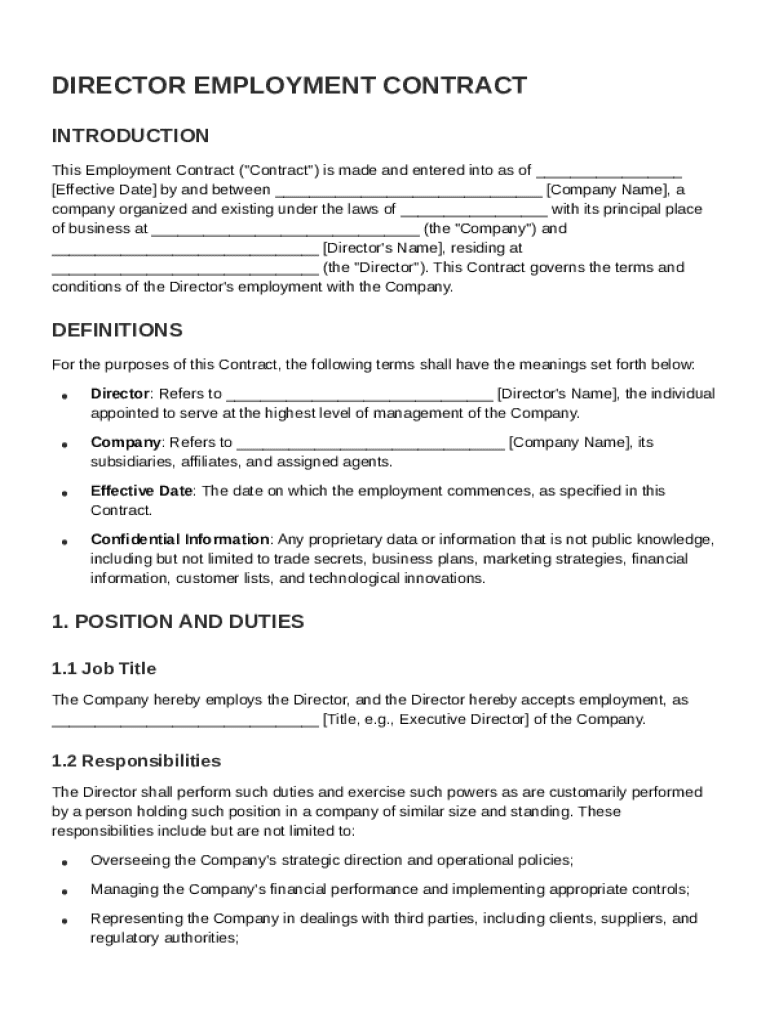
Director Employment Contract Form
Use a Director Employment Contract Template template to make your document workflow more streamlined.
What the Director Employment Contract Form does
A Director Employment Contract Form records the agreed relationship between a company and a director, including appointment terms, duties, compensation, authority, confidentiality, and termination provisions. In the United States, the parties use the completed contract to document their business arrangement and approval process, not to replace state-specific corporate law or legal advice. With signNow, a sender uploads the form, detects or places fillable fields, assigns signers, and sends it for electronic signature. The completed PDF and audit trail preserve the signed terms, signing events, and participant history for later reference.
Who uses this contract form
Corporate governance
Company founders and board administrators use the form to document a director’s appointment, responsibilities, compensation, confidentiality duties, and termination terms before the individual begins acting for the company.
Operating companies
Construction, real estate, healthcare, and professional-services organizations use the form to route director agreements between authorized company representatives and incoming directors while preserving signed copies for personnel and governance files.
Who benefits from this contract form
A construction company’s operations director can prepare director employment terms, assign signature fields to the board and incoming director, and retain the executed agreement with its audit history for personnel records. A legal-services administrator can coordinate director appointments across entities, use reusable templates for compensation and confidentiality terms, and route each agreement to authorized signers without exchanging editable attachments.
How the digital contract workflow works
The Director Employment Contract Form moves from an approved draft to a traceable executed record through four signNow actions.
Prepare document: Upload the completed contract draft. Add fields: Detect or place fields for each signer. Route agreement: Send assigned sections to authorized parties. Preserve record: Store the executed PDF and audit trail.
Complete the contract in five steps
Use this sequence to prepare, route, execute, and preserve a Director Employment Contract Form with signNow.
Upload document:
Upload the Director Employment Contract Form. Check fields:
Review detected fields and add missing fields. Assign signers:
Assign the company and director signers. Send contract:
Send the agreement for electronic signature. Store evidence:
Download the signed PDF and audit trail.
 Best ROI. Our customers achieve an average 7x ROI within the first six months.
 Scales with your use cases. From SMBs to mid-market, airSlate SignNow delivers results for businesses of all sizes.
 Intuitive UI and API. Sign and send documents from your apps in minutes.
Recommended contract workflow settings
Configure the Director Employment Contract Form workflow around signer identity, controlled access, evidence preservation, and secure handling of executed agreements.
| Setting | Recommendation |
|---|---|
| Authentication method | Email verification with SMS OTP |
| Signature type | Typed or drawn electronic signature |
| Audit trail | Retain completion certificate and event history |
| Retention and encryption | Secure archive with AES-256 protection |
| User provisioning | Assign role-based access to contract teams |
How the contract audit trail works
signNow records the technical evidence surrounding each Director Employment Contract Form signing event, creating a traceable completion history.
Signer authentication:
Timestamp capture:
Document hashing:
Tamper-evident sealing:
Event attribution:
Audit export:
Features that support contract execution
signNow combines field preparation, signer routing, audit evidence, and document storage features for Director Employment Contract Form workflows.
Field preparation
Upload the Director Employment Contract Form and use detected fields or add signature, date, initials, and text fields before sending.
Signer routing
Assign the company representative and director as named recipients, preserving the intended approval sequence for the agreement.
Audit evidence
Capture email, timestamps, actions, and completion evidence alongside the executed contract for later review.
Version control
Keep the signed PDF separate from editable drafts so the approved director terms remain identifiable and reproducible.
Reusable templates
Use templates for recurring director appointments while reviewing compensation, authority, and termination language before each send.
Business integrations
Connect executed agreements with Salesforce, NetSuite, Google Drive, Box, or other supported systems used for corporate records.



Security controls for signed agreements
Data in transit:
Stored documents:
Security assurance:
Information security:
U.S. eSignatures:
Protected health data:
Challenges when preparing the contract
Director compensation, authority, and reporting duties may be left undefined, creating disagreement about performance expectations and approval rights. Multiple versions of the agreement can circulate by email, making it difficult to identify which terms received board or director approval. Signature fields may be assigned to the wrong company representative, weakening attribution and delaying execution. Confidentiality, intellectual property, and termination language may not match the company’s state-law requirements or governance documents.
Risks of incomplete execution
Approval dispute
Contract challenge
Attribution failure
Evidence weakness
State-law conflict
Best practices for completing the agreement
Careful term review and controlled execution help ensure the signed Director Employment Contract Form matches the company’s approved governance decisions.
Confirm approved director terms
Assign each required field
Review reusable templates
Preserve the executed agreement
Director contract troubleshooting questions
Resolve the named signing, legal, access, and recordkeeping issues before relying on an executed Director Employment Contract Form.
On the Business plan, upload the Director Employment Contract Form, place or confirm fields, and route it to the named company and director signers. The plan includes templates and audit trails. Verify that the final agreement reflects approved corporate terms before sending.
Electronic signatures for a U.S. business contract generally fall under ESIGN, 15 U.S.C. chapter 96, and applicable state law, including UETA or New York ESRA. Preserve signer intent, consent, attribution, and a reproducible completed record with its audit trail.
If the director does not receive the invitation, confirm the email address, resend the request, or generate a signing link. Review recipient assignment before resending so the contract reaches the authorized director and company representative.
Business Premium is the signNow plan identified as including bulk send, while Business supports individual contract workflows. Use bulk send only when each agreement has been reviewed for director-specific compensation, authority, and termination terms.
Download the completed PDF and its audit trail after all required parties sign. Store both with the approved corporate record, keeping the executed version distinguishable from editable drafts and documenting any later amendment separately.
If the agreement contains protected health information, signNow identifies HIPAA compliance as requiring a business associate agreement. Confirm that requirement before including PHI, and limit access to users assigned to the contract workflow.
Key performance indicators that demonstrate SignNow's proven track record.
BE READY TO GET MORE
Get this form now!

If you believe that this page should be taken down, please follow our DMCA take-down process.