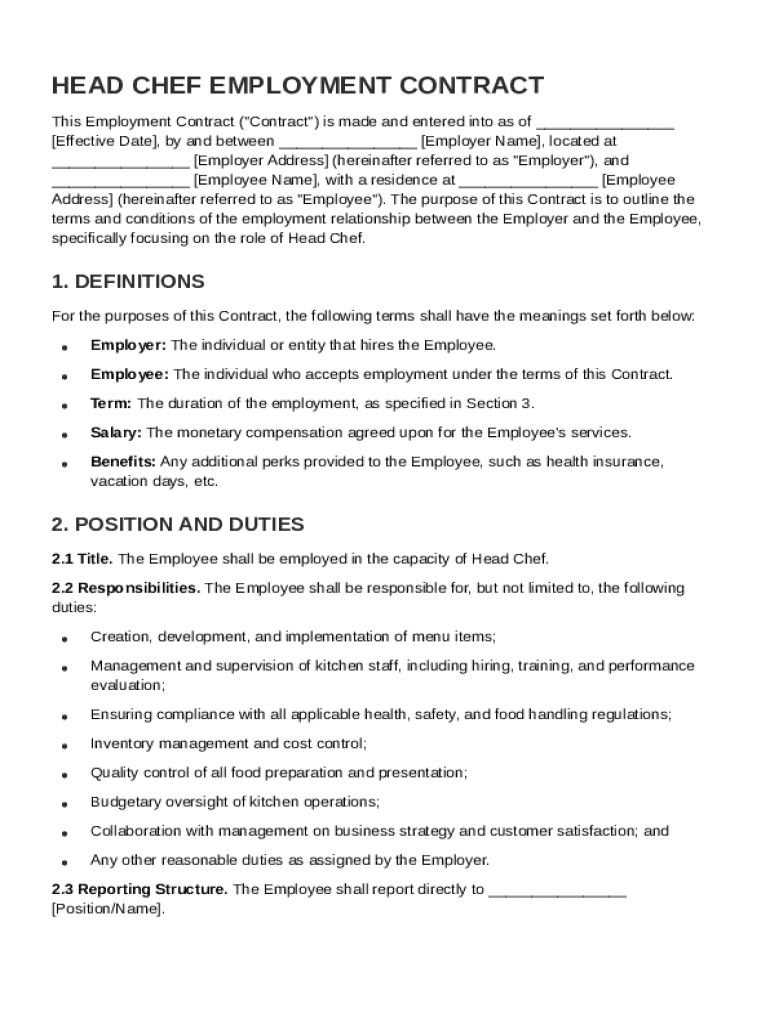
Head Chef Employment Contract Form
Use a Head Chef Employment Contract Template template to make your document workflow more streamlined.
What a head chef employment contract does
A Head Chef Employment Contract Form records the agreed terms between a restaurant or hospitality employer and the person hired to lead kitchen operations. It identifies the parties, position, duties, compensation, schedule, benefits, confidentiality obligations, termination terms, and signature dates. The employer completes the document, reviews its provisions with the head chef, and obtains signatures from authorized parties. With signNow, the contract can be uploaded, fields can be placed or detected, and the completed agreement can be sent, signed, and retained with an audit trail. State employment law still governs the relationship.
Who uses this employment contract
Restaurant operators
Restaurant owners and hospitality operators use the form to define the head chef’s authority, kitchen responsibilities, compensation, schedule, benefits, confidentiality duties, and termination terms before employment begins.
Chefs and HR
Head chefs and HR teams review the written duties, pay terms, workplace policies, and signature requirements before returning an executed agreement to the employer.
How the head chef contract works
The workflow moves from contract preparation to signature collection and preserves a record of each completed action.
Upload contract: Upload the completed contract template Add fields: Place fields for both parties Send contract: Send the contract for signatures Archive record: Store the signed record with audit evidence
Key features for head chef agreements
The form organizes essential employment terms and signNow workflow controls so restaurant employers can complete, sign, and retain the agreement consistently.
Role clarity
Capture the head chef’s role, kitchen authority, duties, reporting relationship, and operational expectations in one structured agreement.
Pay terms
Record salary, bonus terms, schedule, benefits, and other compensation provisions before the employment relationship begins.
Remote signing
Send the completed contract to the employer and head chef for sequential or designated signatures without paper handling.
Audit trail
Preserve signer actions, timestamps, and completion evidence so the executed contract is easier to retrieve and review.
Reusable template
Reuse an approved contract structure while updating location, compensation, duties, and other restaurant-specific terms for each hire.
Mobile access
Review and sign from a desktop or mobile device, supporting hiring workflows that involve restaurant owners and chefs in different locations.



 Best ROI. Our customers achieve an average 7x ROI within the first six months.
 Scales with your use cases. From SMBs to mid-market, airSlate SignNow delivers results for businesses of all sizes.
 Intuitive UI and API. Sign and send documents from your apps in minutes.
Authenticate contract signers securely
PKI:
X.509 certificates:
Two-factor authentication:
SMS OTP:
ID verification:
Audit evidence:
What the audit trail records
The audit trail connects the head chef contract to signer actions, timestamps, authentication events, and a retrievable completion record.
Authenticate signer:
Capture timestamp:
Hash document:
Seal record:
Log actions:
Export trail:
Recommended contract workflow setup
Use a controlled configuration that verifies signers, records contract events, protects the file, and assigns retention responsibility to the employer.
| Setting | Recommendation |
|---|---|
| Authentication method | Email verification with SMS OTP |
| Signature type | Electronic signature with signer intent |
| Audit trail | Enabled for every contract |
| Document retention | Employer policy with state-law review |
| Encryption | TLS in transit and AES-256 at rest |
Legal standing of the contract
A signed Head Chef Employment Contract Form can support proof of agreed employment terms when the parties show intent, consent, attribution, and reliable record retention under ESIGN and applicable state law, including UETA or New York’s ESRA. Wills, court orders, and certain family-law documents are excluded from ESIGN’s coverage.

Contract risks to address
Unclear duties
Pay dispute
Weak attribution
Retention failure
Best practices for retaining contracts
Careful preparation and controlled retention help employers preserve the head chef agreement, signer evidence, and the exact terms accepted by both parties.
Retain the executed agreement with personnel records
Export audit evidence after completion
Restrict access to contract information
Review every term before signature
Business types that use the form
The form fits restaurant employers that need written evidence of head chef duties, compensation, authority, and acceptance before work begins.
Independent restaurants use the form to document one head chef’s authority, compensation, schedule, and operational responsibilities without coordinating a large HR department. Multi-location hospitality groups use reusable templates and controlled signing workflows to keep head chef agreements consistent while preserving location-specific compensation and reporting terms. Restaurant management companies use audit trails and integrations to coordinate contract approvals, signer completion, and secure storage across owners, operators, and culinary leadership.
These tasks are executed by both individual contributors and centralized administrators depending on organizational policy and required controls.
Challenges when preparing the contract
Undefined kitchen authority can create disputes over staffing, purchasing, menu control, and reporting responsibilities. Incomplete compensation language can leave salary, overtime treatment, bonuses, or benefits open to conflicting interpretations. Unsigned revisions may cause the employer and head chef to rely on different contract versions. Unrestricted access can expose compensation, contact details, and other personnel information to unauthorized recipients.
Troubleshoot head chef contract signing
These answers address signing, correction, authentication, plan, and electronic-record questions for this employment contract.
Confirm the recipient email address, signer order, and required fields before resending. signNow templates and audit trails help identify whether the contract is waiting for a particular recipient or field.
Review the compensation, duties, schedule, benefits, and termination language before sending. signNow allows the sender to correct the source document and create a new signing request rather than altering an executed record.
Business includes legally binding eSignatures, templates, audit trails, and mobile apps at $8 per user per month with annual billing. It includes 100 signature invites per user annually; overage fees may apply.
The ESIGN Act, 15 U.S.C. chapter 96, and UETA generally recognize electronic signatures when intent, consent, attribution, and record retention are established. State employment law and any required notices still apply.
For a consumer-facing electronic record, provide the ESIGN disclosure, explain the right to paper records, confirm electronic access, and provide a method to withdraw consent under 15 U.S.C. §7001(c).
Business Premium costs $15 per user per month with annual billing and adds bulk send, kiosk mode, request payments, and quick invite links. Use it when multiple head chef contracts require the same controlled workflow.
Key performance indicators that demonstrate SignNow's proven track record.
BE READY TO GET MORE
Get this form now!

If you believe that this page should be taken down, please follow our DMCA take-down process.