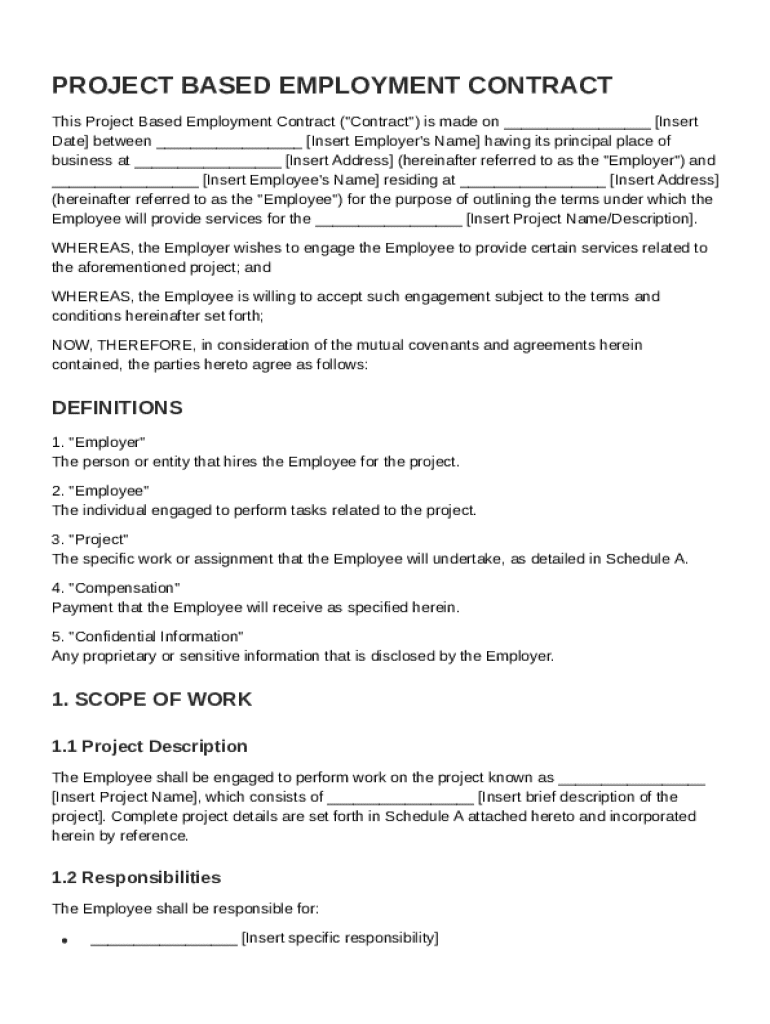
Project Based Employment Contract Form
Use a Project Based Employment Contract Template template to make your document workflow more streamlined.
What this project employment contract does
A Project Based Employment Contract Form records the terms for work tied to a defined project rather than an open-ended assignment. It identifies the parties, describes the project scope and expected deliverables, and records compensation, timing, responsibilities, and approval terms supplied by the parties. With signNow, a sender uploads the agreement, reviews or adds fillable fields, assigns fields to each signer, and sends the document electronically. Signers review and execute the contract, while signNow preserves the completed document and audit trail for the parties’ records.
Why teams look for DocuSign alternatives
Organizations seek alternatives when they need different pricing models, stronger native automation, simpler bulk affidavit workflows, or more flexible identity-verification options than those available in a legacy envelope-based vendor.

Who uses project employment contracts
Project-based employers
Project managers use the form to document a defined assignment, deliverables, payment terms, and approval responsibilities before work begins.
Independent contractors
Independent specialists use the form to confirm scope, milestones, compensation, confidentiality, and signature responsibilities with a hiring business.
Business types using project contracts
Project-based consultants, contractors, and larger employers use this form to define work, compensation, approvals, and signing responsibilities.
A solo design consultant can document a fixed project scope, milestone payments, intellectual-property terms, and client approval through one signed agreement and retained audit trail. A regional construction company can send project-specific employment contracts to field specialists, capturing signatures before mobilization and preserving the agreement with project records. A national services enterprise can standardize project assignments through reusable templates, delegated sending, role-based access, and centralized retention across multiple business units.
These tasks are executed by both individual contributors and centralized administrators depending on organizational policy and required controls.
Features for project contract workflows
Project Based Employment Contract Form workflows combine structured project terms with field assignment, signer routing, audit evidence, reusable templates, and connected record storage.
Field detection
Upload the project agreement and review detected fillable fields before assigning each field to the employer, contractor, or other named signer.
Signer routing
Route the contract to multiple parties in a defined signing order when approvals or acknowledgments must occur before final execution.
Audit trail
Capture timestamps, IP details, and document activity in an audit trail that accompanies the completed project agreement.
Reusable templates
Use reusable templates for recurring project engagements while preserving fields for scope, milestones, rates, and responsibilities.
Mobile signing
Let authorized users send contracts through web or mobile workflows when project teams operate away from the office.
Business integrations
Connect completed agreements with supported systems such as NetSuite, Salesforce, Google Drive, Box, or Procore.
 Best ROI. Our customers achieve an average 7x ROI within the first six months.
 Scales with your use cases. From SMBs to mid-market, airSlate SignNow delivers results for businesses of all sizes.
 Intuitive UI and API. Sign and send documents from your apps in minutes.
Complete and sign the contract
Use this sequence to prepare the project agreement, obtain signatures, and retain evidence of completion.
Upload contract:
Upload the completed contract template. Check fields:
Review detected fields and add missing roles. Assign signers:
Assign signature fields to each party. Send contract:
Send the agreement for electronic signature. Store record:
Download the signed contract and audit trail.
Recommended contract workflow setup
Configure the contract workflow around signer identity, evidence, secure storage, and controlled team access.
| Setting | Recommendation |
|---|---|
| Authentication method | Email verification with optional SMS OTP |
| Signature type | Electronic signature with signer intent |
| Audit trail | Capture timestamps, IP addresses, and actions |
| Document retention | Retain signed contracts under company policy |
| Encryption | TLS 1.2/1.3 and AES-256 protection |



Platform requirements for contract signing
Project Based Employment Contract Form can be prepared and signed through Chrome, Firefox, Safari, or Edge on Windows and macOS. signNow also provides mobile apps for iOS and Android, while TLS 1.2/1.3 protects the connection during document access and signing.
Browser support Chrome, Firefox, Safari, and Edge on Windows or macOS Mobile apps signNow mobile apps for iOS and Android Secure connection TLS 1.2/1.3 connection for document access
Teams can use managed Windows, macOS, iOS, or Android devices when contract access requires organizational controls. Enterprise deployments may connect signNow through API and SSO provisioning, while AES-256 encryption protects stored documents and audit records. Confirm browser versions and mobile-app availability against your organization’s device policy before rollout.
Record-keeping practices for signed contracts
Preserve the completed contract, signing evidence, and retention rationale together so the agreement remains understandable and retrievable.
Define scope before sending
Export the signed record
Apply the correct retention rule
Secure the contract archive
Risks of incomplete contract records
Unclear scope
Missing payment terms
Missing audit trail
Uncontrolled access
Processing stages for contract completion
The contract moves from scope confirmation through signer delivery, completion, and secure archival.
Document preparation
Delivery to signers
Signer turnaround
Completion and archival
How the contract audit trail is built
The audit trail records identity, timing, document activity, and completion evidence separately from the contract’s business terms.
Authenticate signer:
Capture timestamp:
Hash document:
Seal record:
Log activity:
Export evidence:
Security controls for contract records
Transport encryption:
Stored encryption:
Security assurance:
Information security:
Electronic signatures:
Health information:
Project contract signing questions
Resolve field assignment, electronic-signature, audit-trail, plan, consent, and document-scope questions before finalizing the agreement.
Check that every party has a clearly assigned signature field and that required project terms are completed before sending. signNow templates and field assignment can separate employer, contractor, and approver responsibilities without changing the underlying agreement.
An electronic signature can support contract execution under ESIGN, 15 U.S.C. ch. 96, and applicable UETA rules when intent, consent, attribution, and record retention are demonstrated. Review state contract law for the specific engagement.
Use signNow’s audit trail to preserve timestamps, signer activity, IP information, and completion evidence with the signed contract. The audit trail supports attribution and record integrity, but it does not replace accurate contract drafting.
Business includes legally binding eSignatures, audit trails, templates, and mobile apps at $8/user/month when billed annually. Business Premium is $15/user/month annually and adds bulk send and kiosk mode.
For a consumer-facing engagement, review the ESIGN consumer disclosure requirements in 15 U.S.C. §7001(c), including paper-record rights, electronic access, and consent withdrawal procedures. Configure the process before requesting a signature.
Do not use an electronic contract workflow for documents excluded by ESIGN, including wills, codicils, testamentary trusts, certain court orders, and family law decrees. Confirm whether a separate notarization or filing process applies.
Key performance indicators that demonstrate SignNow's proven track record.
BE READY TO GET MORE
Get this form now!

If you believe that this page should be taken down, please follow our DMCA take-down process.