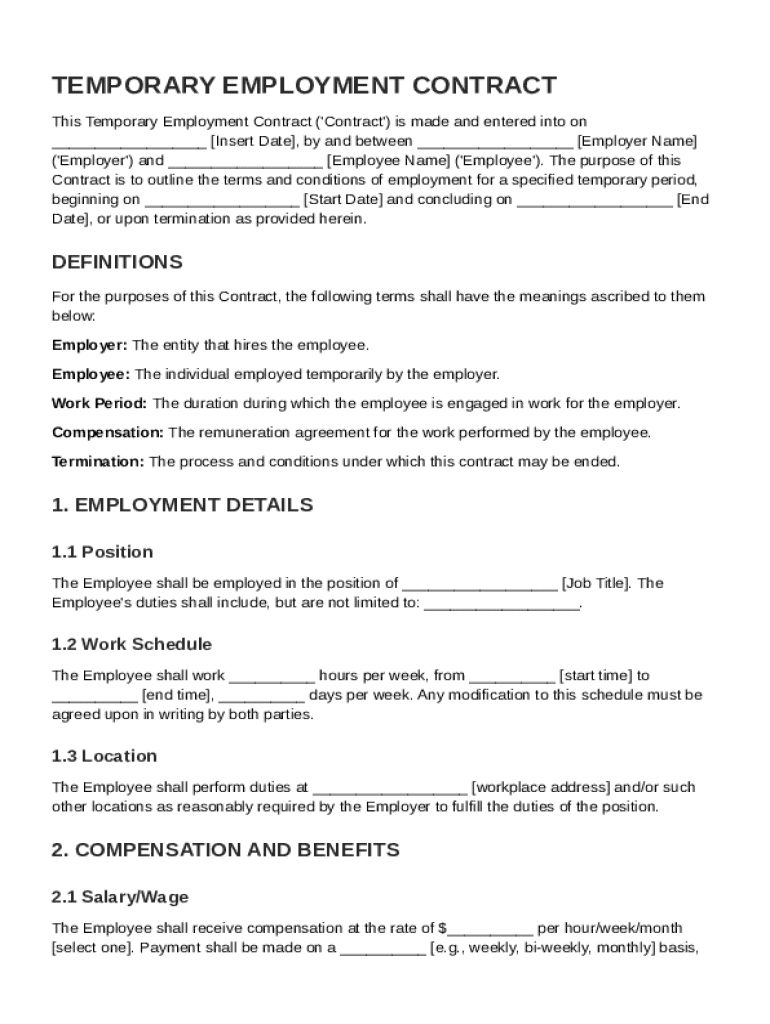
Temporary Employment Contract Form
Use a Temporary Employment Contract Template template to make your document workflow more streamlined.
What a temporary employment contract form does
A Temporary Employment Contract Form records the terms for a defined work assignment between an employer and a temporary worker. It identifies the parties, role, duties, workplace, start and end dates, compensation, payment schedule, supervision, confidentiality obligations, and termination terms. The employer completes the assignment-specific fields, reviews applicable federal and state employment requirements, and sends the document for signature. With signNow, the sender uploads the form, checks detected fields, assigns signers, and stores the completed contract with an audit trail. ESIGN and UETA can support electronic execution when intent, consent, attribution, and record retention requirements are met.
Who uses this contract form
Staffing and HR
Staffing agencies and employers use the form to document each temporary assignment, including the worker’s role, placement dates, compensation, supervisor, workplace, and termination terms. HR teams can send approved templates, while payroll verifies payment details before execution.
Business operations
Businesses use the same controlled workflow for related NDAs, policy acknowledgments, invoice approvals, and consent records, but each document should retain its own legal purpose. Managers and workers review only the fields relevant to the temporary assignment.
Signer authentication for contract execution
PKI signatures:
X.509 certificates:
Two-factor authentication:
SMS OTP:
ID verification:
Audit evidence:
Key features for temporary contracts
signNow connects field preparation, signer routing, electronic execution, and record evidence for the specific terms that define a temporary work assignment.
Field detection
Upload the approved temporary employment contract and review signNow’s automatically detected fillable fields before assigning recipients. This reduces manual field placement while keeping responsibility for final accuracy with the sender.
Role assignment
Assign employer and worker roles so each party signs the intended sections. Required fields can capture assignment dates, compensation, duties, supervisor information, and acknowledgment of the final terms.
Remote signing
Send the completed contract by email or signing link, allowing temporary workers to review and sign without coordinating an in-person meeting. Authentication options can add evidence of signer access.
Audit trail
The completed document is paired with a signNow audit trail recording signing activity, timestamps, and access information. Preserve both files when demonstrating how the contract was executed.
Reusable templates
Reusable templates help staffing and HR teams maintain consistent contract language while changing assignment-specific details for each temporary worker. Review state-specific provisions before deploying a template broadly.
Mobile access
Mobile apps allow managers and workers to review or sign assignment documents away from a desk. Offline signing availability should be confirmed for the chosen workflow and device.
 Best ROI. Our customers achieve an average 7x ROI within the first six months.
 Scales with your use cases. From SMBs to mid-market, airSlate SignNow delivers results for businesses of all sizes.
 Intuitive UI and API. Sign and send documents from your apps in minutes.
Recommended contract workflow setup
Configure the temporary employment contract around signer identity, assignment-specific fields, audit evidence, encryption, and controlled record retention.
| Setting | Recommendation |
|---|---|
| Authentication method | Email verification with SMS OTP |
| Signature type | Typed or drawn electronic signature |
| Audit trail | Capture timestamps, IP addresses, and actions |
| Document retention | Retain under applicable employment record rules |
| Encryption | TLS 1.2/1.3 and AES-256 encryption |
How to complete the contract
Follow the signNow workflow from document preparation through completed storage, checking every assignment-specific term before requesting signatures.
Upload contract:
Upload the approved contract template. Check fields:
Review detected fields and assignment details. Assign signers:
Assign employer and worker recipients. Send document:
Send the contract for electronic signature. Store records:
Download the completed contract and audit trail.
Best practices for contract records
Accurate terms, controlled access, and complete signing evidence make temporary employment records easier to administer and review.
Export the completed contract and audit trail
Apply the correct retention period
Use controlled contract naming
Review state-specific employment terms
Businesses that use temporary contracts
The form is most useful when an organization must document a defined assignment consistently while preserving worker-specific terms and execution evidence.
Staffing agencies can reuse an approved temporary employment contract while changing each worker’s assignment dates, pay terms, workplace, supervisor, and duties. signNow templates and audit trails help separate individualized records without rebuilding the workflow for every placement. Small businesses hiring seasonal or project-based workers can send contracts remotely, collect signatures before the assignment begins, and preserve the final agreement with its signing history. Managers can use mobile access when work occurs away from the office. Enterprise HR departments can connect contract workflows with systems such as NetSuite, Salesforce, or Microsoft 365. Centralized permissions, reusable templates, and audit evidence help coordinate high-volume temporary assignments across departments and locations.
These tasks are executed by both individual contributors and centralized administrators depending on organizational policy and required controls.
Platform requirements for signing
Temporary employment contract workflows can run in Chrome, Firefox, Safari, or Edge on Windows and macOS. signNow mobile applications support iOS and Android, allowing authorized users to review assignment terms and complete signature fields from supported devices. Encrypted connections use TLS 1.2/1.3.
Browsers Chrome, Firefox, Safari, Edge Desktop systems Windows and macOS desktops Mobile apps iOS and Android applications
Organizations should manage access through approved devices, user permissions, and signNow account controls. Teams requiring automated contract creation can evaluate API access and integrations with Salesforce, Microsoft 365, NetSuite, Google Drive, or HR systems. Confirm retention, authentication, and any state-specific employment controls before production deployment.
Privacy and disclosure pitfalls
Including a worker’s Social Security number or medical information without restricting access can expose sensitive personal data beyond the staffing team’s legitimate needs. Sending the contract before confirming electronic consent may weaken evidence that the worker agreed to receive and sign the record electronically. Leaving compensation, assignment dates, or supervisor fields blank can create disputes about the temporary worker’s actual obligations and payment terms. Granting every manager template-editing access can allow unauthorized changes to confidentiality, termination, or classification language.
Temporary employment contract troubleshooting
Resolve field, authentication, delivery, and compliance questions before sending a temporary employment contract for signature.
Use signNow’s field validation and audit trail to document who completed each contract, when it was signed, and whether required employment terms were changed.
The Business plan includes templates, audit trails, and legally binding eSignatures. Review every temporary worker’s dates, pay terms, duties, and termination language before sending.
ESIGN and UETA generally recognize electronic signatures when intent, consent, attribution, and record retention are established. Obtain required consumer disclosures when the worker is a consumer signer.
Business Premium adds bulk send, which helps distribute the same approved contract structure to multiple temporary workers. Personalize each recipient’s identifying information before sending.
Signers can use email delivery, SMS authentication, or stronger authentication options where configured. Check the audit trail for identity and access events before relying on the completed record.
Paid plans include 100 signature invites per user per year, with overage fees. The Site License uses $1.50 per signature invite and is designed for high-volume document workflows.
Key performance indicators that demonstrate SignNow's proven track record.
BE READY TO GET MORE
Get this form now!

If you believe that this page should be taken down, please follow our DMCA take-down process.