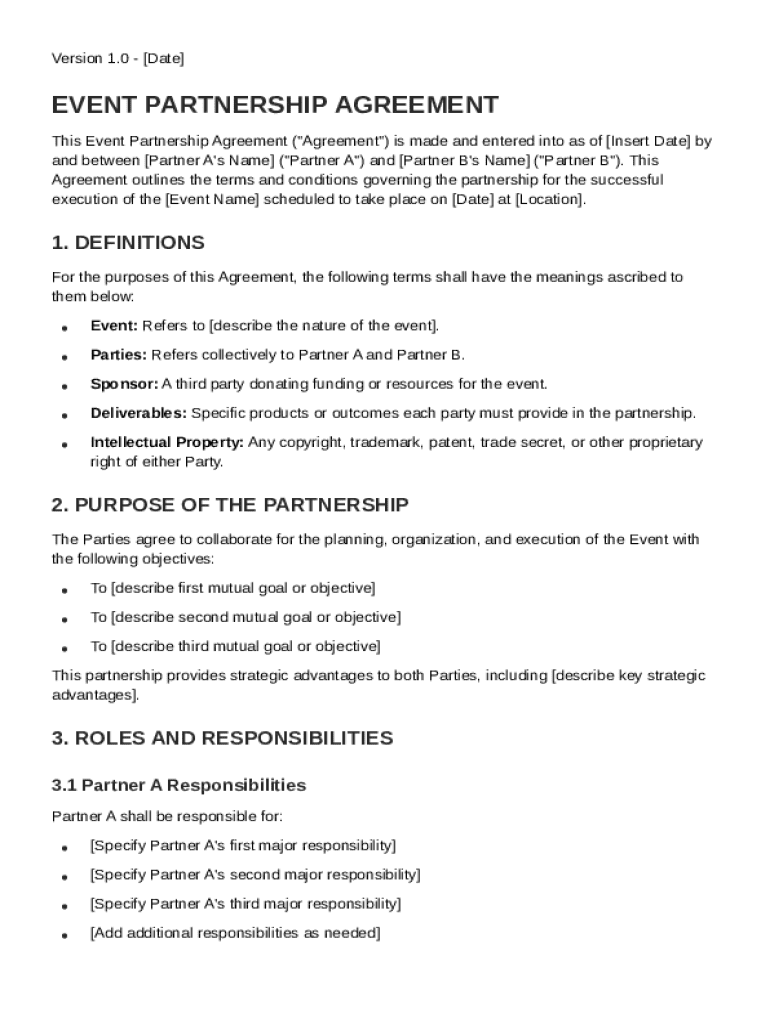
Event Partnership Agreement Form
Use a Event Partnership Agreement Template template to make your document workflow more streamlined.
What this event agreement does
An Event Partnership Agreement Form records the commitments between an event organizer and partners such as sponsors, venues, agencies, or vendors. It identifies the event, defines deliverables and promotional benefits, sets dates and payment terms, assigns responsibilities, and records cancellation or approval conditions. With signNow, upload the approved document, review detected fields, assign each signer, and send it for electronic signature. The completed agreement and audit trail can then be stored together. ESIGN and UETA generally support electronic signatures for U.S. commercial transactions when intent, consent, attribution, and record retention requirements are satisfied.
Who uses this agreement form
Event organizers
Event organizers use the form to document sponsor benefits, venue responsibilities, promotional placements, payment terms, cancellation rules, and approval dates before commitments become operational.
Partnership participants
Sponsors, venues, agencies, and vendors use the agreement to confirm assigned deliverables, authorized signers, commercial conditions, and the final record retained after execution.
Businesses that use partnership agreements
Event Partnership Agreement Form is most useful when multiple parties must confirm event obligations, commercial terms, and approval authority before work begins.
Independent event producers use the agreement to document venue access, sponsor deliverables, payment terms, cancellation provisions, and signature approval before promoting an event. Event agencies coordinate client, sponsor, venue, and vendor signatures in sequence, keeping the final agreement and audit trail together for later reference. Enterprise marketing departments standardize partnership terms through shared templates, delegated sending, and controlled approvals across regional event teams and procurement groups.
These tasks are executed by both individual contributors and centralized administrators depending on organizational policy and required controls.
How to complete the agreement
Prepare the final event terms first, then use signNow to place fields, route the agreement, and preserve evidence of completion.
Upload agreement:
Upload the approved Event Partnership Agreement Form PDF. Check fields:
Review detected fields and add missing signature dates. Assign signers:
Assign organizer, sponsor, venue, and vendor roles. Send request:
Send the agreement through signNow routing. Store records:
Export the signed agreement and audit trail.
Features for partnership agreements
signNow organizes the Event Partnership Agreement Form from upload through signature, record export, and system handoff without changing the underlying commercial terms.
Field detection
Upload the approved agreement and review detected fields before sending, reducing manual preparation for sponsor, venue, agency, and vendor signatures.
Signer routing
Route the Event Partnership Agreement Form to each authorized participant in the required order, helping separate commercial approval from operational acknowledgment.
Reusable templates
Reuse an approved agreement structure for recurring sponsorships, venue arrangements, or vendor relationships while updating event-specific terms before each send.
Audit trail
Capture signer actions, timestamps, and document history with the completed agreement so the event team can preserve evidence of execution.
Mobile signing
Let participants review and sign from a desktop or mobile device, including situations where event staff work away from the office.
Integrations
Connect completed partnership records with business systems such as Salesforce, NetSuite, Google Drive, Box, or Procore when the workflow requires it.
 Best ROI. Our customers achieve an average 7x ROI within the first six months.
 Scales with your use cases. From SMBs to mid-market, airSlate SignNow delivers results for businesses of all sizes.
 Intuitive UI and API. Sign and send documents from your apps in minutes.



Security for agreement records
Data in transit:
Data at rest:
Security reporting:
Information security:
Electronic signatures:
Health information:
Platform requirements for signing
Event Partnership Agreement Form workflows run in Chrome, Firefox, Safari, or Edge on Windows 10, Windows 11, macOS, and ChromeOS. signNow mobile apps support iOS 15 or later and Android 10 or later, with TLS-secured connections used during online access.
Browser support Chrome, Firefox, Safari, and Edge on Windows 10, Windows 11, macOS, and ChromeOS. Mobile apps signNow mobile apps support iOS 15 or later and Android 10 or later. Device access Use a current Windows, macOS, iOS, or Android device with internet access.
Organizations can manage Event Partnership Agreement Form access on Windows, macOS, iOS, and Android devices through signNow controls. Confirm that managed browsers permit secure connections, configure SSO or API access where the plan supports it, and apply retention and certificate policies required by your organization.
Recommended agreement workflow setup
Configure Event Partnership Agreement Form around signer identity, agreement integrity, audit evidence, and controlled access for every event relationship.
| Setting | Recommendation |
|---|---|
| Authentication method | Email verification with SMS OTP |
| Signature type | Typed or drawn electronic signature |
| Audit trail | Export with completed agreement |
| Document retention | Retain through contract policy |
| Encryption | TLS 1.2/1.3 and AES-256 |
Best practices for agreement records
Careful preparation keeps the Event Partnership Agreement Form aligned with the event’s commercial terms and preserves reliable evidence of acceptance.
Confirm commercial terms before sending
Assign each signer precisely
Preserve the signed record
Control template revisions
Agreement privacy and disclosure pitfalls
Including sponsor contact details, guest information, or payment data without limiting access can expose personal information beyond the event team’s business need. Sending the Event Partnership Agreement Form before finalizing sponsor benefits, venue access, or cancellation terms can produce conflicting commitments and later amendments. Assigning a signature field to an assistant rather than an authorized representative can weaken evidence that the organization approved the partnership. Failing to export the completed agreement with its audit trail can make later review harder when participants dispute timing, revisions, or signature activity.
Risks of incomplete agreements
Scope dispute
Authority gap
Version conflict
Proof weakness
Exit dispute
Event partnership agreement examples
These examples show how organizers can structure sponsor, venue, agency, and vendor obligations before an event moves into execution.
Event agency
A regional event agency coordinates a sponsor, venue, and production vendor through one structured partnership agreement.
- Sponsor benefits and placement
- Venue access and event dates
- Vendor deliverables and payment terms
Using signNow for the Event Partnership Agreement Form gives each participant a defined signing role and preserves the completed agreement with its audit trail. The agency can send the same approved structure to future partners while retaining evidence of who signed and when.
Healthcare conference
An event organizer prepares a healthcare conference partnership agreement involving sponsor obligations, venue services, and privacy-sensitive operational details.
- Controlled signer access
- Document history retention
- HIPAA-aware data handling
The organizer can route the agreement to authorized representatives, capture signatures electronically, and store the completed record under its internal policy. If the document includes protected health information, the organization must separately assess HIPAA obligations and confirm whether a BAA is required.
Troubleshooting event partnership agreements
Resolve agreement preparation, signer routing, plan, enforceability, access, and recordkeeping questions before the event partnership is finalized.
Upload the final PDF again and check whether required fields are detected before sending. signNow Business provides templates and audit trails; use a clean source file with readable labels for the most reliable field placement.
Use signNow’s recipient routing to place the event organizer, sponsor, venue representative, or vendor in the required order. Review each role before sending so every signature, date, and approval reaches the correct party.
Business includes legally binding eSignatures and audit trails, while Business Premium adds bulk send and kiosk mode. Select the plan according to the number of agreements and signing contexts your event program requires.
For U.S. commercial agreements, ESIGN and applicable state law generally recognize electronic signatures when intent, consent, attribution, and record retention are established. Keep the completed agreement and signNow audit trail together.
If a signer cannot open the request, verify the email address, resend the invitation, or use a signNow quick invite link where available. The signer can review and complete the agreement without changing its prepared terms.
Use signNow’s audit trail to review timestamps, signer actions, and document history. Export the completed agreement and audit record, then retain them under your organization’s contract policy and any applicable state requirements.
Key performance indicators that demonstrate SignNow's proven track record.
BE READY TO GET MORE
Get this form now!

If you believe that this page should be taken down, please follow our DMCA take-down process.