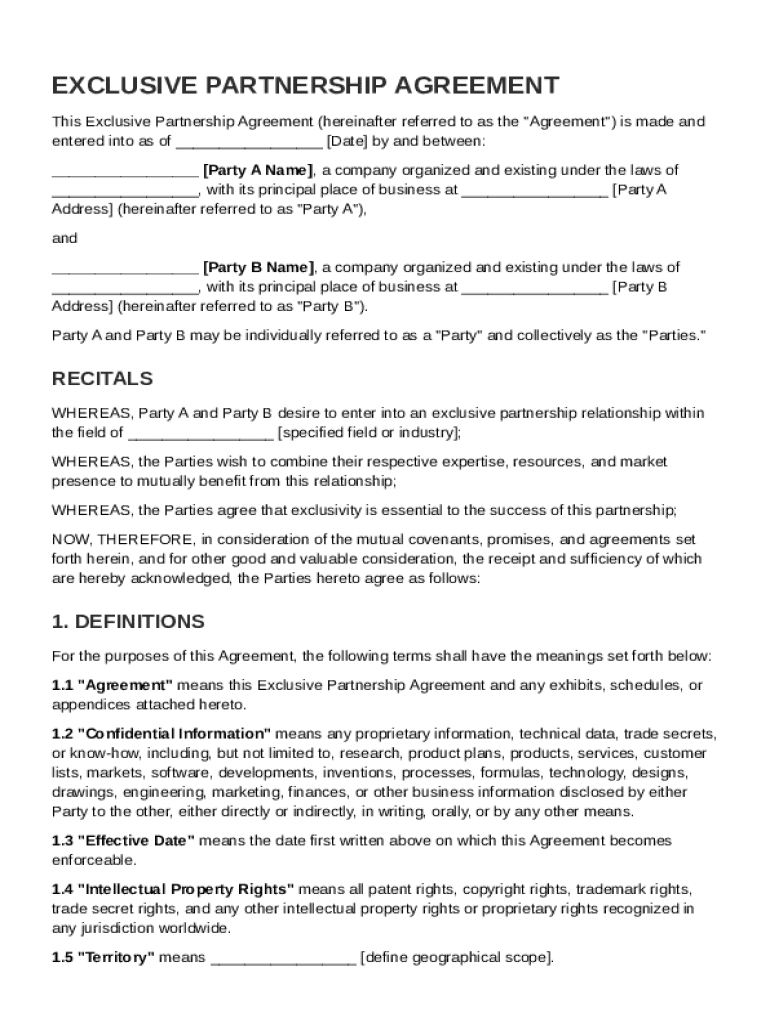
Exclusive Partnership Agreement Form
Use a Exclusive Partnership Agreement Template template to make your document workflow more streamlined.
What this partnership agreement covers
An Exclusive Partnership Agreement Form is a business contract that records when one party receives exclusive rights to represent, sell, distribute, develop, or provide services within a defined relationship. It normally identifies the parties, scope of exclusivity, territory or channel, performance duties, compensation, term, renewal, confidentiality, intellectual-property treatment, and termination rights. In the United States, electronic execution may be recognized under the ESIGN Act, 15 U.S.C. chapter 96, and applicable state law such as UETA, provided intent, consent, attribution, and reliable record retention are established.
Who uses this partnership agreement
Business partnerships
Business owners and attorneys use the Exclusive Partnership Agreement Form to document territory, exclusivity, responsibilities, payment terms, renewal conditions, and termination rights between commercial partners. The signed agreement creates a clear reference for negotiations, performance reviews, and dispute prevention while preserving each party’s defined obligations.
Industry teams
Real estate, healthcare, technology, and professional-services teams use the form when one partner receives exclusive rights or responsibilities. Teams can complete the agreement online, route it to authorized representatives, and retain the signed record with an audit trail for contract administration and later review.
Challenges when preparing the form
Parties often describe exclusive rights without defining territory, customer class, channel, or the conduct that ends exclusivity. The agreement may omit measurable performance duties, leaving renewal or continued exclusivity dependent on disputed expectations. Different representatives may sign inconsistent versions, making it difficult to identify the operative partnership terms. A completed agreement may be stored without its audit trail, weakening evidence of signer identity, timing, and document history.
How the form workflow works
The signNow workflow turns the partnership agreement into a controlled record from upload through signature collection and archival.
Upload document: Upload the agreement for field detection. Set recipients: Assign fields to each authorized signer. Collect signatures: Collect signatures and record consent. Archive record: Store the completed agreement with evidence.
 Best ROI. Our customers achieve an average 7x ROI within the first six months.
 Scales with your use cases. From SMBs to mid-market, airSlate SignNow delivers results for businesses of all sizes.
 Intuitive UI and API. Sign and send documents from your apps in minutes.
Complete the agreement online
Prepare the partnership terms, route the document to authorized representatives, and preserve the signed agreement with its audit trail.
Upload agreement:
Upload the completed agreement PDF to signNow. Check fields:
Review detected fields and add missing signature dates. Assign signers:
Assign each field to the correct partner representative. Send document:
Send the agreement through email or a signing link. Store records:
Download the completed agreement and audit trail.
How the audit trail records signing
The audit trail preserves technical evidence showing who handled the partnership agreement, when actions occurred, and which document was completed.
Authenticate signer:
Capture timestamps:
Hash document:
Seal record:
Log activity:
Export trail:
Why teams look for DocuSign alternatives
Organizations seek alternatives when they need different pricing models, stronger native automation, simpler bulk affidavit workflows, or more flexible identity-verification options than those available in a legacy envelope-based vendor.

Risks of incomplete agreements
Unclear exclusivity
Authority gap
Termination dispute
Payment ambiguity
Retention periods for related records
Retention depends on how the Exclusive Partnership Agreement Form is used. Apply the longest applicable federal, state, contractual, or industry requirement.
Three years: tax support
Six years: understatement
Six years: HIPAA records
Six years: broker records
Seven years: audit records
Security for signed agreements
Transport encryption:
Stored encryption:
Control assurance:
Security certification:
Signature compliance:
Health data protection:



Best practices for this agreement
Careful drafting and controlled execution help the Exclusive Partnership Agreement Form reflect the parties’ actual commercial arrangement and preserve reliable evidence.
Identify parties and authority
Define the exclusive scope
Verify every signing field
Preserve the evidence package
Troubleshoot partnership agreement signing
These answers address field detection, signer identity, eSignature validity, plan selection, and record preservation for this agreement.
Upload the final partnership agreement as a PDF, then inspect signNow’s detected fields before sending. Add or correct signature, date, initials, and text fields manually when the source layout does not identify them accurately. Keep the executed PDF and audit trail together.
The Business plan costs $8 per user monthly with annual billing and includes templates and audit trails. Business Premium costs $15 per user monthly annually and adds bulk send. Choose Business Premium when the same partnership agreement must reach multiple counterparties.
signNow lists ESIGN and UETA compliance for its platform. The agreement still needs signer intent, electronic consent where required, attribution, and reproducible records. For consumer-facing transactions, review the ESIGN disclosure requirements in 15 U.S.C. §7001(c).
Use signNow’s signer authentication options for the agreement’s authorized representatives, including email delivery and stronger authentication where risk warrants it. Advanced signer authentication is listed with Enterprise, while the final contract should identify each signing entity and representative clearly.
Business Premium includes kiosk mode and quick invite links, while Enterprise adds advanced signer authentication. For remote counterparties, send individual invitations or a controlled signing link; verify that the completed agreement identifies the intended parties before archival.
signNow provides audit trails and stores document history for completed workflows. Export the completed agreement and audit trail after all parties sign, restrict access to authorized users, and apply the retention period required by the agreement’s business or regulated context.
Key performance indicators that demonstrate SignNow's proven track record.
BE READY TO GET MORE
Get this form now!

If you believe that this page should be taken down, please follow our DMCA take-down process.