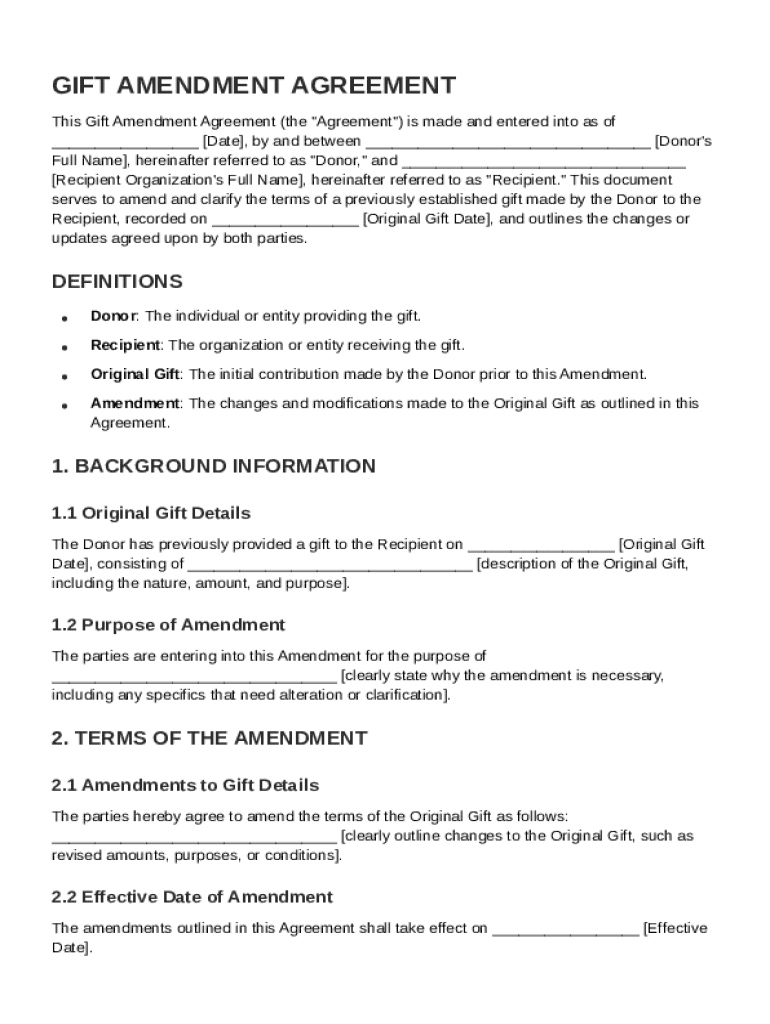
Gift Amendment Agreement Form
Use a Gift Amendment Agreement Template template to make your document workflow more streamlined.
What the Gift Amendment Agreement Form does
A Gift Amendment Agreement Form records a change to agreed gift terms between identified parties. It can state the original gift arrangement, the amended property or conditions, effective date, donor and recipient information, and signatures. In signNow, upload the document, let the platform detect fillable fields, review the donor and recipient assignments, send it for signature, and preserve the completed PDF with its audit trail. Electronic execution may be recognized under the federal ESIGN Act and applicable state law, but deeds, wills, family-law documents, and notarized matters may require separate procedures.
Who uses gift amendment forms
Donors and recipients
Individuals and family representatives can use the form to document changed gift terms, acknowledgments, or supporting agreements. They should verify whether the amendment affects a deed, trust, will, or tax filing requiring separate legal procedures.
Professional advisers
Attorneys, estate planners, tax professionals, and financial teams can route amendments for review and signature. Contracts, consent forms, invoices, and related records may be completed electronically when their governing law permits electronic execution.
How signNow handles the amendment
The signNow workflow keeps document preparation, signature routing, and evidence preservation in a defined sequence.
Upload document: Upload the Gift Amendment Agreement Form. Prepare fields: Auto-detect fields and correct assignments. Route amendment: Send assigned signature requests. Preserve record: Store the signed PDF and audit evidence.
How to complete the form
Use this sequence to prepare, route, sign, and preserve a Gift Amendment Agreement Form in signNow.
Upload form:
Upload the document to signNow. Check fields:
Review detected fields and add missing ones. Assign signers:
Assign donor and recipient signing roles. Send form:
Send the amendment and monitor completion. Store evidence:
Download the signed PDF and audit trail.
 Best ROI. Our customers achieve an average 7x ROI within the first six months.
 Scales with your use cases. From SMBs to mid-market, airSlate SignNow delivers results for businesses of all sizes.
 Intuitive UI and API. Sign and send documents from your apps in minutes.
Recommended setup for gift amendments
Configure the Gift Amendment Agreement Form around signer identity, electronic intent, evidence preservation, encryption, and controlled access.
| Setting | Recommendation |
|---|---|
| Authentication method | Email verification with SMS OTP |
| Signature type | Typed or drawn electronic signature |
| Audit trail | Export certificate of completion |
| Encryption | TLS 1.2/1.3 and AES-256 |
| User provisioning | Admin-managed role-based access |
Mobile options for gift amendments
The signNow mobile apps support Gift Amendment Agreement Form workflows on iOS 15 or later and Android 10 or later. Users can review documents, capture pages with a device camera, and work offline when connectivity is unavailable. Reconnect before synchronization and final record retrieval.
iOS app iOS 15 or later with signNow app Android app Android 10 or later with signNow app Mobile tools Offline signing and camera capture supported
Organizations using managed iPhone, iPad, or Android devices should apply mobile-device controls, restrict document access by role, and confirm synchronization after offline work. API access, SSO provisioning, and certificate or long-term-validation requirements may require plan-specific configuration, especially for regulated gift records.
What the audit trail records
For a Gift Amendment Agreement Form, signNow records the execution evidence separately from the business terms and field-placement workflow.
Authenticate signer:
Capture timestamp:
Hash document:
Seal record:
Track actions:
Export audit trail:
Privacy and disclosure pitfalls
Including full donor and recipient details in every shared copy can expose sensitive personal information beyond the people who need access. Sending the amendment without recording electronic consent can weaken evidence that each party agreed to use electronic records. Giving all team members edit or download rights can allow unauthorized changes to donor information or the final signed document. Mixing an editable template with the executed amendment can make it difficult to identify which version contains the parties’ final terms.
Record-keeping practices for gift amendments
Preserve the signed amendment, evidence of execution, and supporting records according to the transaction’s legal and tax purpose.
Apply the correct tax retention period
Export the audit trail with the signed copy
Archive the final record securely
Separate HIPAA records from other gifts
State rules and document exclusions
Deed acknowledgment
Wills and codicils
Family-law decrees
Real-estate deeds
Legal standing of a gift amendment
A Gift Amendment Agreement Form may be admissible when parties show intent and consent, the signature is attributable, and the record remains accurate and reproducible under ESIGN and UETA. Wills, codicils, testamentary trusts, court orders, and family-law decrees remain excluded from ESIGN’s coverage.

Troubleshooting the Gift Amendment Agreement Form
Resolve field, authentication, signature, retention, plan, and state-law questions before sending this gift amendment for execution.
Upload the Gift Amendment Agreement Form to signNow, use auto-detection to place fields, and confirm each donor, recipient, and amendment detail before sending. The Business plan includes templates, audit trails, and legally binding eSignatures. ESIGN and UETA support electronic records when intent, consent, attribution, and retention requirements are met.
The Gift Amendment Agreement Form can be signed electronically when the parties demonstrate intent and consent, and the completed record remains reproducible. signNow Business includes audit trails that capture signing activity. For consumer-facing transactions, provide the ESIGN disclosure required by 15 U.S.C. §7001(c).
Use signNow’s signer authentication options, including email delivery and stronger verification where appropriate. Business Premium adds kiosk mode and quick invite links; Enterprise adds advanced signer authentication. Select controls based on the gift transaction’s identity, fraud, and privacy risks.
A 7-day free trial is available without a credit card. The Business plan costs $8 per user monthly when billed annually and includes 100 signature invites per user annually. Additional invite fees may apply, so review the selected plan before sending amendments.
A completed Gift Amendment Agreement Form should preserve the signed PDF, certificate of completion, audit trail, and amendment history. signNow supports secure storage and audit-trail retrieval; your retention period still depends on the transaction, tax purpose, privacy obligations, and applicable state law.
A gift amendment involving a deed, will, family-law decree, or required notarization may need a different execution process. ESIGN excludes wills, court orders, and family-law matters. Confirm state-law requirements with counsel or the relevant recorder before relying on electronic signing.
Key performance indicators that demonstrate SignNow's proven track record.
BE READY TO GET MORE
Get this form now!

If you believe that this page should be taken down, please follow our DMCA take-down process.