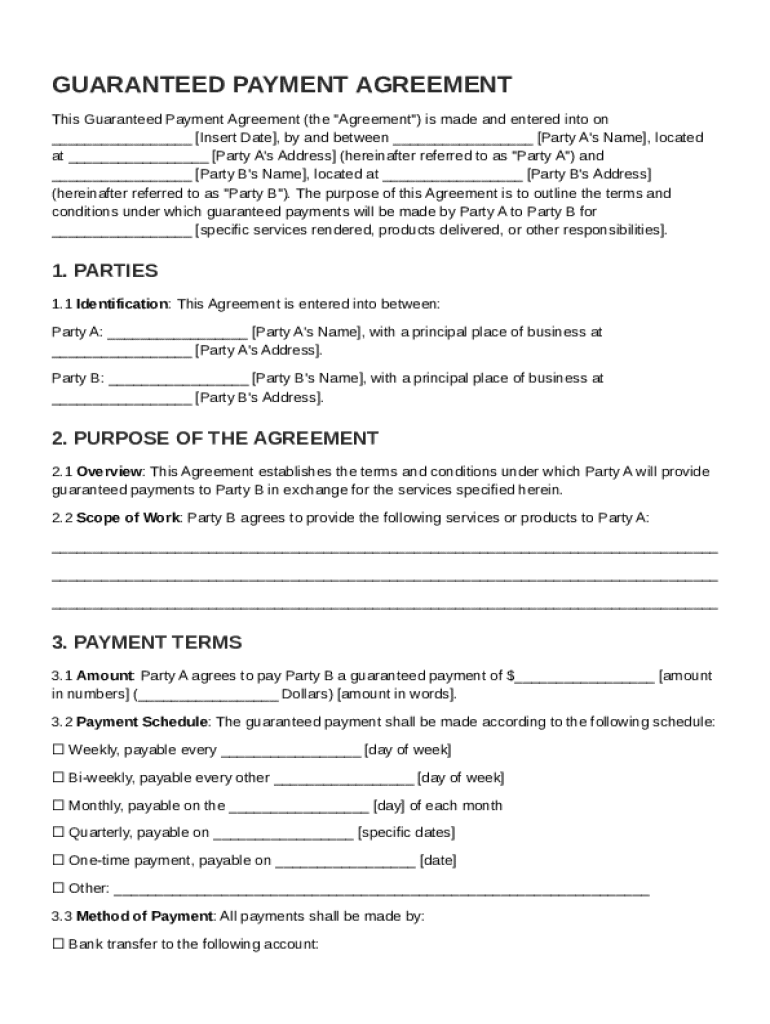
Guaranteed Payment Agreement Form
Use a Guaranteed Payment Agreement Template template to make your document workflow more streamlined.
What a guaranteed payment agreement does
A Guaranteed Payment Agreement Form records a promise that a specified party will receive an identified payment under stated conditions. It normally identifies the parties, payment amount or calculation, timing, triggering conditions, and signatures. In a signNow workflow, the sender uploads the form, places or confirms fields, routes it to the required signers, and stores the completed PDF with an audit trail. Electronic execution may be recognized under the federal ESIGN Act and applicable state law, including UETA, but the agreement’s terms and business purpose determine its legal effect.
Manage agreement teams and permissions
An administrator can create a reusable Guaranteed Payment Agreement Form template with required payment, party, date, and signature fields. Shared templates keep approved language consistent while permission controls limit who can edit, send, or access completed agreements on the team account. Delegated senders can issue agreements on behalf of an authorized manager, while administrators review activity through signNow audit trails. This separates preparation, approval, and sending responsibilities without requiring every employee to change the agreement’s controlled structure.
Key features for guaranteed payment agreements
A structured signNow workflow helps parties prepare, complete, sign, and retain Guaranteed Payment Agreement Forms with clearer terms and traceable execution records.
Field detection
Upload the Guaranteed Payment Agreement Form, then use signNow field detection to identify signature, date, payment, and party information fields before sending it for completion.
Signer routing
Route the agreement to the payer, recipient, or authorized representative in a defined order, reducing missed signatures and keeping each person’s required action visible.
Payment terms
Capture the agreed payment amount, schedule, parties, and conditions in designated fields so the completed document preserves the terms that support the transaction.
Flexible signing
Use email invitations, signing links, or mobile access to collect signatures without requiring every participant to attend the same office or meeting.
Audit evidence
Store the executed agreement with its completion certificate and audit trail, creating a reviewable record of signer actions, timestamps, and document history.
Controlled templates
Apply role-based access and reusable templates when multiple agreements use the same payment structure, while allowing authorized administrators to update fields centrally.
How the guaranteed payment form works
The signNow process turns the agreement into a controlled sequence from document preparation through signed-record storage.
Upload agreement: Upload agreement Add required fields: Add required fields Send to parties: Send to parties Store signed copy: Store signed copy
 Best ROI. Our customers achieve an average 7x ROI within the first six months.
 Scales with your use cases. From SMBs to mid-market, airSlate SignNow delivers results for businesses of all sizes.
 Intuitive UI and API. Sign and send documents from your apps in minutes.
Quick steps to complete the agreement
Use this sequence to prepare the Guaranteed Payment Agreement Form and preserve evidence of execution.
Upload:
Upload the completed agreement PDF. Prepare:
Confirm payment and signature fields. Route:
Add each signer in order. Send:
Send invitations or a signing link. Sign:
Review and sign the agreement. Retain:
Download the signed PDF and audit trail.
What the agreement audit trail records
A signNow audit trail documents the execution events that connect the Guaranteed Payment Agreement Form to its signers and final stored record.
Authenticate signer:
Capture timestamps:
Track document history:
Seal completion:
Attach certificate:
Export audit trail:
Platform requirements for guaranteed payment agreements
Complete the Guaranteed Payment Agreement Form through Chrome, Firefox, Safari, or Edge on Windows and macOS, with signNow mobile apps available for iOS and Android.
Browser support Chrome, Firefox, Safari, and Edge on Windows 10 or macOS 12 Mobile apps signNow mobile apps for iOS 15 and Android 10 Connection security Desktop and mobile access requires TLS 1.2 or 1.3
Organizations handling payment agreements should use managed Windows, macOS, iOS, or Android devices with current security updates. Enterprise deployments can connect signNow through API access and SSO provisioning, while regulated workflows may require certificate, authentication, or long-term validation settings configured by an administrator.
Signer authentication for payment agreements
PKI identity:
X.509 certificates:
Two-factor authentication:
SMS OTP:
ID verification:
Authentication records:
Privacy and disclosure risks to address
Leaving payment amounts, due dates, or conditions outside the signed agreement can create conflicting evidence about the guaranteed payment obligation. Collecting a signature without recording electronic consent may weaken evidence that a consumer agreed to receive and sign the Guaranteed Payment Agreement Form electronically. Sending the agreement to an incorrect email address can expose payment terms and personal information to an unintended recipient. Allowing broad template access can let unauthorized users change party names, payment terms, or signature requirements before sending.
Record-keeping practices for payment agreements
Retention depends on the agreement’s tax and business purpose, so preserve the signed record, audit evidence, and supporting payment documentation under the applicable authority.
Export the complete execution record
Apply the correct IRS period
Protect executed agreement files
Review terms before sending
Retention periods for payment agreement records
Choose the retention period by the agreement’s underlying tax, payroll, audit, or business-record purpose, and verify state requirements separately.
Three years from filing
Six years for major understatement
Indefinite for fraud
Three years for payroll records
Seven years for audit records
Troubleshooting guaranteed payment agreements
Resolve field, authentication, consent, plan, and retention questions by checking the agreement’s terms, signNow configuration, and applicable U.S. authority.
Upload the original Guaranteed Payment Agreement Form again and check whether the PDF is password-protected, image-only, or missing readable field boundaries. signNow’s field tools can place signature and date fields manually when automatic detection cannot identify the intended locations.
The Business plan costs $8 per user per month with annual billing and includes legally binding eSignatures, templates, and audit trails. Confirm that the account has available signature invites before sending additional Guaranteed Payment Agreement Forms.
For consumer-facing agreements, provide the ESIGN Act electronic-record disclosure, explain access to the record, and describe withdrawal procedures under 15 U.S.C. §7001(c). Store the disclosure and consent evidence with the signed agreement.
Use signNow’s SMS OTP, two-factor authentication, or available identity-verification controls when the payment agreement requires stronger signer attribution. Record the selected method and review the resulting audit trail before relying on the completed document.
A simple eSignature is not the same as a PKI digital signature. ESIGN and UETA generally recognize electronic signatures when intent, consent, attribution, and record reproduction are established; an industry-specific rule may require additional controls.
Export the completed agreement together with its signNow audit trail and completion certificate. Preserve the final record in a controlled repository, because the IRS retention period depends on the tax purpose and circumstances under IRC §6501(a).
Key performance indicators that demonstrate SignNow's proven track record.
BE READY TO GET MORE
Get this form now!

If you believe that this page should be taken down, please follow our DMCA take-down process.