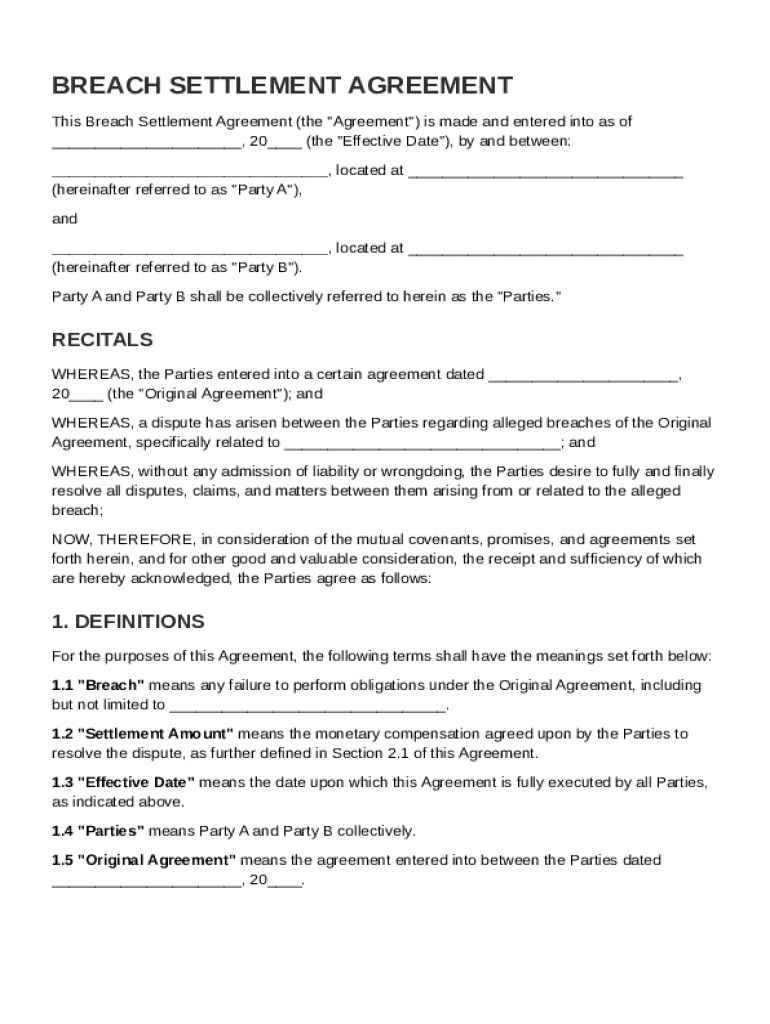
Breach Settlement Agreement Form
Use a Breach Settlement Agreement Template template to make your document workflow more streamlined.
What the Breach Settlement Agreement Form does
The Breach Settlement Agreement Form records how parties resolve a dispute involving an alleged breach, including the agreed obligations, releases, payment or performance terms, and signatures. It is not a government-issued filing with one universal layout, so the parties or their counsel must confirm the applicable contract language and state-law requirements. With signNow, upload the prepared agreement, review detected fields, assign each party’s signature and date fields, send it for signing, and retain the completed PDF with its audit trail. ESIGN and applicable state electronic-transactions law generally support electronic execution when intent, consent, attribution, and record retention are established.
Who uses this settlement agreement form
Legal services
Legal departments and outside counsel use settlement agreements to document negotiated releases, payment terms, confidentiality provisions, and obligations after a disputed contract or claim. Role-based signing order helps ensure authorized representatives execute the exact version reviewed by counsel.
Business operations
Businesses and counterparties use the form to confirm resolved commercial disputes, service credits, repayment terms, or mutual releases. The signed PDF and audit trail provide an organized record for finance, compliance, and contract administration teams.
How the settlement agreement workflow works
The signNow workflow turns the prepared Breach Settlement Agreement Form into a controlled signing transaction with assigned parties and preserved completion evidence.
Upload agreement: Upload the settlement agreement and inspect detected fields. Place fields: Add missing signature, date, and initials fields. Assign signers: Assign each field to the correct settlement party. Complete and archive: Send the agreement, collect signatures, and store evidence.
Features for completing settlement agreements
signNow combines field preparation, signer routing, audit evidence, templates, integrations, and mobile access for the Breach Settlement Agreement Form.
Field detection
Upload the prepared agreement and review signNow’s detected fields before assigning signature, date, initials, and text fields to each settlement participant.
Signer routing
Assign every signature and acknowledgment field to a named party, reducing the risk that a released claim or payment term is signed by the wrong person.
Audit trail
Collect signatures through a controlled transaction and preserve the completed agreement with an audit trail documenting actions, timestamps, and signer activity.
Reusable templates
Use reusable templates for recurring settlement structures while updating party names, amounts, deadlines, releases, and matter-specific provisions before each send.
System integrations
Connect completed agreements to Salesforce, NetSuite, Google Drive, Box, or Microsoft 365 so authorized teams can locate the signed record within existing systems.
Mobile signing
Use mobile apps when counsel or business representatives need to review and sign the agreement away from a desktop, subject to the organization’s access policy.
 Best ROI. Our customers achieve an average 7x ROI within the first six months.
 Scales with your use cases. From SMBs to mid-market, airSlate SignNow delivers results for businesses of all sizes.
 Intuitive UI and API. Sign and send documents from your apps in minutes.
Review the audit trail for each agreement
A signNow audit trail records identity, timing, document integrity, and signing actions for the completed Breach Settlement Agreement Form.
Authenticate signer:
Capture timestamp:
Hash document:
Seal record:
Store activity:
Retrieve evidence:
Security controls for settlement records
TLS protection:
AES-256 encryption:
SOC 2 Type II:
ISO 27001:
HIPAA compliance:
ESIGN and UETA:



Risks of an incomplete settlement agreement
Missing signer attribution
Incomplete settlement language
Unavailable audit trail
Uncontrolled document edits
Retain settlement records with purpose
Retention depends on the underlying dispute, industry, and information contained in the Breach Settlement Agreement Form; preserve the execution evidence with the governing record schedule.
Preserve the complete execution record
Map retention to the underlying obligation
Protect agreements containing health information
Export and test evidence retrieval
Platform requirements for signing agreements
Complete the Breach Settlement Agreement Form through Chrome, Firefox, Safari, or Edge on Windows or macOS. signNow also provides mobile apps for iOS and Android, with encrypted connections using TLS 1.2/1.3.
Supported browsers Chrome, Firefox, Safari, Edge Operating systems Windows, macOS, iOS, Android Secure connection TLS 1.2/1.3 encrypted connection
Organizations should manage access through approved devices and user permissions. Enterprise deployments may connect signNow through API integrations or SSO, while regulated workflows should configure signer authentication, audit-trail access, and retention controls according to the underlying matter’s requirements.
Troubleshoot Breach Settlement Agreement Form workflows
These answers address field detection, signer identity, electronic consent, regulated information, plan limits, and evidence preservation for settlement agreements.
Upload the original agreement as a PDF or supported document, then review signNow’s detected fields. If fields are missed, place signature, date, initials, and text fields manually before sending the settlement agreement.
The signNow Business plan is $8 per user per month with annual billing and includes templates, audit trails, and legally binding eSignatures. Business Premium adds bulk send at $15 per user per month annually.
For consumer-facing settlement records, ESIGN requires disclosure of the right to paper records and access to the electronic format under 15 U.S.C. §7001(c). Capture that consent before electronic signing.
If the settlement concerns health information, signNow is HIPAA compliant when a business associate agreement is required and in place. Limit access to authorized users and retain records under 45 CFR §164.530(j).
Use signNow’s signer authentication options, including email delivery and SMS codes where configured, when identity evidence must be stronger than an email link. Record the selected method in the transaction workflow.
A completed agreement should include the signed PDF and its audit trail. Export both from signNow and preserve them together so timestamps, actions, and signer attribution remain available for review.
Key performance indicators that demonstrate SignNow's proven track record.
BE READY TO GET MORE
Get this form now!

If you believe that this page should be taken down, please follow our DMCA take-down process.