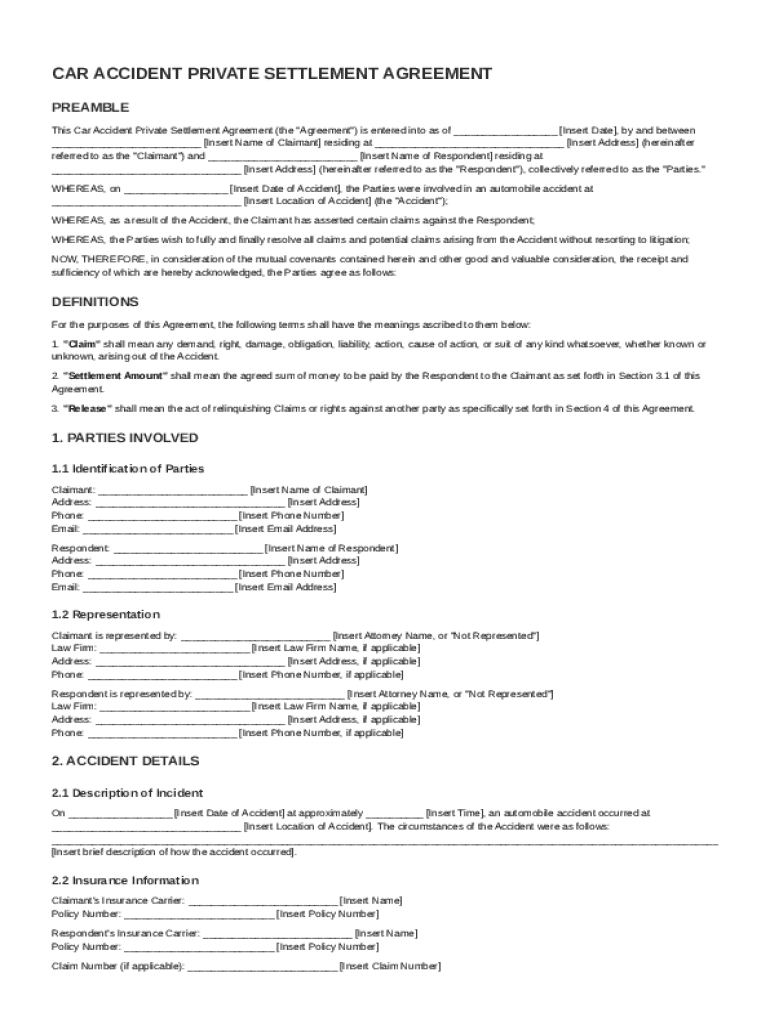
Car Accident Private Settlement Agreement Form
Use a Car Accident Private Settlement Agreement Template template to make your document workflow more streamlined.
What this settlement agreement does
A Car Accident Private Settlement Agreement Form records the parties’ agreement to resolve specified vehicle-accident claims without relying solely on informal messages. It identifies the drivers, vehicles, incident date, payment or repair terms, release language, and signatures. The parties should describe the accident accurately, attach supporting records when appropriate, and confirm that the agreement addresses only claims they can legally settle. State contract, insurance, and personal-injury rules may affect enforceability, so parties should obtain legal advice before waiving unknown or future claims.
Who uses this settlement form
Drivers and vehicle owners
Individuals involved in a minor collision use the form to record agreed payment, repair responsibility, release language, and signatures. They should confirm whether their insurer, lender, state reporting agency, or attorney must also receive notice. The document records a private agreement; it does not automatically determine fault or eliminate statutory duties.
Claims and legal teams
Law firms, repair businesses, insurers, and fleet operators may use the form to coordinate settlement documentation. Their teams can upload a completed agreement, place fields for each party, send in signing order, and preserve the final PDF with signNow’s audit trail for claim or file review.
How the settlement workflow works
The signNow workflow turns the completed accident agreement into a controlled signing record without changing the parties’ negotiated terms.
Upload document: Upload the accident settlement PDF to signNow. Check fields: Review detected fields and add missing details. Assign signers: Assign drivers or representatives to each signature. Complete and preserve: Send, collect signatures, and store the completed record.
Configure the settlement workflow
Use identifiable signers, a preserved audit trail, and controlled access for each accident settlement record.
| Setting | Recommendation |
|---|---|
| Authentication method | Email verification with SMS OTP |
| Signature type | Typed or drawn electronic signature |
| Audit trail | Enable timestamped completion certificate |
| Document retention | Retain signed agreement and audit trail |
| Encryption | TLS 1.2/1.3 and AES-256 protection at rest and in transit |
 Best ROI. Our customers achieve an average 7x ROI within the first six months.
 Scales with your use cases. From SMBs to mid-market, airSlate SignNow delivers results for businesses of all sizes.
 Intuitive UI and API. Sign and send documents from your apps in minutes.
What the audit trail records
For this agreement, the audit trail connects each signer and action to the final settlement record for later review.
Authenticate signer:
Capture timestamp:
Record document:
Seal history:
Track actions:
Export audit trail:
Platform requirements for signing
Complete the Car Accident Private Settlement Agreement Form in a current Chrome, Firefox, Safari, or Edge browser on Windows or macOS. signNow also provides mobile apps for iOS and Android, allowing parties to review and sign the settlement record from supported phones or tablets.
Supported browsers Chrome, Firefox, Safari, Edge Desktop operating systems Windows and macOS desktops Mobile access iOS and Android mobile apps
Organizations should use managed devices, current operating-system security updates, and controlled accounts when handling accident photographs, driver information, payment details, or medical references. API access, SSO provisioning, and certificate or long-term-validation requirements should be confirmed against the selected signNow plan and the organization’s records policy before deployment.
Security controls for accident records
Transport encryption:
Storage encryption:
Security certification:
Information security:
Electronic signatures:
Protected health information:
Avoid settlement agreement pitfalls
Unclear release language can leave medical expenses, vehicle damage, or unknown claims outside the settlement’s intended scope. Missing accident date, vehicle details, payment amount, or signer identity can make later authentication and enforcement more difficult. Sending the agreement before confirming every recipient can expose driver information, payment terms, photographs, or injury-related details. A private settlement cannot replace required insurer notices, statutory reports, court filings, or state-specific notarization when those rules apply.
Preserve the settlement record properly
A signed agreement is more useful when its terms, supporting evidence, and signing history remain together and retrievable.
Retain the complete accident file
Export the audit trail
Archive records securely
Document the retention rationale
Retention periods for related records
Retention depends on the records attached to the settlement; apply only the rule that actually governs the agreement’s contents.
Three years for tax records
Six years for HIPAA records
Three years for payroll records
Five years for OSHA injuries
Thirty years for exposure records
Check exclusions and state rules
State execution rules
Document exclusion
Court-related exclusion
Real-estate exclusion
Troubleshoot signing and record issues
These answers address field detection, signer authentication, enforceability, privacy, and preservation for this settlement agreement.
Upload the original settlement PDF again and check whether fields are flattened or protected. signNow can auto-detect fillable fields, but a scanned image may require manual placement of names, dates, payment amounts, releases, and signatures before sending.
The Business plan includes legally binding eSignatures, templates, audit trails, and mobile apps at $8 per user per month when billed annually. Business Premium is $15 and adds bulk send, but a single accident settlement usually needs only one controlled envelope.
ESIGN and UETA recognize electronic signatures when intent, consent, attribution, and record retention are established. Use signNow’s audit trail and completion certificate, preserve the final agreement, and confirm that no excluded document or state-specific formality applies.
A signer can use a shareable signing link or email invitation, depending on the workflow. Add SMS OTP or another available authentication control when the settlement contains sensitive identity, payment, vehicle, or injury-related information.
The signNow platform states that it protects data in transit with TLS 1.2/1.3 and at rest with AES-256. Limit document access, verify recipients, and avoid sending the agreement or accident attachments to unintended parties.
Download the completed PDF and its audit trail after every required party signs. If a party disputes a payment, release, or signer identity, the preserved agreement, timestamps, delivery history, and action log provide the available electronic record for review.
Key performance indicators that demonstrate SignNow's proven track record.
BE READY TO GET MORE
Get this form now!

If you believe that this page should be taken down, please follow our DMCA take-down process.