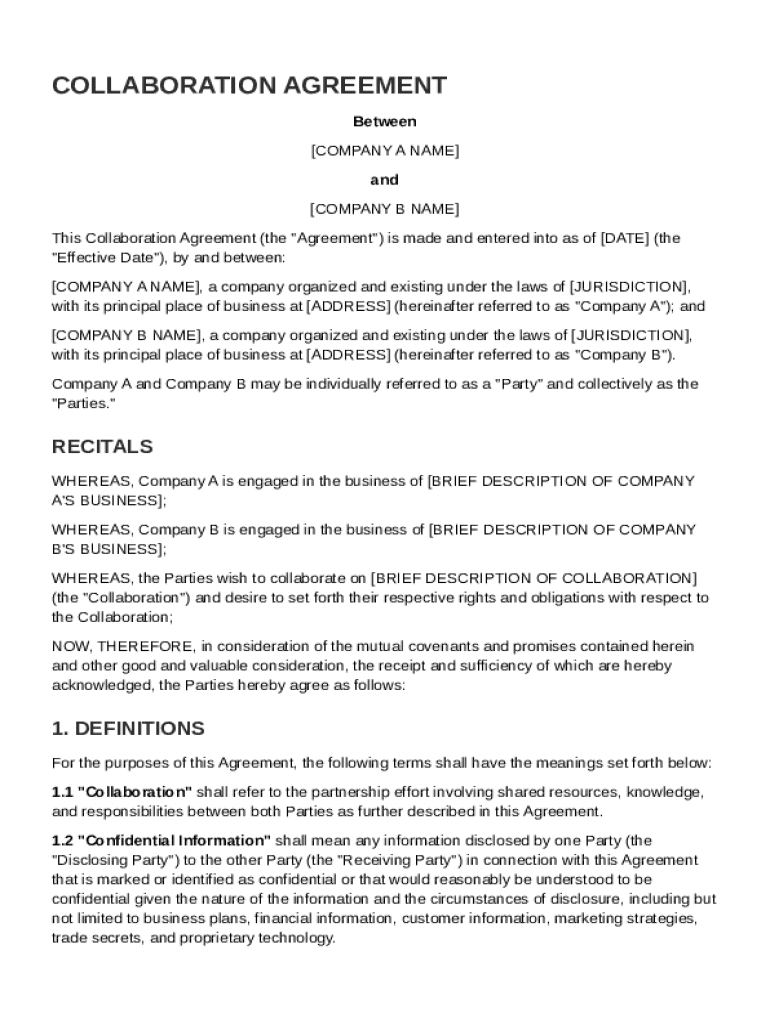
Collaboration Between Two Companies Agreement Form
Use a Collaboration Between Two Companies Agreement Template template to make your document workflow more streamlined.
What this collaboration agreement does
A Collaboration Between Two Companies Agreement Form records how two businesses will work together, including their responsibilities, deliverables, confidentiality duties, ownership terms, payments, and termination conditions. The parties complete the negotiated fields, identify authorized representatives, and sign the final record. With signNow, a sender uploads the agreement, reviews automatically detected fillable fields, assigns each company’s signer, sends the document, and stores the completed agreement with its audit trail. ESIGN and UETA generally support qualifying electronic signatures for U.S. business transactions, subject to exclusions and state-specific requirements.
Who benefits from collaboration agreements
The form helps businesses document shared responsibilities before two companies begin a defined commercial, operational, or professional collaboration.
Independent consultants and small agencies can define project scope, intellectual-property ownership, confidentiality, payment milestones, and termination terms with another business before exchanging work or client information. Healthcare, financial, and legal partnerships can route collaboration agreements through controlled signer workflows, preserving audit trails and applying additional safeguards when the document contains regulated or confidential information. Enterprise procurement and operations teams can standardize intercompany and vendor collaboration agreements with reusable templates, delegated sending, role-based access, and integrations that connect signed records to business systems.
These tasks are executed by both individual contributors and centralized administrators depending on organizational policy and required controls.
Features that support this agreement
signNow combines document preparation, separate signer assignment, audit evidence, and controlled storage for agreements governing work between two companies.
Field detection
Upload the completed Collaboration Between Two Companies Agreement Form, let signNow detect fillable areas, and compare each field against the final negotiated document before sending.
Signer assignment
Assign separate signature, initials, and date fields to authorized representatives of each company, reducing attribution errors when both businesses execute the same agreement.
Remote signing
Send the agreement by email or a shareable signing link, allowing representatives to review and execute the document without coordinating an in-person meeting.
Audit trail
Capture timestamps, signer actions, and document history in an audit trail that can accompany the executed agreement during internal review or a later dispute.
Secure storage
Save the signed agreement and completion evidence in signNow or a connected repository, using controlled access for confidential collaboration terms and attachments.
Business integrations
Connect signed collaboration records with Salesforce, NetSuite, Microsoft 365, Google Drive, or other supported systems to reduce duplicate entry after execution.
Complete the agreement in signNow
Use signNow to prepare the Collaboration Between Two Companies Agreement Form, assign both companies’ authorized representatives, and preserve the completed record.
Upload agreement:
Upload the final agreement PDF. Check fields:
Review detected fields and add missing ones. Assign signers:
Assign each company’s authorized signer. Complete signing:
Send, sign, and download the completed record.
 Best ROI. Our customers achieve an average 7x ROI within the first six months.
 Scales with your use cases. From SMBs to mid-market, airSlate SignNow delivers results for businesses of all sizes.
 Intuitive UI and API. Sign and send documents from your apps in minutes.
Recommended agreement workflow setup
Configure the signing process around authorized representatives, documented consent, audit evidence, and controlled retention for the final agreement.
| Setting | Recommendation |
|---|---|
| Authentication method | Email verification with SMS OTP |
| Signature type | Legally binding electronic signature |
| Audit trail | Download with completed agreement |
| Document retention | Apply business-purpose retention policy |
| Encryption | TLS 1.2/1.3 and AES-256 protection |
Ways to send and sign the agreement
- Use the signNow web app when a coordinator needs to upload the final agreement, place fields, set signing order, and monitor both companies’ completion status.
- Use the signNow mobile app when an authorized representative must review or sign the collaboration agreement from a phone or tablet during travel or field work.
- Use kiosk mode when representatives sign together on one controlled device, after confirming that the session configuration matches the parties’ identity and privacy requirements.
- Use a shareable signing link when the sender needs to distribute the same prepared agreement through an approved website, message, or partner workflow.
Processing stages for the agreement
The agreement has no universal federal signing deadline; the parties should set a response date in the document or delivery message.
Prepare the agreement
Deliver to signers
Complete signer review
Archive completed records
Retention periods for signed agreements
Retention depends on the agreement’s business purpose and the records it supports. Apply the most specific federal or state rule available.
Three years from filing
Six years after filing
Three years after hire
Six years from creation
Three years after record creation
Best practices for collaboration agreements
A reliable agreement workflow combines complete commercial terms, accurate signer assignment, and evidence that the final record was executed and preserved correctly.
Define each company’s obligations
Review every detected field
Preserve the audit record
Confirm legal and commercial terms



Security for signed agreements
Transport encryption:
Stored encryption:
Security certification:
Information security:
Electronic signatures:
Health data:
Risks from incomplete execution
Signer identity unclear
Electronic consent absent
Contract dispute risk
Evidence harder to authenticate
Troubleshoot agreement completion and signing
Resolve field, signer, authentication, retention, and compliance questions before both companies rely on the completed agreement.
On signNow Business, upload the agreement as a PDF, review auto-detected fields, and add any missing signature, date, or initials fields manually. Business includes templates, audit trails, and mobile apps; field detection does not replace sender review of every clause and signature location.
A signer can often complete a signNow request without creating an account, depending on the sender’s workflow. Confirm the recipient email, resend the invitation, or generate a quick invite link when available. Business Premium includes quick invite links, while authentication requirements may still require additional verification.
signNow records signer actions, timestamps, and document history in an audit trail. Download the completed agreement and its audit information after all required signatures. Under ESIGN and UETA, preserve a reproducible record showing intent, attribution, consent, and access to the electronic document.
Business provides legally binding eSignatures and audit trails. If the workflow needs bulk sending, kiosk mode, or request payments, Business Premium adds those capabilities. If advanced signer authentication or conditional fields are required, Enterprise adds those features; select the plan based on the agreement process.
ESIGN and UETA generally recognize electronic signatures for business transactions when intent, consent, attribution, and record retention are established. Consumer-facing transactions also require the ESIGN disclosure and access procedures under 15 U.S.C. §7001(c). State law and document-specific exceptions still control.
If the agreement contains protected health information, signNow identifies HIPAA compliance as requiring a business associate agreement. Configure the appropriate account safeguards before transmitting PHI, and retain the signed agreement and audit record according to the applicable HIPAA policy and 45 CFR §164.530(j).
Key performance indicators that demonstrate SignNow's proven track record.
BE READY TO GET MORE
Get this form now!

If you believe that this page should be taken down, please follow our DMCA take-down process.