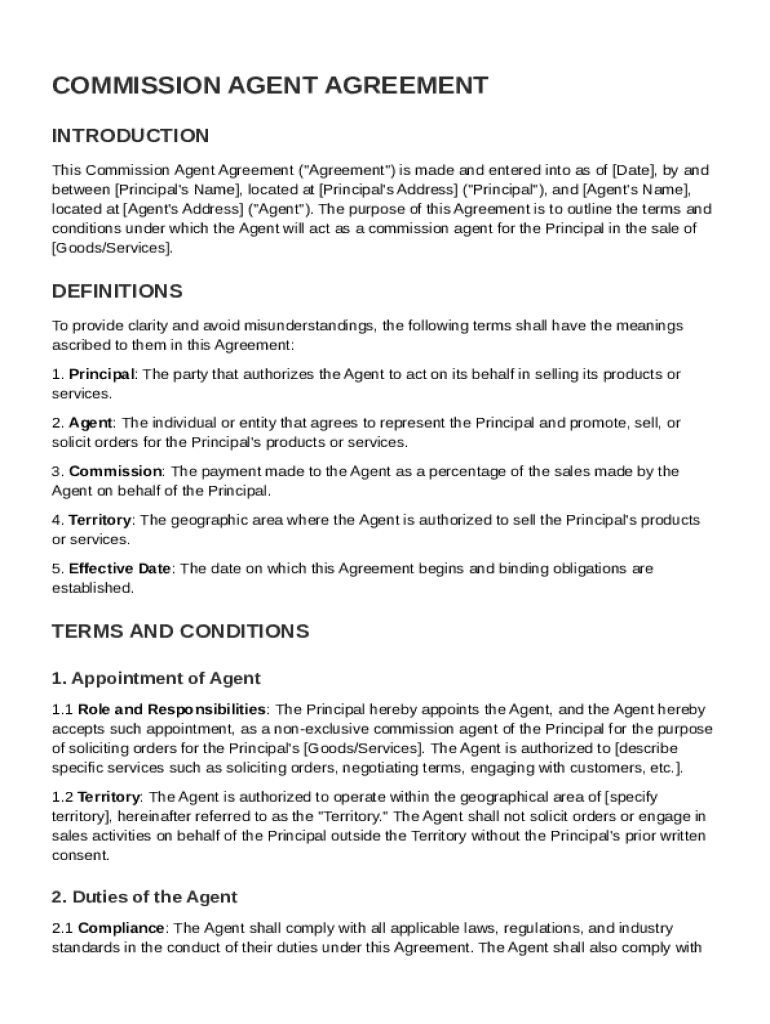
Commission Agent Agreement Form
Use a Commission Agent Agreement Template template to make your document workflow more streamlined.
What the agreement form records
A Commission Agent Agreement Form records the business terms between a principal and an independent commission agent. It can identify the parties, products or services, territory, commission calculation, payment schedule, expenses, duties, confidentiality obligations, term, and termination rights. The parties review those terms, complete required fields, and sign the document. With signNow, a sender uploads the agreement, auto-detects fillable fields, assigns fields to each signer, sends it for signature, and stores the completed document with an audit trail.
Who uses this agreement form
Independent sales agents and broker representatives use the Commission Agent Agreement Form to document territory, commission percentages, payment timing, and termination terms before promoting a principal's products. signNow lets them complete the agreement remotely and preserve the signed record for later commission questions or contract reviews. Manufacturers, distributors, and agency operations teams use the form to formalize relationships with outside representatives. Shared templates can standardize product scope, eligible sales, expense treatment, and approval routing while signNow records each signer, timestamp, and completed agreement for administrative review.
Key features for commission agreements
signNow applies document preparation, recipient routing, electronic signatures, and audit evidence to the specific terms recorded in a Commission Agent Agreement Form.
Field detection
Auto-detect fillable fields after upload, helping identify spaces for party details, commission terms, dates, initials, and signatures before sending the agreement.
Recipient routing
Assign principal and agent fields to specific recipients so each party completes only the information and approvals required in the agreement.
Audit trail
Capture signer identity, timestamps, IP addresses, and document actions, creating a reviewable history for commission-term disputes or contract administration.
Reusable templates
Use reusable templates for recurring agent relationships while preserving the specific territory, products, rates, and payment terms for each agreement.
Mobile signing
Complete the Commission Agent Agreement Form from desktop or mobile devices when representatives and principals operate in different locations.
Record storage
Store executed agreements and their completion records in a controlled signNow workspace for later retrieval, review, or export.
Configure the agreement workflow
Use a controlled workflow for preparing, signing, and preserving each Commission Agent Agreement Form.
| Setting | Recommendation |
|---|---|
| Authentication method | Email verification with SMS OTP |
| Signature type | Typed or drawn electronic signature |
| Audit trail | Capture timestamps, IP addresses, and actions |
| Document retention | Retain completed agreements under company policy |
| Encryption | TLS 1.2/1.3 and AES-256 protection |
 Best ROI. Our customers achieve an average 7x ROI within the first six months.
 Scales with your use cases. From SMBs to mid-market, airSlate SignNow delivers results for businesses of all sizes.
 Intuitive UI and API. Sign and send documents from your apps in minutes.
Review the agreement audit trail
The audit trail connects each Commission Agent Agreement Form signature to an identifiable signer, recorded event, and preserved document record.
Authenticate signer:
Capture timestamp:
Hash document:
Seal document:
Log activity:
Export audit trail:
Process and archive the agreement
The agreement moves from field preparation to signer delivery, review, execution, and controlled record storage.
Prepare the agreement
Deliver to signers
Complete signer review
Archive completed record
Protect agreement records and signatures
Data encryption:
Security certification:
Information security:
Electronic signatures:
Audit trail:
Protected health data:
Legal standing of the agreement
A signed Commission Agent Agreement Form can support proof of assent, signer attribution, and contract terms when the parties demonstrate intent and retain an accurate, reproducible record. ESIGN, 15 U.S.C. chapter 96, and applicable state UETA rules generally recognize qualifying electronic signatures, but exclusions include wills, certain court filings, and family-law decrees.

Best practices for completing the form
Accuracy matters because the form defines how commission rights, payment duties, and termination obligations will be interpreted.
Verify every commercial term before sending
Review variable terms in every agreement
Preserve the signed agreement and audit evidence
Address electronic-consent requirements before execution
Risks of incomplete agreements
Commission dispute
Incomplete execution
Weaker proof
Attribution challenge
Challenges when completing the form
Parties omit the commission calculation formula, leaving payment amounts difficult to verify when sales involve discounts, returns, chargebacks, or bundled products. The agreement names a territory or product line imprecisely, creating uncertainty about which transactions qualify for commission payments. A representative signs before reviewing termination, exclusivity, expense reimbursement, and post-termination commission provisions, increasing the chance of later contract disagreement. The sender changes a completed agreement outside the signing workflow, weakening confidence that the stored document matches what both parties signed.
Pricing and features for agreement workflows
For Commission Agent Agreement Form workflows, signNow pricing and plan capabilities are compared with competitor details only where verified in the available product data.
| Features | signNow | DocuSign | Adobe Sign | PandaDoc | Dropbox Sign |
|---|---|---|---|---|---|
| Starting annual price | $8/user/month, Business | Not verified | Not verified | Not verified | Not verified |
| Free trial availability | 7 days, no card | Not verified | Not verified | Not verified | Not verified |
| Bulk send availability | Business Premium plan | Not verified | Not verified | Not verified | Not verified |
| Audit trail availability | Business plan included | Not verified | Not verified | Not verified | Not verified |
| HIPAA compliance availability | Available with BAA | Not verified | Not verified | Not verified | Not verified |
Troubleshoot Commission Agent Agreement Form workflows
Resolve field, signer, plan, consent, authentication, and record-retention issues before relying on an executed commission agreement.
Upload the current agreement again and check that the file is readable and not password-protected. signNow can auto-detect fillable fields after upload; manually add fields when the source PDF has no usable form controls.
Confirm that each signature, date, and required text field is assigned to the principal or agent. A recipient cannot complete fields assigned to another signer, so review role assignments before resending the Commission Agent Agreement Form.
The signNow Business plan is listed at $8 per user per month with annual billing and includes legally binding eSignatures, templates, and audit trails. Business Premium adds bulk send at $15 per user per month annually.
signNow states that it is ESIGN and UETA compliant, but enforceability still depends on intent, consent, attribution, and record retention. For consumer-facing records, address the disclosure and access requirements in 15 U.S.C. §7001(c).
Use signNow authentication options such as email verification or SMS-based one-time codes where appropriate, then retain the resulting audit trail. Stronger identity checks may be appropriate when commission rights or payment authority create material risk.
Export the completed agreement and its audit trail from the authorized workspace, then apply the organization’s retention and access policy. The platform record should remain reproducible and connected to the final signed Commission Agent Agreement Form.
Key performance indicators that demonstrate SignNow's proven track record.
BE READY TO GET MORE
Get this form now!

If you believe that this page should be taken down, please follow our DMCA take-down process.