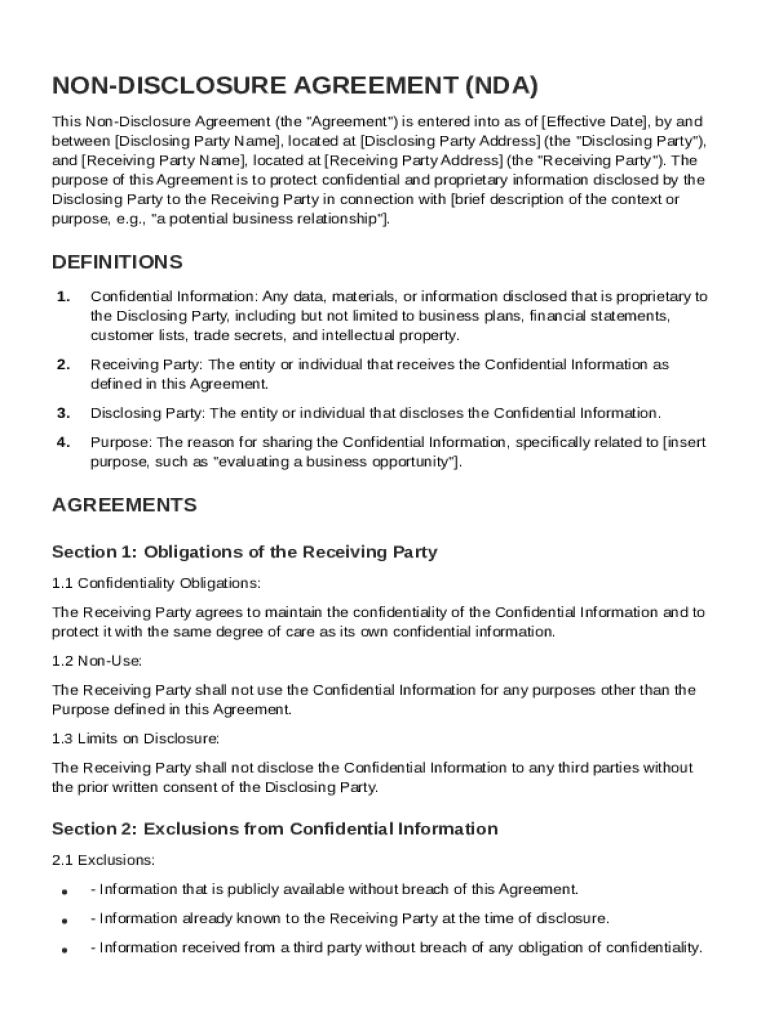
Company Non Disclosure Agreement Form
Use a Company Non Disclosure Agreement Template template to make your document workflow more streamlined.
What this company NDA form does
A Company Non Disclosure Agreement Form records a party’s commitment to protect specified business information and use it only for agreed purposes. The document normally identifies the disclosing and receiving parties, defines confidential information and exclusions, states permitted use and duration, addresses return or destruction, and records signatures. Upload the completed template to signNow, place or confirm fields, send it to each signer, and retain the executed PDF with its audit trail. U.S. electronic execution generally falls under the ESIGN Act, 15 U.S.C. chapter 96, and applicable state law, including UETA or New York ESRA.
Businesses that benefit from this NDA
A Company Non Disclosure Agreement Form gives businesses a consistent way to document confidentiality before sensitive information changes hands.
Independent consultants use the Company Non Disclosure Agreement Form before receiving client data, source materials, product plans, or customer information, documenting permitted use and return obligations without scheduling an in-person signing. Growing technology companies use the form for employees, contractors, investors, and vendors, applying role-based routing and reusable templates before sharing software designs, roadmaps, pricing, or intellectual property. Enterprise legal and procurement teams use the form across departments and jurisdictions, standardizing confidentiality clauses while preserving signer authentication, completion timestamps, audit trails, and controlled archival records.
These tasks are executed by both individual contributors and centralized administrators depending on organizational policy and required controls.
Who uses this NDA form
Legal and compliance teams
Legal departments use Company Non Disclosure Agreement Form templates for employees, contractors, vendors, and acquisition discussions. They define confidential information, permitted use, exclusions, duration, remedies, governing law, and signature requirements before routing the agreement for execution and secure retention.
Operational business teams
Technology, healthcare, construction, and financial-services teams use Company Non Disclosure Agreement Form workflows before sharing project, patient, product, or commercial information. Role-based routing, signer authentication, and audit-trail export help document who accepted confidentiality obligations and when.
Key features for this NDA workflow
signNow connects document preparation, signer routing, electronic execution, and evidence preservation for Company Non Disclosure Agreement Form workflows.
Field detection
Upload the Company Non Disclosure Agreement Form, let signNow detect fillable areas, and add missing signature, initials, date, and text fields without recreating the document.
Signer routing
Route the NDA to employees, contractors, vendors, or counterparties in a defined signing order, keeping each recipient connected to the correct obligation.
Audit trail
Capture signer actions, timestamps, delivery events, and completion details in an audit trail that supports later review of the executed agreement.
Reusable templates
Reuse an approved Company Non Disclosure Agreement Form template so legal-approved confidentiality language remains consistent across departments and transactions.
Mobile signing
Allow authorized signers to complete the NDA through signNow mobile apps or a browser, reducing dependence on printing and scanning.
Secure records
Store the signed NDA and completion evidence together, with encryption in transit and at rest supporting controlled access to confidential business information.
How this NDA workflow works
The Company Non Disclosure Agreement Form moves from upload to field preparation, signer routing, electronic execution, and auditable storage.
Upload the form: Upload the Company Non Disclosure Agreement Form PDF to signNow. Prepare fields: Review detected fields and add missing signature, date, initials, and text fields. Assign signers: Assign each field to the correct employee, contractor, vendor, or counterparty. Complete and store: Send the prepared NDA, collect signatures, and preserve the completed PDF with its audit trail.
 Best ROI. Our customers achieve an average 7x ROI within the first six months.
 Scales with your use cases. From SMBs to mid-market, airSlate SignNow delivers results for businesses of all sizes.
 Intuitive UI and API. Sign and send documents from your apps in minutes.
Complete the company NDA online
Use this sequence to prepare, route, sign, and preserve a Company Non Disclosure Agreement Form in signNow.
Upload:
Upload the approved NDA PDF. Prepare:
Confirm detected fields and add missing fields. Route:
Enter signer names, emails, and routing order. Send:
Send the NDA and monitor completion status. Archive:
Download the signed PDF and audit trail.
Review the NDA audit trail
The audit trail records technical evidence around the Company Non Disclosure Agreement Form without replacing the agreement’s substantive confidentiality terms.
Authenticate signer:
Capture timestamp:
Record document history:
Seal record:
Export evidence:
Archive records:
Recommended NDA workflow setup
Configure the Company Non Disclosure Agreement Form around signer identity, electronic execution, audit evidence, secure storage, and controlled administration.
| Setting | Recommendation |
|---|---|
| Authentication method | Email verification with SMS OTP |
| Signature type | Typed or drawn electronic signature |
| Audit trail | Export with completed PDF |
| Document retention | Follow agreement and industry requirements |
| Encryption | TLS 1.2/1.3 and AES-256 protection |
Security controls for signed NDAs
Transport encryption:
Storage encryption:
Security reporting:
Information security:
Electronic execution:
Protected information:



Legal standing of the company NDA
A Company Non Disclosure Agreement Form can provide admissible evidence when the parties show intent, electronic consent, signer attribution, and reliable record retention under ESIGN and applicable UETA or New York ESRA rules. It should not be used for wills, codicils, testamentary trusts, court orders, or official court filings excluded by 15 U.S.C. §7003.

Privacy and disclosure pitfalls
Personal details in a Company Non Disclosure Agreement Form can expose employee or partner information when access permissions are too broad. Missing electronic-consent language can weaken evidence that each signer agreed to receive and execute the Company Non Disclosure Agreement Form electronically. Sending an NDA to the wrong recipient can disclose confidential business information before identity or role verification is complete. Unrestricted downloads and forwarding can expose the completed Company Non Disclosure Agreement Form beyond the authorized project team.
Retention and record-keeping practices
Retain each completed Company Non Disclosure Agreement Form according to its business, contractual, and regulated-record context.
Apply the correct retention rule
Export the audit trail
Limit archival access
Preserve agreement context
NDA workflow examples by industry
These customer examples show how mobile execution and connected signature routing can support confidentiality agreements in operational settings.
Real estate operations
Martin Properties’ founder described processing and executing documents online, including mobile and offline work, while maintaining compliance and security for necessary parties.
- Mobile and offline document execution
Tim Martin’s documented signNow experience illustrates how a real-estate business can move agreements between office and field teams. For a Company Non Disclosure Agreement Form, the same workflow can help authorized parties review and sign before confidential property, transaction, or client information is shared.
Enterprise operations
Xerox’s Director of NetSuite Operations described using signNow to obtain the right signatures in the right formats through a NetSuite integration.
- NetSuite-connected signature routing
Xerox’s integration example shows how an enterprise can connect document execution with operational systems. Applied to a Company Non Disclosure Agreement Form, controlled routing can associate the NDA with the relevant vendor, project, or business record while retaining completion evidence for later review.
Risks of incomplete NDA execution
Narrow agreement scope
Missing signer attribution
Excessive access permissions
Unclear governing law
Troubleshooting Company Non Disclosure Agreement Form workflows
Resolve field, consent, authentication, security, and audit-record issues before relying on a completed Company Non Disclosure Agreement Form.
If a Company Non Disclosure Agreement Form has no detected fields, upload the original PDF again and use signNow’s field-detection workflow before placing signature, date, and text fields manually.
The signNow Business plan includes templates, audit trails, mobile apps, and legally binding eSignatures at $8/user/month when billed annually. Business Premium adds bulk send at $15/user/month annually.
For consumer-facing electronic records, ESIGN requires clear disclosure of the right to paper records, access capability, and withdrawal procedures under 15 U.S.C. §7001(c). Configure consent before sending.
signNow protects data in transit with TLS 1.2/1.3 and at rest with AES-256. Its SOC 2 Type II certification and ISO 27001 certification support documented security controls.
Business Premium includes bulk send, while Enterprise adds advanced signer authentication. Use Enterprise when the NDA requires stronger identity controls than email-based signing or SMS verification.
A completed NDA remains evidence only when the record preserves intent, consent, attribution, and accurate reproduction. Export the signNow audit trail and signed PDF together for internal records.
Key performance indicators that demonstrate SignNow's proven track record.
BE READY TO GET MORE
Get this form now!

If you believe that this page should be taken down, please follow our DMCA take-down process.