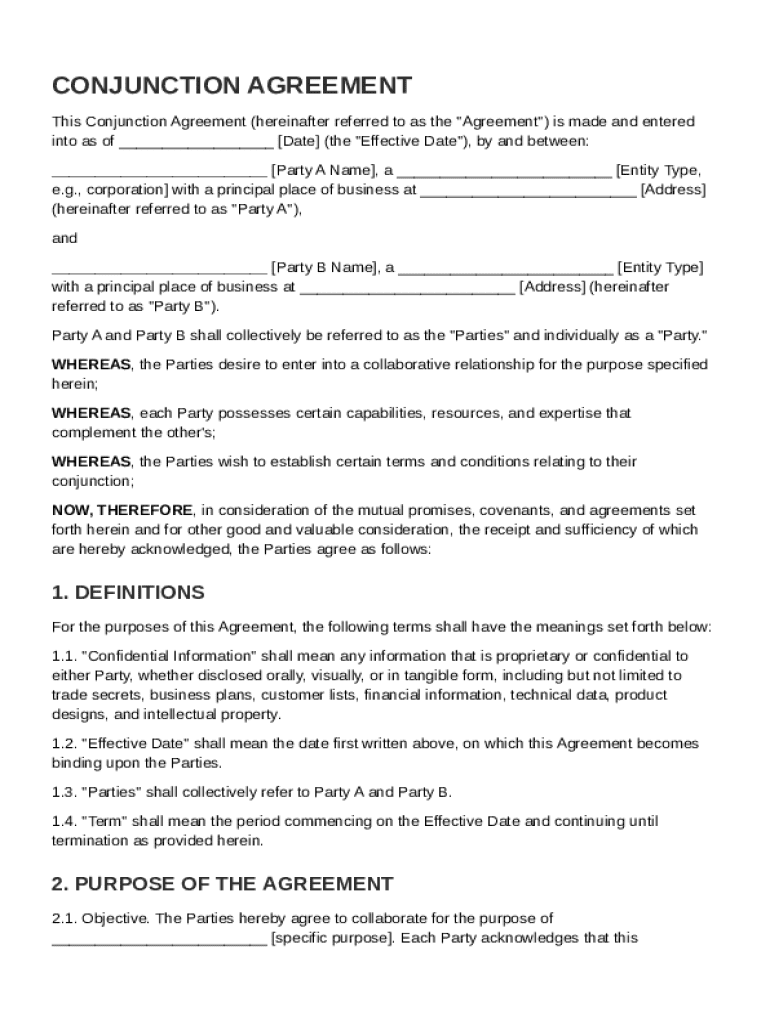
Conjunction Agreement Form
Use a Conjunction Agreement Template template to make your document workflow more streamlined.
What a conjunction agreement form does
A Conjunction Agreement Form is a written agreement that records how two or more parties coordinate responsibilities, approvals, or related obligations. It should identify each party, describe the connected duties, state the terms that apply, and capture consent through signatures. Because this name does not identify a standardized federal filing, the controlling requirements come from the agreement text, applicable contract law, and any state-specific rules. signNow can convert an uploaded document into a fillable workflow, route it to signers, and preserve the completed agreement with an audit trail.
Who uses this agreement
Business agreements
Businesses use the form for coordinated contracts, service agreements, approvals, and other records requiring signatures from connected parties.
Legal operations
Legal and operations teams use assigned fields, signing order, and Audit Trails to document who reviewed and accepted each obligation.
How to complete the agreement
Use this sequence to turn the approved Conjunction Agreement Form into a controlled signing workflow.
Upload document:
Upload the approved agreement. Detect fields:
Let signNow detect fillable fields. Assign signers:
Assign fields to each signer. Send request:
Send the signing request. Sign agreement:
Review and e-sign the agreement. Store evidence:
Download the completed record and Audit Trail.
 Best ROI. Our customers achieve an average 7x ROI within the first six months.
 Scales with your use cases. From SMBs to mid-market, airSlate SignNow delivers results for businesses of all sizes.
 Intuitive UI and API. Sign and send documents from your apps in minutes.
Platform requirements for signing
Open the Conjunction Agreement Form in Chrome, Firefox, Safari, or Edge on Windows or macOS. Signers can also use the signNow mobile apps on iOS or Android to review and sign assigned fields.
Supported browsers Chrome, Firefox, Safari, and Edge Operating systems Windows, macOS, iOS, and Android Mobile apps signNow mobile apps for iOS and Android
Use a managed device when the agreement contains confidential business or personal information. Organizations can also connect signing records to storage or operational systems through signNow integrations, while administrators should configure access, retention, and authentication according to their policies.



Best practices for this agreement
Accurate party details, deliberate consent, and a preserved signing record make the agreement easier to administer and defend.
Confirm the agreement before sending
Assign every field to its signer
Document electronic-record consent clearly
Preserve the signed record and Audit Trail
Documents needing special handling
Notarization required
Wills excluded
Court filings
Deed formalities
What the Audit Trail records
The Audit Trail supplements the signed Conjunction Agreement Form by documenting signer activity and the history of the electronic transaction.
Authenticate signer:
Capture timestamp:
Track document:
Seal record:
Log activity:
Export Audit Trail:
Retention periods for related records
Choose a retention rule based on the agreement’s actual business context; state requirements may exceed federal periods.
Three years: federal tax records
Six years: major understatement
Six years: HIPAA records
Three years: FLSA payroll
Five years: OSHA injuries
Conjunction Agreement Form troubleshooting
Resolve signing, consent, plan, and record-handling questions before sending this agreement to its parties.
Business provides legally binding eSignatures, templates, audit trails, and mobile apps at $8/user/month with annual billing. The plan includes 100 signature invites per user annually; additional invites may incur overage fees. Confirm the agreement’s signer volume before selecting a plan.
For a consumer-facing agreement, provide the electronic-record disclosure required by 15 U.S.C. §7001(c). The signer must be able to access the electronic format, understand the right to paper records, and withdraw consent through an established procedure.
Use assigned recipient fields and signer authentication to connect each signature with the intended party. signNow Audit Trails capture actions, timestamps, and related evidence, but the agreement should still identify parties and obligations clearly.
Business Premium is listed at $15/user/month with annual billing and adds bulk send, kiosk mode, request payments, and quick invite links. Those features may help when the same agreement is sent repeatedly or signed in person.
signNow states that ESIGN and UETA compliance supports electronic signatures in covered U.S. transactions. These laws do not override exclusions such as wills, court orders, family law decrees, or state-specific notarization requirements.
Use signNow’s integrations with Salesforce, Microsoft 365, NetSuite, Google Drive, Box, or Procore where the agreement belongs in an existing business process. Competitor integration details are not verified here.
Key performance indicators that demonstrate SignNow's proven track record.
BE READY TO GET MORE
Get this form now!

If you believe that this page should be taken down, please follow our DMCA take-down process.